21D-Link DWA-121 User Manual
Section 3 - Conguration
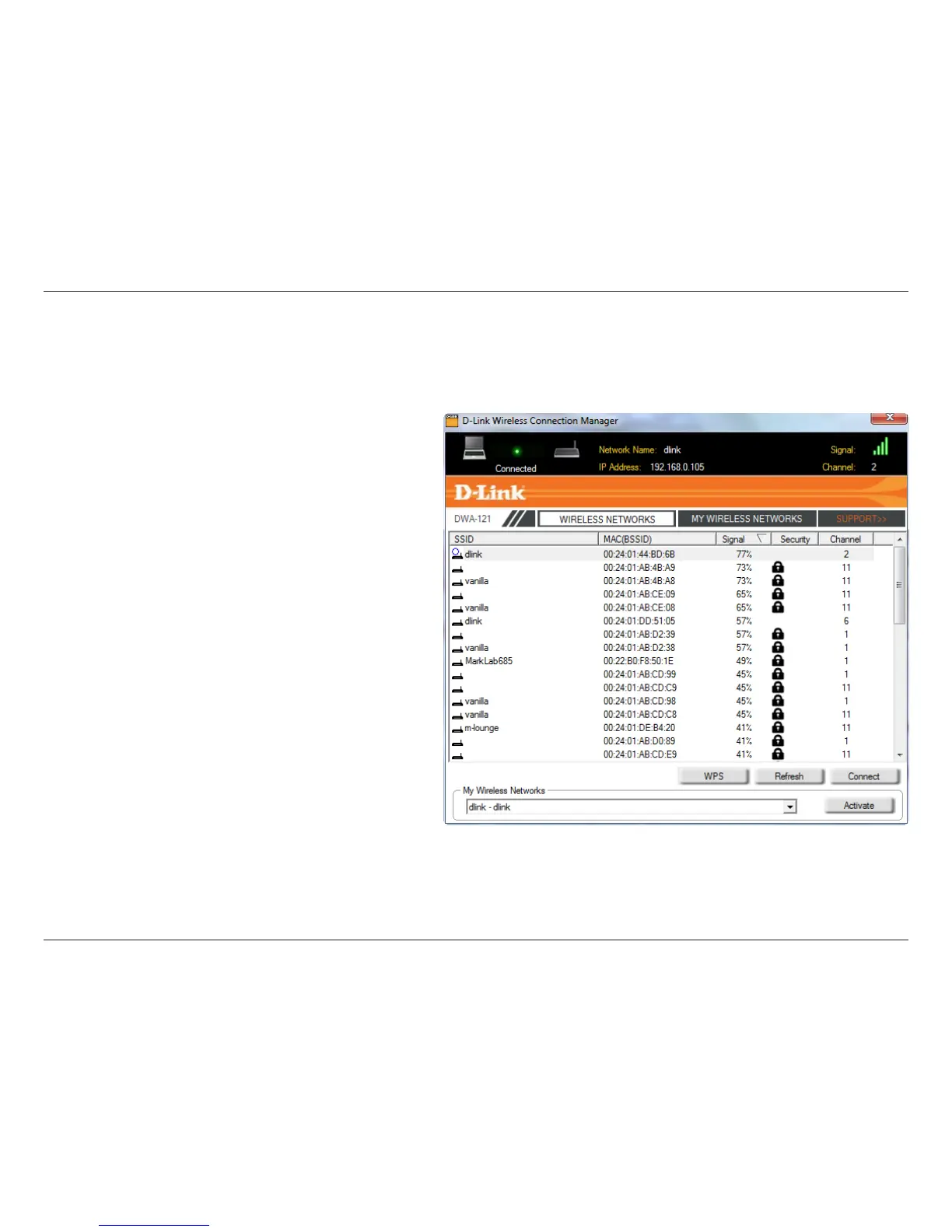
Wireless Networks
The SSID (Service Set Identier) is the name of the wireless
network.
Displays the MAC address of the wireless device.
Displays the Link Quality of the wireless connection.
If there is a “lock” icon, this means the wireless network is
secure.Youmustknowtheencryptionkey/securitysettings
to connect.
Displays the channel of the wireless network.
Connect to a wireless network using Wi-Fi Protected Setup.
Refer to the next page.
Rescans for available wireless networks in your area.
Highlight a wireless network and click the Connect button. If
the network is secure, a pop-up window will appear. Enter the
security information to connect (refer to the Wireless Security
section for more information).
Select a wireless network prole from the drop-down menu
and click Activate to connect. Allow up to 30 seconds to
connect.
MAC:
SSID:
Channel:
Signal:
Security:
Refresh Button:
Connect Button:
Activate Button:
The Wireless Networks (Site Survey) page will display all wireless networks that are available in your area. To connect to a network, simply highlight
the wireless network (SSID) and click Connect.
WPS Button:



 To Next Page
 Loading...