12D-Link DWR-978 User Manual
Section 3 - Conguration
Main Wi-Fi
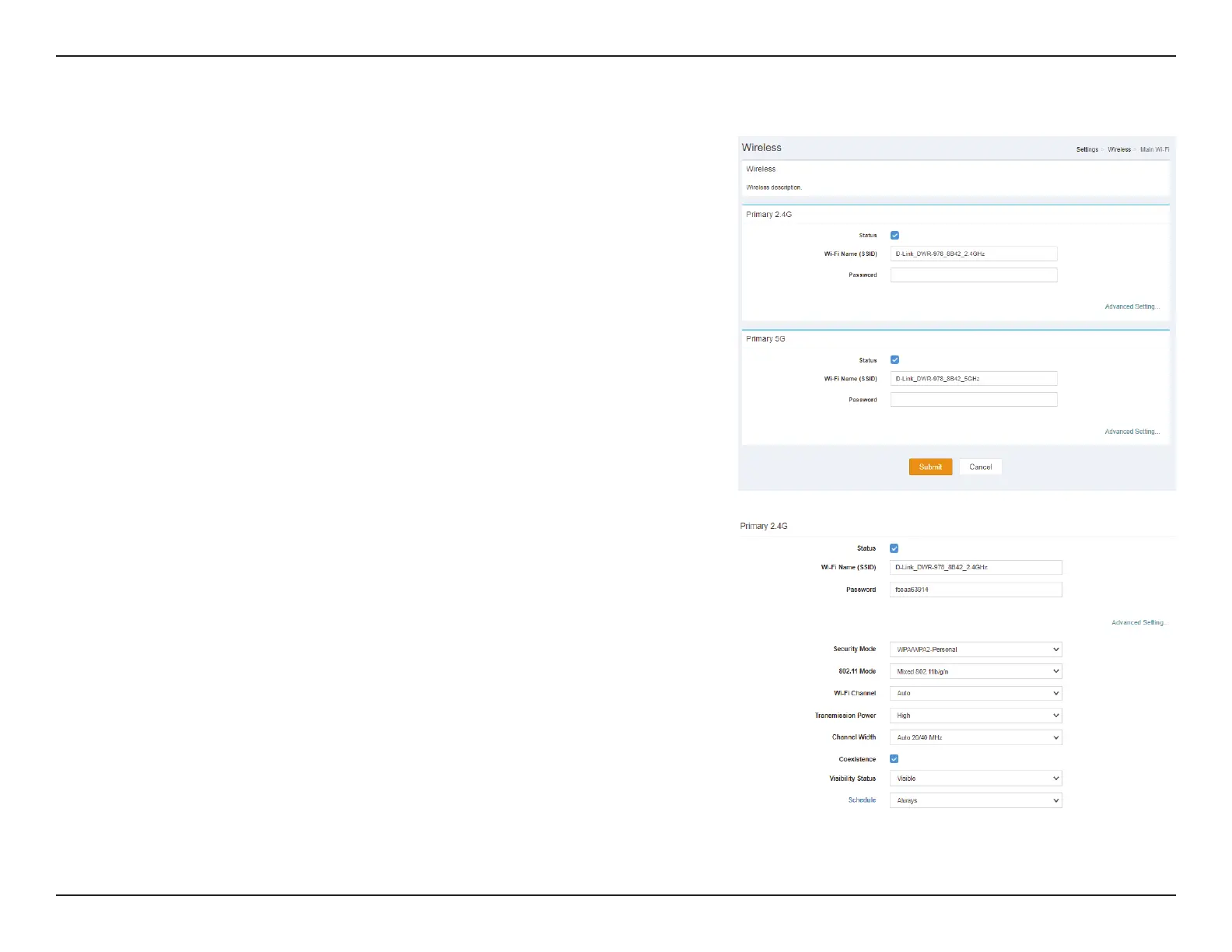
Primary 2.4G Advanced Setting
Status: Indicates whether the connection is Enabled or Disabled.
Wi-Fi Name
(SSID):
Indicates the name of the connection.
Password: Indicates the password of the connection.
Security
Mode:
Indicates the Security Mode of the connection. By default WPA/
WPA2-Personal is selected, you may also select None.
802.11 Mode: Indicates the wireless mode of the connection. By default Mixed
802.11b/g/n is selected, you may also select Mixed 802.11g/n or
802.11n only.
Wi-Fi
Channel:
Select the Wi-Fi channel. By default Auto is selected, you can choose
manually between channel 1-13.
Transmission
Power:
Indicates the Transmission Power of the connection. By default
High is selected, you may also select Medium or Low.
Channel
Width:
Indicates the Channel Width of the connection. By default Auto
20/40 MHz is selected, you may also select 20 MHz.
Coexistence: Indicates whether Coexistence is Enabled or Disabled.
Visibility
Status:
Indicates whether the Wi-Fi network is Visible or Invisible.
Schedule: Indicates whether the Wi-Fi network is part of a schedule. Click on
Schedule to access the schedule menu “Schedule” on page 29.
Click Submit to save your settings, or Cancel to revert to your previous settings.



 To Next Page