36D-Link DCS-2120 User Manual
Section 3 - Configuration
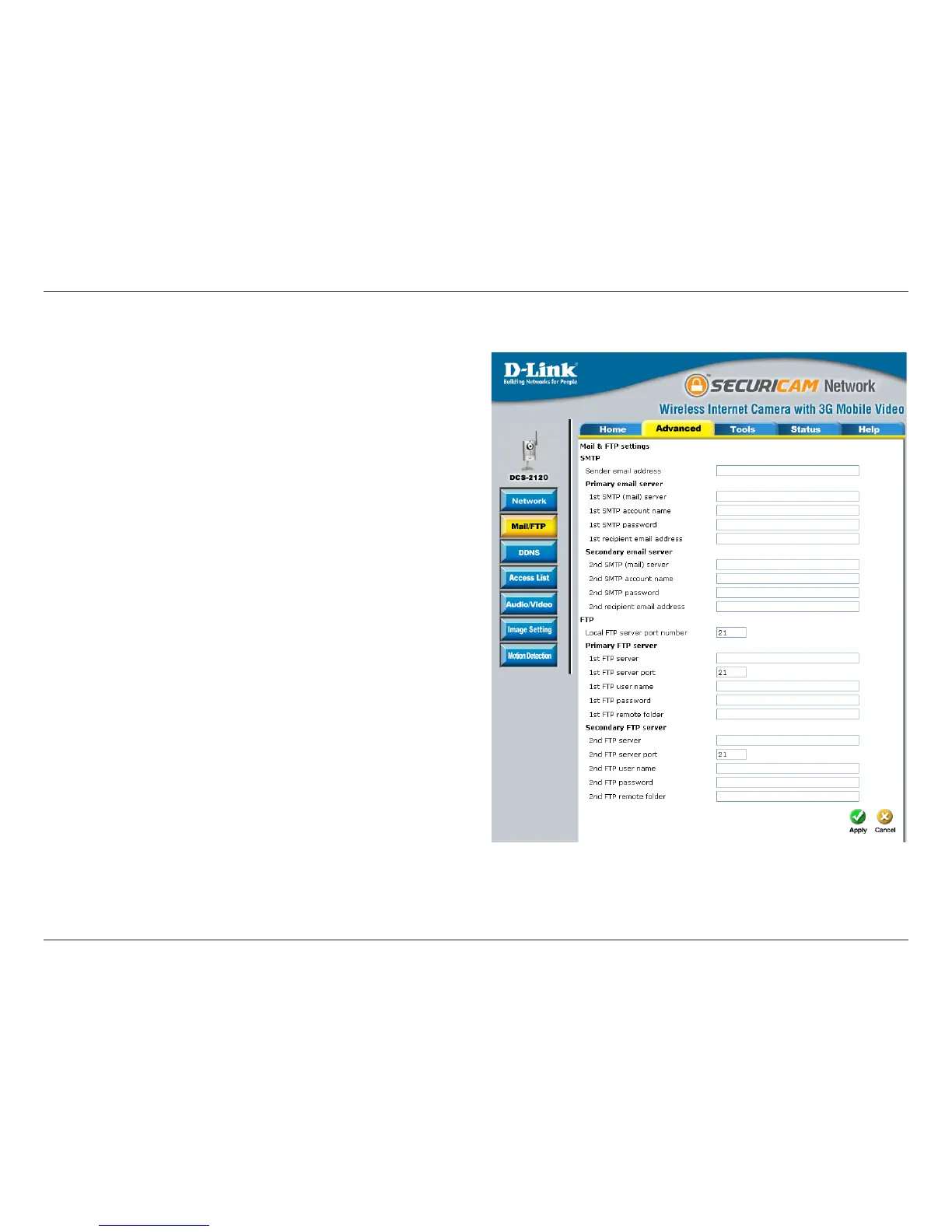
The sender’s email address that appears
in the mail alert.
The domain name or IP address of external
mail server.
The user name used to log into your e-mail
account (e.g. jdoe or jdoe@yourisp.com).
The password used to log into your e-mail
account. The password will appear as dots
instead of entered characters.
The e-mail address of recipients for
snapshots or a system log file.
The domain name or IP address of a
secondary mail server used only if the
primary mail server is unreachable.
The user name for the second SMTP
server.
The password used to log into the second
e-mail account. (The password will appear
as dots instead of entered characters.)
The e-mail address of recipients for the secondary server.
It can be other than default port 21. If you find that you want to change the port to a port number other than
21, you will need to specify the port when connecting to the FTP server. For example FTP://68.5.1.81:60 (if
you are to use port 60 for your FTP server port)
Mail & FTP
Sender email address:
1st SMTP (mail) server:
1st SMTP account name:
1st SMTP password:
1st recipient e-mail address:
2nd SMTP (mail) server:
2nd SMTP account name:
2nd SMTP password:
2nd recipient email address:
Local FTP server port number:




 To Next Page