7-2. How to use Hold mode
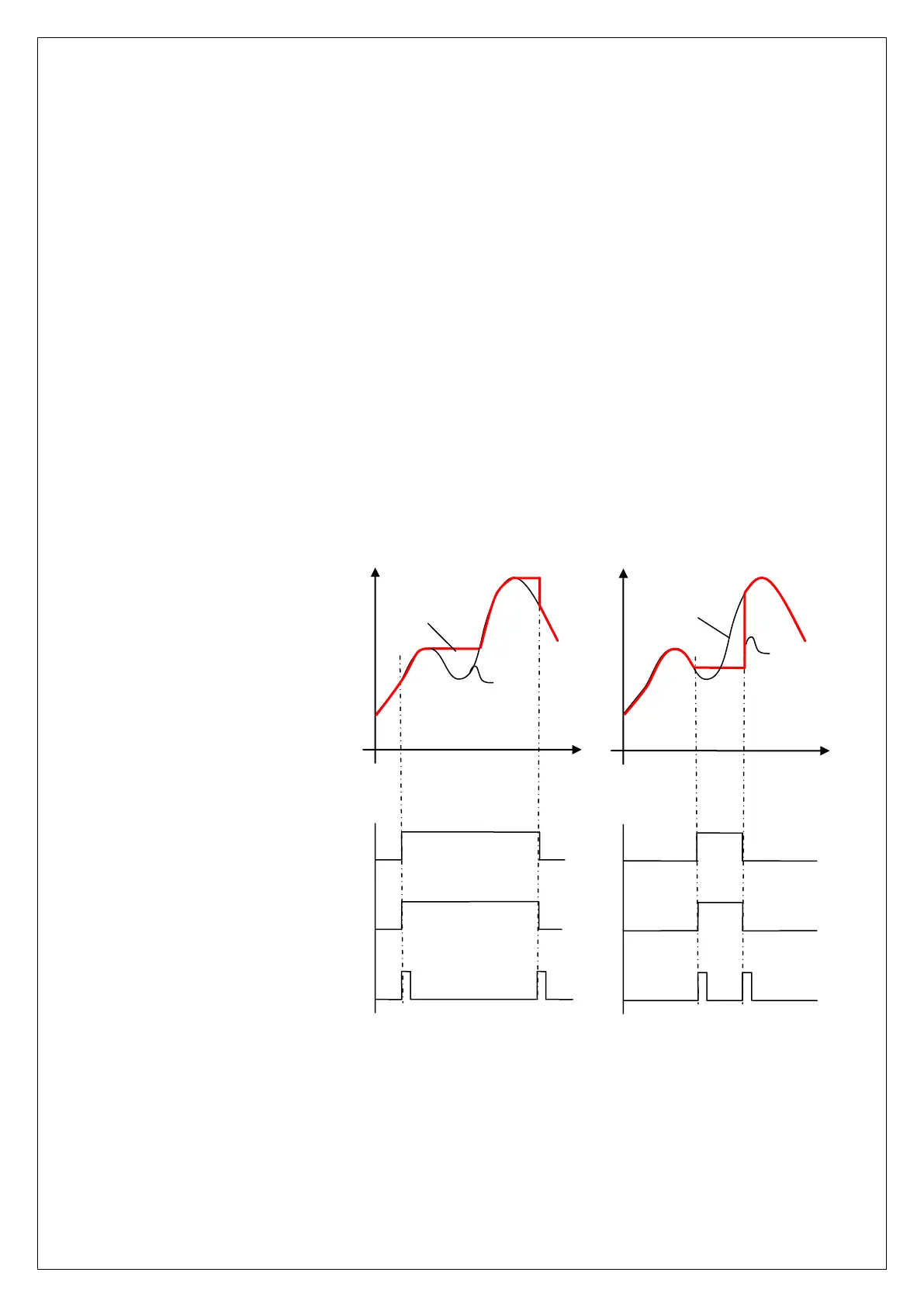
Hold mode is largely divided into Peak Hold and Sample Hold. Please select Analog,
Digital or Display Hold as per your purpose of use (Hi or Low Speed)
To input Hold, you can use Hold key on the front panel or external input. For the
operation method, please refer to the drawing below.
1) Peak Hold : To Hold the maxium value among the measured values.
Peak hold mode : It is a high-speed Peak hold. It is to hold and display the
maximum value of (+) direction.
Absolute peak hold mode : It is to hold and display the the maximum value of the
absolute value (+/-).
2) Sample hold : It is to hold and display the value at the time of Hold signal input
among the measured values.
① − : sensor input value
② − : Display value &
analog output value
Front panel HOLD LED
External HOLD input termanal
Front panel HOLD Key
<Peak HOLD> <Sample HOLD>



 To Next Page