17English
Product Overview
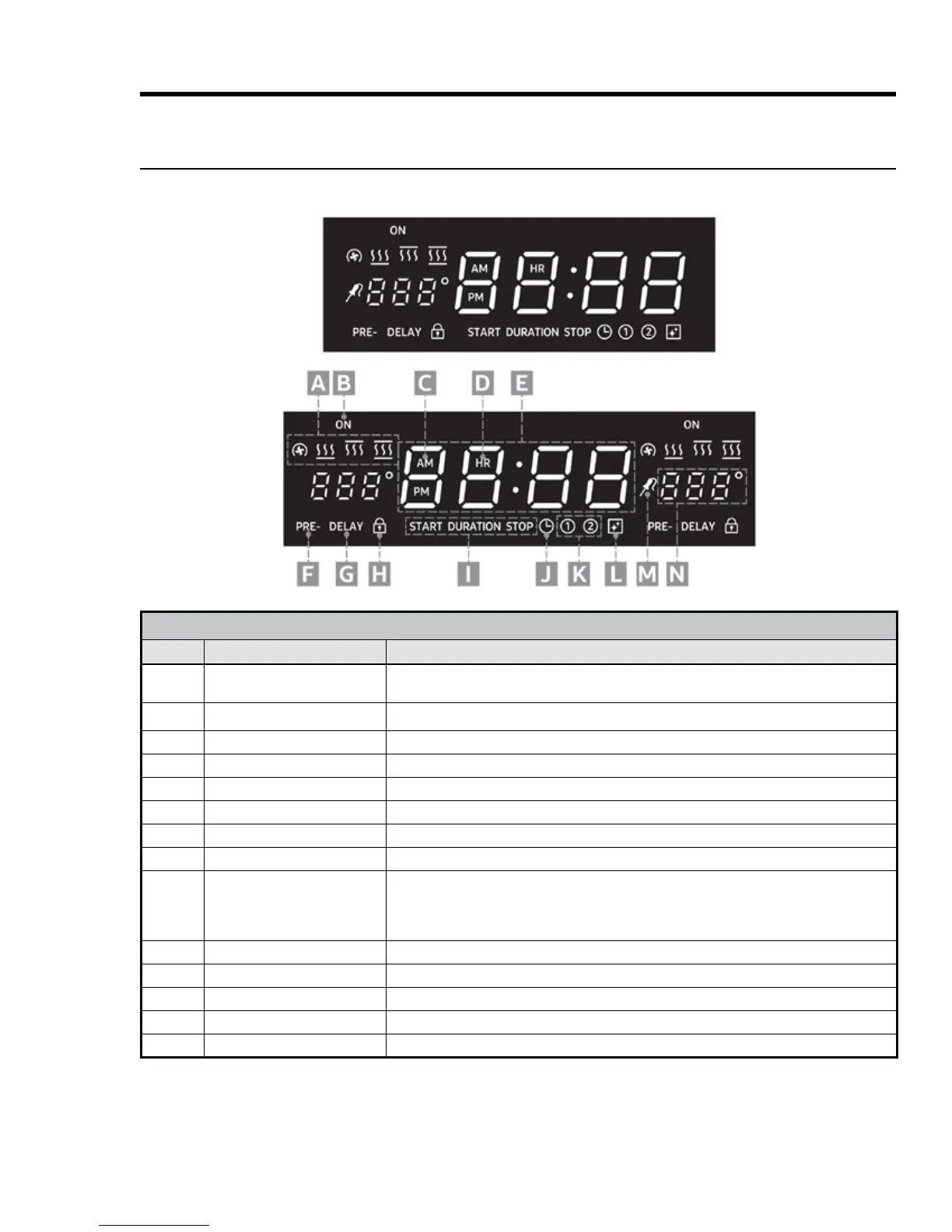
HDPRS/HDERS Control-Panel Display
30", 36" Single Oven (top), 48" Double Oven (bottom)
CONTROL-PANEL FEATURES
Callout Name Description
A Cook-Mode Icons
From left: Convection, Bake, Broil, Roast; these appear, sometimes in combination,
according to selected cook mode.
B
Oven-On Indicator Appears when oven is in use.
C AM-PM Indicator
One of these appears according to time of day.
D Clock-Mode Indicator
Appears when military-time mode is selected (absent when standard mode is selected).
E Clock/Timer Readout
Shows time remaining on selected timer or time of day when no timer is selected.
F Preheating Indicator
Appears when oven is preheating (disappears when set oven temp is reached).
G Time-Delay Indicator
Appears when delay-time cooking is active.
H Control-Lockout Icon
Appears when control-lockout is active.
I Cook-Time Indicators
START: Appears if a start time is set for a cook task; readout (E) shows time of day when
oven will start cooking; DURATION: Appears if you tap COOK TIME after setting a stop
time for a cook task; readout (E) shows cook-time countdown; STOP: Appears if a stop
time is set for a cook task; readout (E) shows time of day when cooking will stop.
J Clock-Set Icon
Appears when CLOCK key is pressed for setting the current time.
K Timer Indicators
These appear depending on use; if both timers are active, both indicators appear.
L Cleaning Icon
Appears when the oven is in Self-Clean or Steam-Clean mode.
M
Meat-Temperature-Probe Icon
Appears when temperature-probe mode is active.
N Oven-Temperature Readout
Shows oven temperature in °F or °C, depending on user setting.



 To Next Page