22 English
Operating the Oven
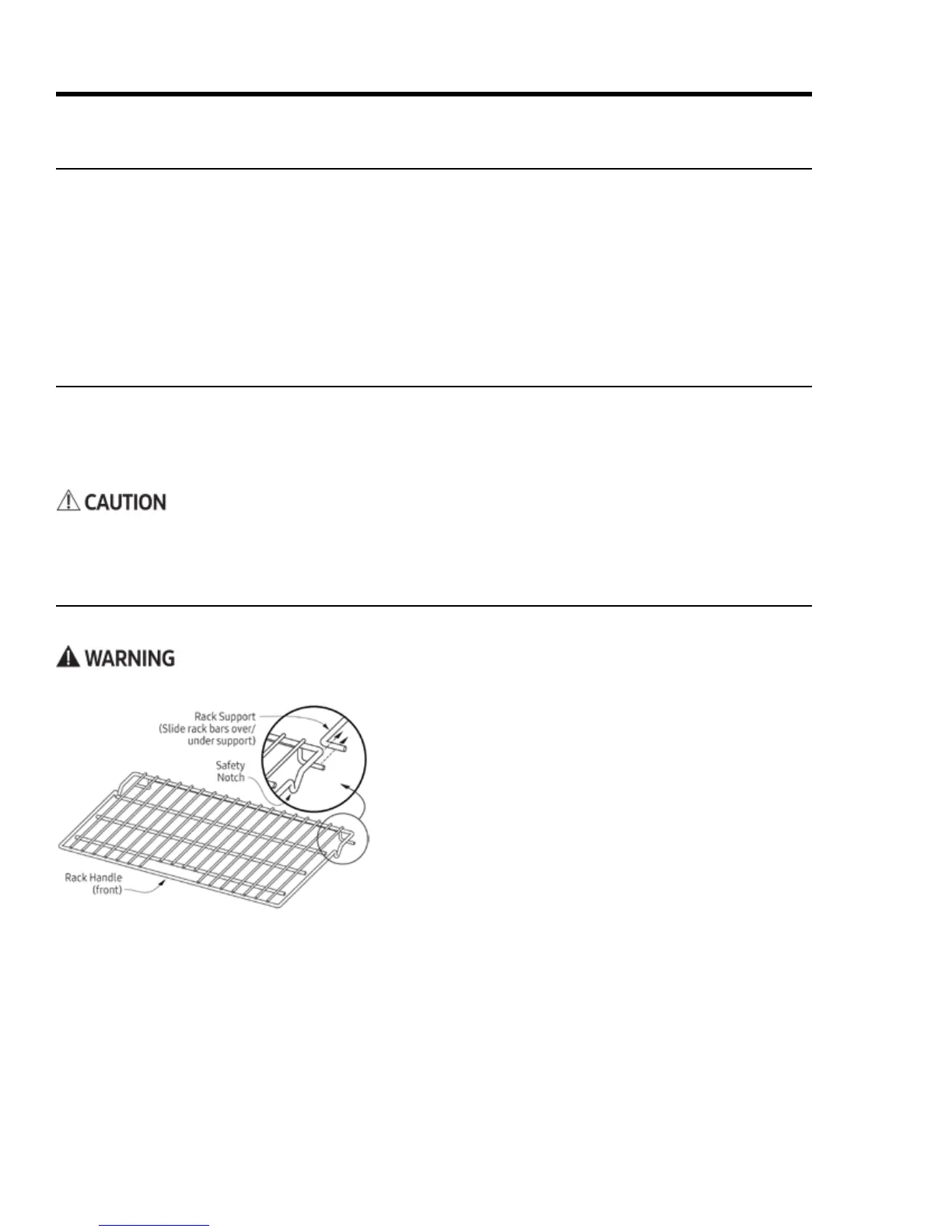
Inserting a Standard Oven Rack
1. Grasp the handle area at front of the rack, and slide the
rack onto the left-/right-side supports.
2. Begin sliding the rack in, then lift up so the safety notches
clear the ends of the rack supports.
3. With both hands, push the rack all the way in.
Removing a Standard Oven Rack
1. Grasp the handle area at front of the rack, and pull gently
until the rack stops at the safety notches.
2. Lift the front of the rack 6 inches to clear the safety notch-
es, and pull the rack completely out.
1. On the control panel, tap-hold START TIME for 6 seconds.
"Beep" appears on the display.
2. On the numeric keypad, tap #, then tap CANCEL/SECURE.
The beep is enabled/disabled.
Handle the racks only when the oven is cool. If you must reposition a rack when the oven is hot, use potholders.
Before Cooking
• -
• When baking/roasting, the oven preheats automatically. Preheating time varies with the temperature set-
ting and your home’s type of electrical supply. Preheating cannot be used for broiling.
Positioning the Oven Racks
About the Control-Panel "Beep"
The control panel beeps: 1) when you tap a key, 2) when a timer reaches zero, 3) when there is an error, and 4)



 To Next Page