40 English
Maintaining the Range
1. Turn off power to the oven at the circuit breaker/fuse box.
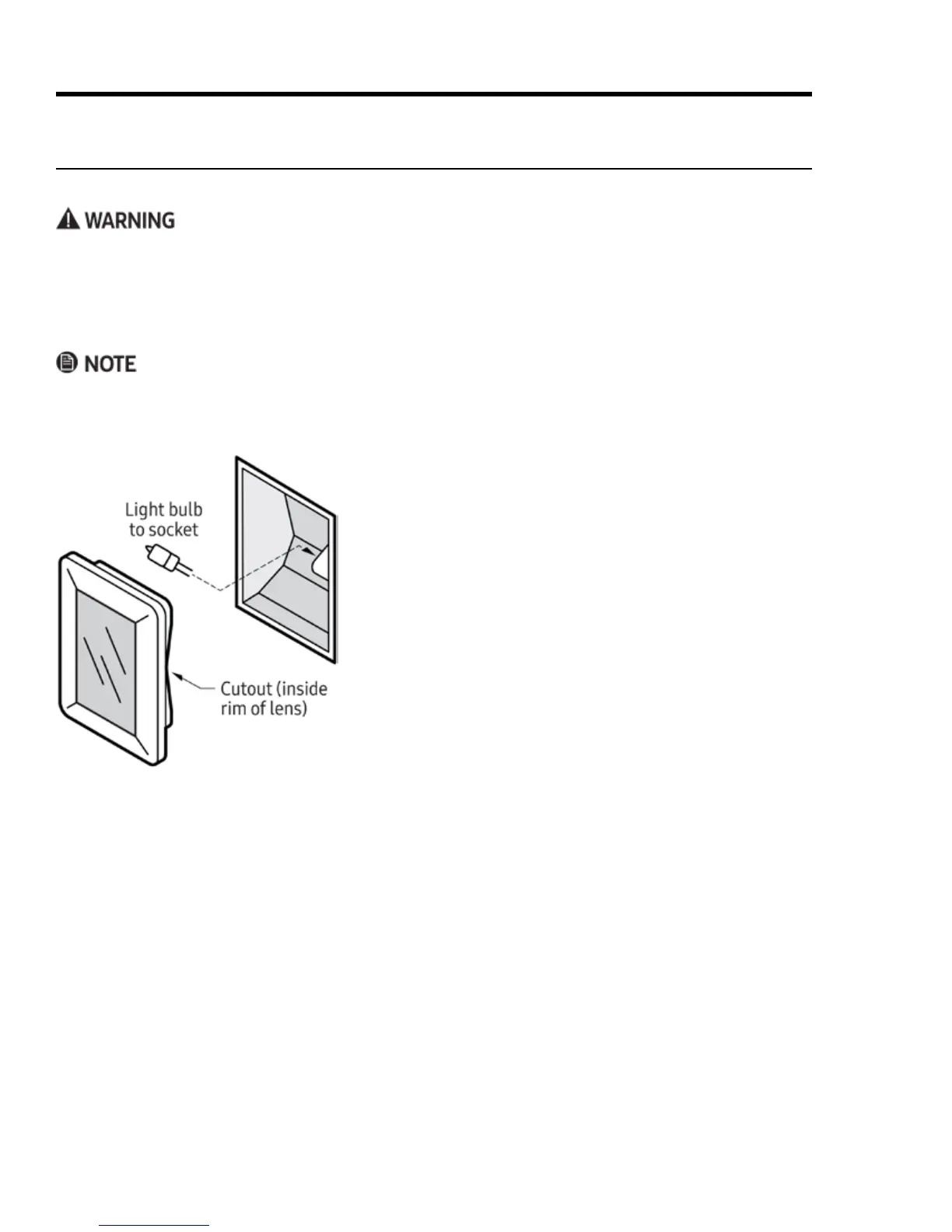
2. Supporting the lens from below, gently pry it loose with a
table knife, and pull the lens cover straight out.
3. Pull the old bulb straight out of the socket.
4. Wearing a glove, take the new bulb, and insert it in the
socket.
5. In reinstalling the lens cover, line up the cutout on the
inside rim with the light socket, and gently press it into
place.
6. Return power to the oven, and reset the clock (Pg. 21).
Replacing the Oven Lights
If no lights work, see Troubleshooting, Pg. 42, before replacing them.
• To prevent electric shock, turn off power to the oven, and ensure the oven and bulbs are cool.
• Use the oven only with the lens covers installed. The covers protect the bulbs from high temperatures and
mechanical shock.
•
• Do not use a screwdriver to remove the lens.
•
• Replace the light bulb only with Dacor bulb PN 100429, 12V 20W. (See Pg. 4 for Dacor Customer Assurance
contact information.)



 To Next Page