EasyManua.ls Logo

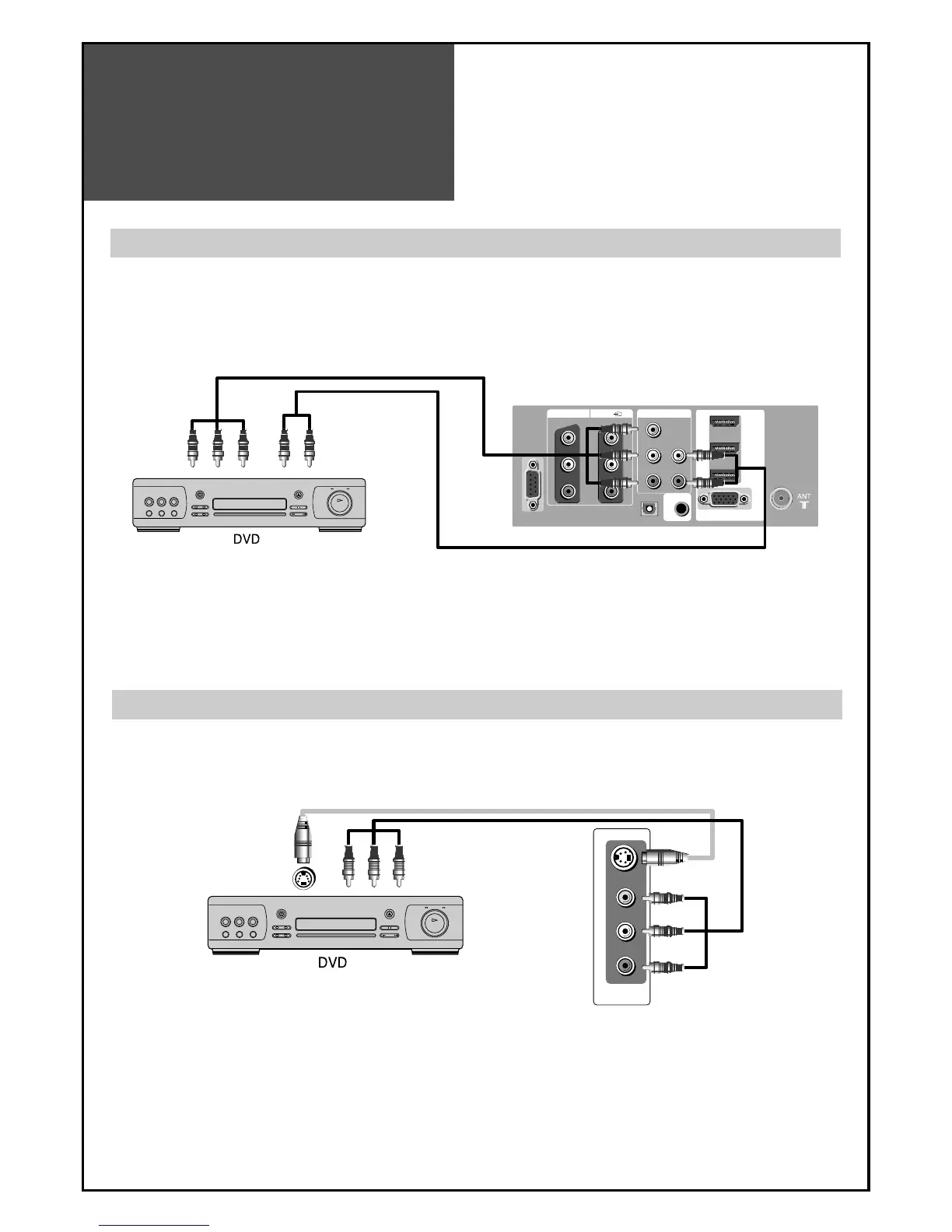
Daewoo LM32L1 - DVD Player Connection; When Connecting with a Component Cable; When Connecting with a S-VHS Cable and RCA Cable

Daewoo LM32L1
49 pages
Print Icon
To Next Page IconTo Next Page
To Previous Page IconTo Previous Page
Loading...
DVD Player
connection
16
OUTPUT
UP-GRADE
PORT
AV1
Pr
R AUDIO L
R AUDIO L VIDEO
Pb Y
COMPONENT
OPTICAL
HDMI
3
PC
HDMI
2
HDMI
1
INPUT
PC AUDIO
R-AUDIO-L VIDEO
S-VIDEO
AV2
INPUT
Note :
• When you connect with the component video, please check the colour of the cable between the DVD and
TV set.
Note :
• If your AV device has both Video OUT terminal and S-Video OUT terminal, the S-Video connection is
recommended for better picture quality.
When connecting with a component cable
When connecting with a S-VHS cable and RCA cable
TV
TV

Table of Contents

Other manuals for Daewoo LM32L1

Related product manuals