EasyManua.ls Logo

Daewoo LM32L1 - Screen Adjustment; When Setting up Various Screen Modes

Daewoo LM32L1
49 pages
Print Icon
To Next Page IconTo Next Page
To Previous Page IconTo Previous Page
Loading...
35
Screen Adjustment
- The user may select various screens designed for a good picture without adjusting the brightness, contrast
or colour individually.
Note :
Normal : For a highly defined image in a normally bright room
Movie : Ideal for movies.
Dynamic : Ideal for fast movement like sports.
Favourite : Allows the user to customize settings as desired.
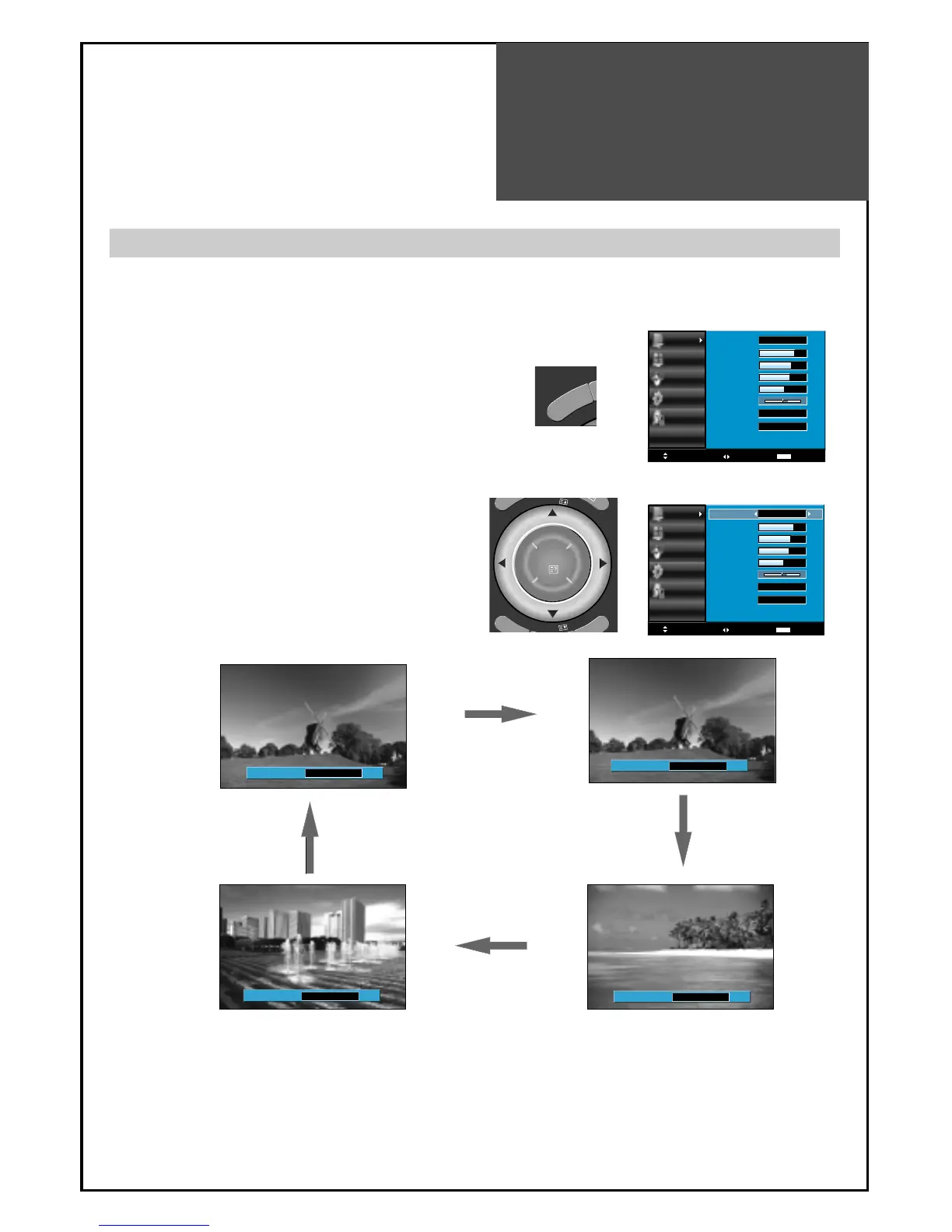
When setting up various screen modes
1. Select "Picture" by pressing the 'MENU" button.
• The menu screen appears as follows.
2. Move to the "Picture Mode" using
/
button,
and press
/
button again, the screen
changes as follows : Normal => Movie =>
Dynamic => Favourite => Normal

Picture Mode Favourite
Picture Mode Dynamic
Picture Mode Normal
Picture Mode Movie
Picture
Screen
Sound
Install
Function
Move
Select
Exit
MENU
Picture Mode
Brightness
Contrast
Colour
Sharpness
Tint
N. R.
Colour Temp
Normal
45
42
40
31
0
Off
Normal
M
E
N
U
Picture
Screen
Sound
Install
Function
Move
Adjust
Exit
MENU
45
42
40
31
0
Off
Normal
Normal
Picture Mode
Brightness
Contrast
Colour
Sharpness
Tint
N. R.
Colour Temp
P
I
P
P
R
P
I
P
P
R
OK
I
A

Table of Contents

Other manuals for Daewoo LM32L1

Related product manuals