PIP Mode
39
Note.
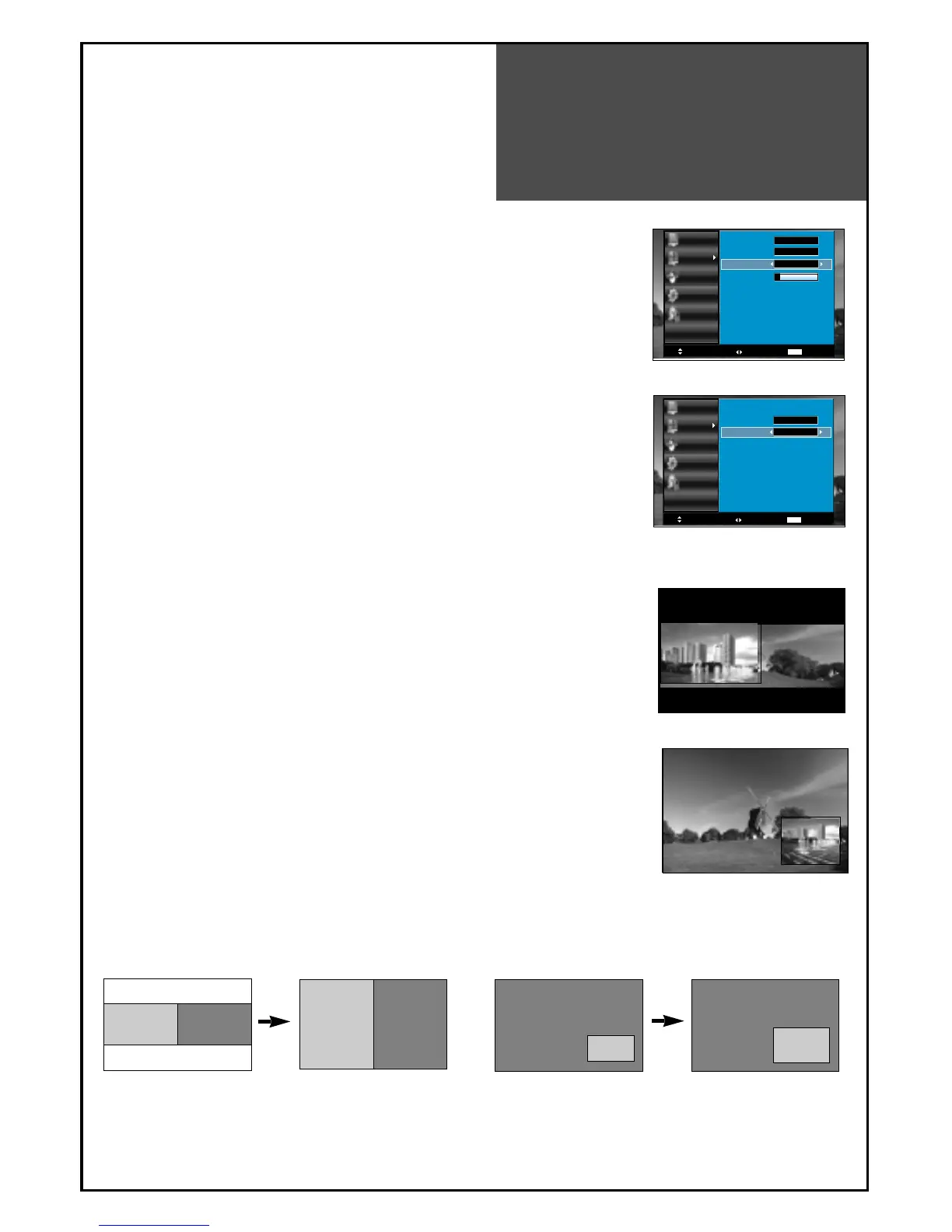
• On the side by side, you can select the sound output directly by
activating outline using ”
◀◀
/
▶▶
” buttons on the remote controller.
1. Adjustment of PiP Mode
•
Move to Mode in the PiP.
• Press the "
◀◀
/
▶▶
" buttons to select, PiP mode changes as follow:
POP => Small PiP => Large PiP => Off
2. Adjustment of Sound Output
•
Move to Sound Output in the PiP.
• Press the ”
◀◀
/
▶▶
” buttons to select, Sound Output changes
as follow : Main => Sub => Main
- The user can enjoy two screens by using PiP function.
3. Pressing the “PIP” button on the remote controller.
•
The PiP Mode changes as follows:
PiP off => Side by Side => PiP => PiP off
• Side by Side : This mode will display two screen left(Main) and
right(Sub).
• PiP : This mode will display two screen, Main is full screen and
Sub is fixed on the right-bottom side.
4. Pressing the “P.SIZE” button on the remote controller.
•
On the Side by Side, the screen changes as full side by side.
• On the PiP, Sub screen size is changed: large => small => large.
Note.
• PiP is just consist of one Analog(RF, AV, COMP and PC mode)
and one Digital(HDMI mode). It means, if Main is on Analog then
Sub must be on Digital.




 To Next Page