User's Manual
39
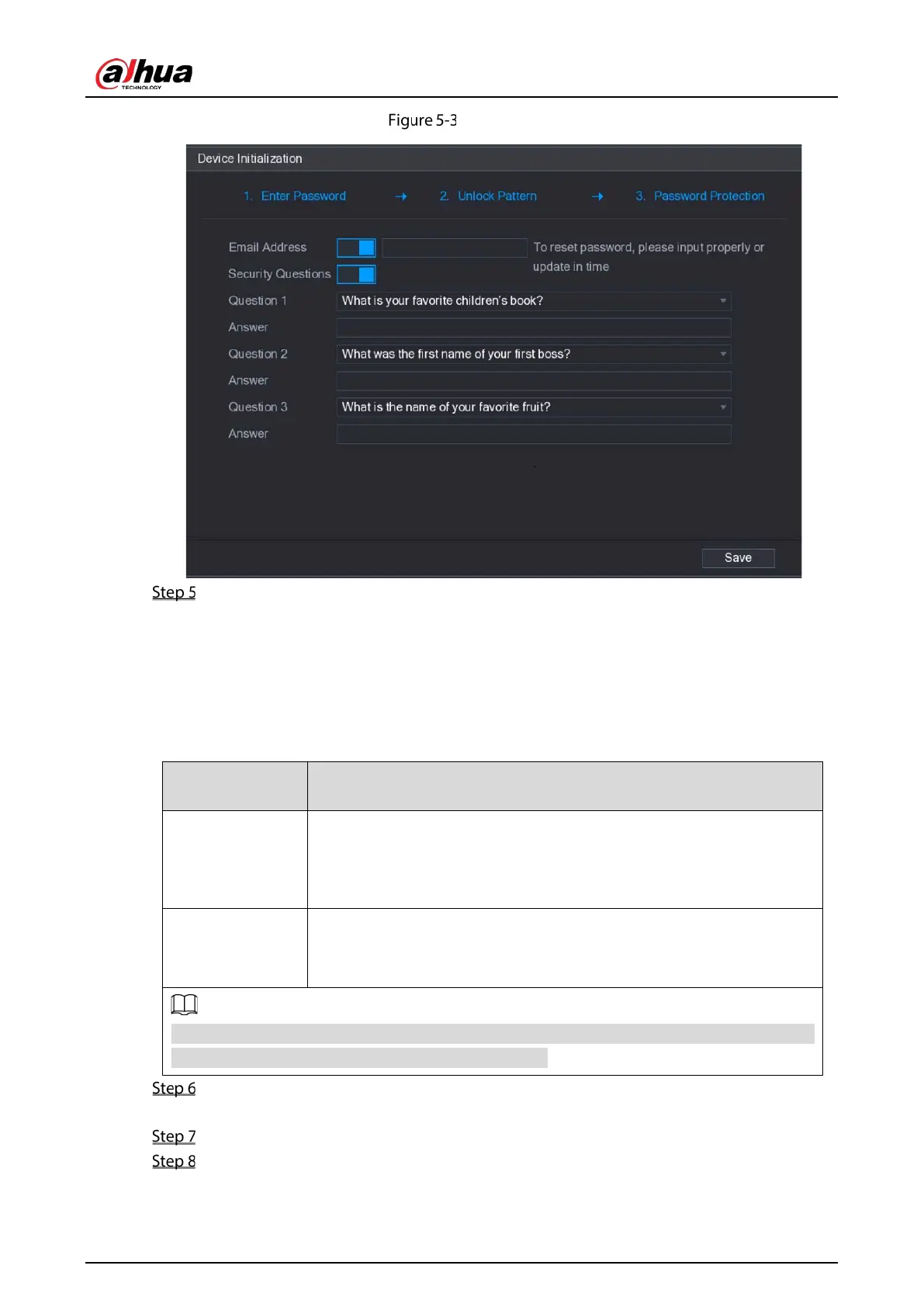
Password protection
Configure the protection parameters for password.
After configuration, if you forgot the password for admin user, you can reset the password
through the reserved email address or security questions. For details about resetting the
password, see "5.1.3 Resetting Password."
If you do not want to configure the settings, disable the email address and security questions
functions on the interface.
Table 5-2 Password protection description
Email Address
Enter the reserved email address.
In the
box, enter an email address for password reset. In
case you forgot password, enter the security code that you will get from
this reserved email address to reset the password of admin.
Security Questions
Configure the security questions and answers.
In case you forgot password, enter the answers to the questions can
make you reset the password.
If you want to configure the email or security questions fucntion later or you want to change the
configurations, select
Main Menu > ACCOUNT > USER
.
Click Save to complete the settings.
The End-User License Agreement interface is displayed.
Select the I have read and agree to all terms check box.
Click Next.
The Startup Wizard interface is displayed. For details about quick settings during startup, see
"5.1.4 Setting Up with the Startup Wizard."


 To Next Page
 Loading...

