User's Manual
81
Main menu
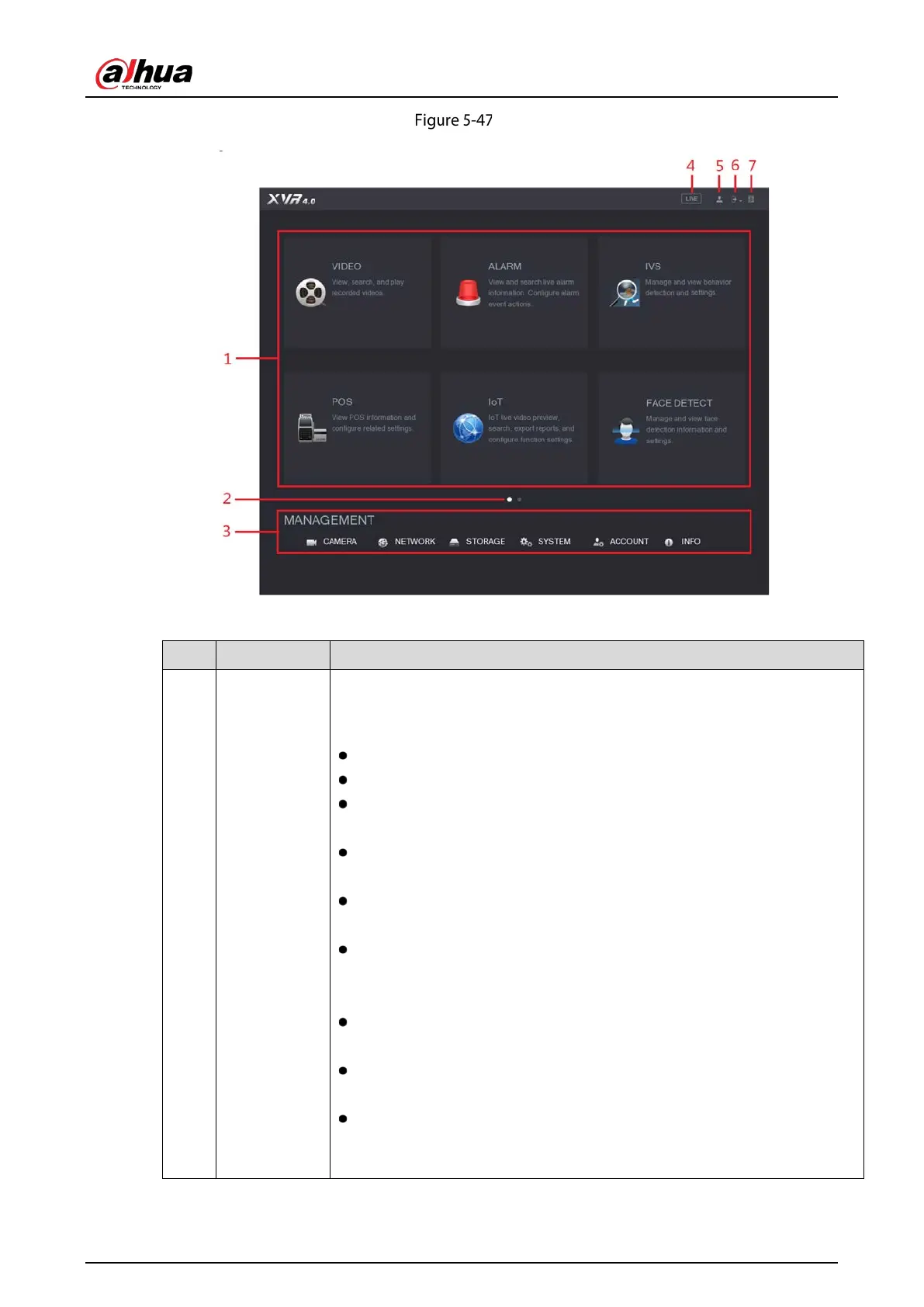
Table 5-19 Main interface description
1 Function tiles
Includes eight function tiles:
,
,
,
,
,
,
,
, and
. Click each tile to open the configuration interface of
the tile.
: Search for and play back the recorded video saved on the Device.
: Search for alarm information and configure alarm event actions.
: Configure the behavior detections by drawing rules for detecting
tripwire, intrusion, abandoned objects, and missing objects.
: You can connect the Device to the POS (Point of Sale) machine and
receive the information from it.
: Configure the human faces detection settings and search
detected human faces.
: View, search and export the temperature and humidity data of
camera, connect sensors and wireless siren, and configure the alarm
event linkage settings.
: Search and back up the video files to the local PC or external
storage device such as USB storage device.
: Configure the display effect such as displaying content, image
transparency, and resolution, and enable the zero-channel function.
: Manage audio files and configure the playing schedule. The
audio file can be played in response to an alarm event if the voice
prompts function is enabled.


 To Next Page
 Loading...

