User's Manual
83
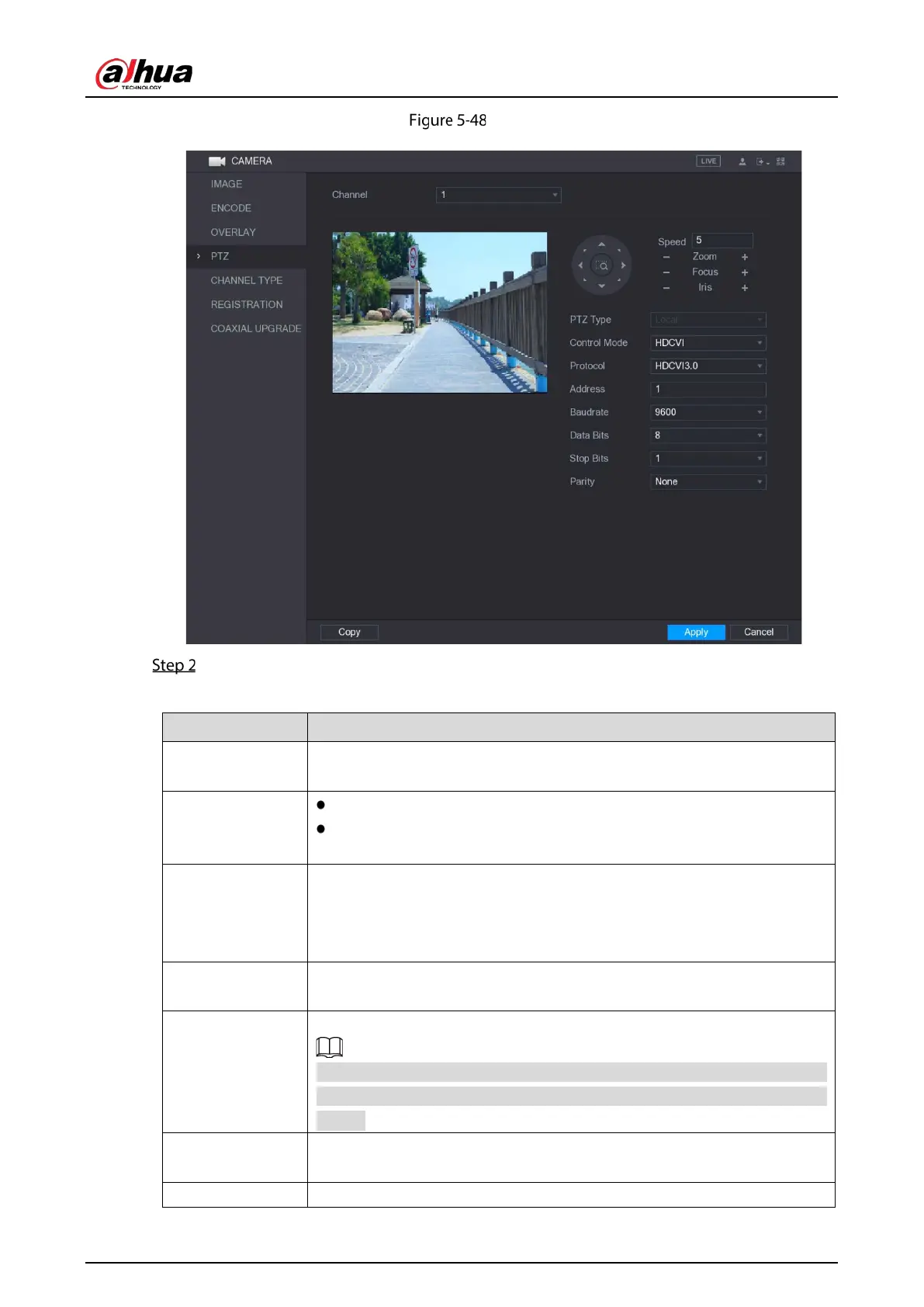
PTZ interface
Configure the settings for the PTZ connection parameters.
Table 5-20 PTZ parameters
Channel
In the
list, select the channel that you want to connect the PTZ
camera to.
PTZ Type
Local: Connect through RS485 port or coaxial cable.
Remote: Connect through network by adding IP address of PTZ camera
to the Device.
Control Mode
In the
list, select
or
. For HDCVI series product,
please select HDCVI. The control signal is sent to the PTZ through the coaxial
cable. For the serial mode, the control signal is sent to the PTZ through the
RS485 port.
Protocol
In the
list, select the protocol for the PTZ camera, for example,
select
.
Address
In the
box, enter the address for PTZ camera. The default is 1.
The entered address must be the same with the address configured on the
PTZ camera; otherwise the PTZ camera cannot be controlled from the
Device.
Baudrate
In the
list, select the baudrate for the PTZ camera. The default is
9600.
Data Bits The default is 8.


 To Next Page
 Loading...

