IOM1178-1/Page5of16
Wiring
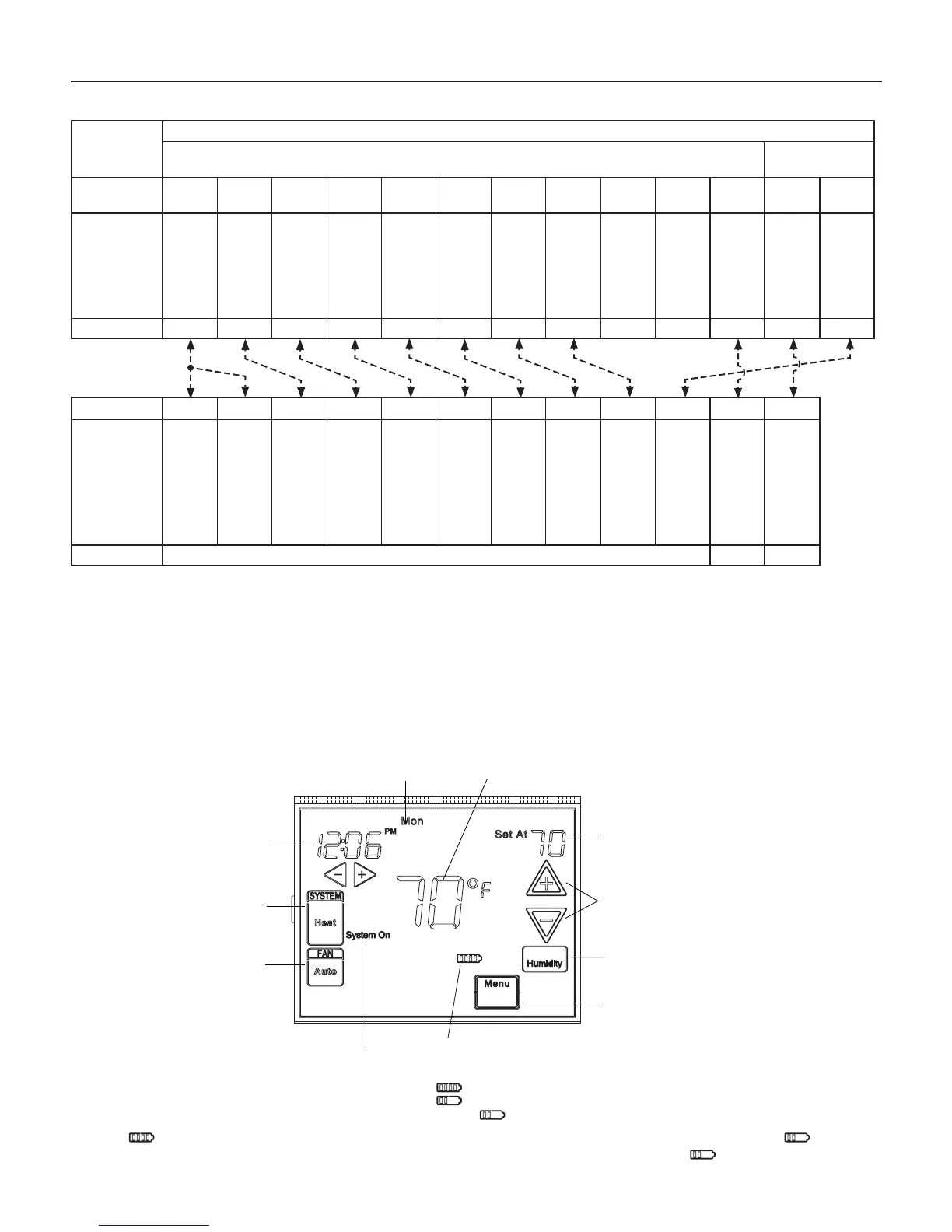
Figure 2: SmartSource MicroTech III board to programmable touch screen thermostat wiring
SmartSource
Board
MicroTech III Board
Base Board
I/O Expansion
Module
Terminal Block
Label
TB2-1 TB2-9 TB2-7 TB2-6 TB2-5 TB2-4 TB2-3 TB2-8 TB3-1 TB3-2 TB2-2 TB1-1 TB1-2
Description
24VAC
24VAC Common
Fan
Cool Stage #1
Cool Stage #2
Heat Stage #1
Heat Stage #2
Heat Stage #3
Emergency Shut-
down Input
Unoccupied Input
Alarm Output
Humidistat
(Dehumid/WSE)
Input
Heat Stage #4
Terminal Label R C G Y1 Y2 W1 W2 O E U A 1 W4
Typical Wiring
Terminal Label RC RH C G Y Y2 W1 W2 W3 W4 L D/A
Description
24VAC
24VAC
24VAC Common
Fan
Cool Stage #1
Cool Stage #2
Heat Stage #1
Heat Stage #2
Electric Heat Stage #1
(Heat Stage #3)
Electric Heat Stage #2
(Heat Stage #4)
Alarm Input
Dehumidicationor
Waterside Economizer
Thermostat Programmable Touch Screen (Part No. 910121750)
Heat Pump Connections
The thermostat can be congured for use with the following heat pump systems:
• Heat Pump Type 1 (HP1) – Single stage compressor system with electric backup
• Heat Pump Type 2 (HP2) – 2-stage compressor system with electric backup
Note: Afterwiring,seeInstallerCongurationsectionforprobethermostatconguration.
Thermostat Quick Reference
Figure 3: Home screen display and descriptions
Time of Day
Day of Week
Temperature
System
Switch
Fan
Switch
Indicates when
thermostat is calling
for Heat or Cool
Battery Level Indicator
Indicating the current power level
of the 2 “AA” batteries.
Full power remaining.
Half power remaining.
Change The batteries should be replaced at this time.
Menu key for entering
different modes such as
Cleaning, Configuration, Set
Time and Set Schedule
Press to view
Humidity setpoint
Temperature
UP/Down used for
modifying setpoint
as well as to
navigating the menus
Set Temperature/Humidity
Note: If isdisplayed,thethermostatisbatterypowered.Whenbatterypowerremainingisapproximatelyhalf, willbe
displayed.Ifthezoneisgoingtobeunoccupiedforanextendedperiod(over3-months)and isdisplayed,thebatteries
shouldbereplacedbeforeleaving.



 To Next Page