Installer reference guide BRC1E53
19
4P419250-1 – 2015.10
Test operation method (SkyAir only)
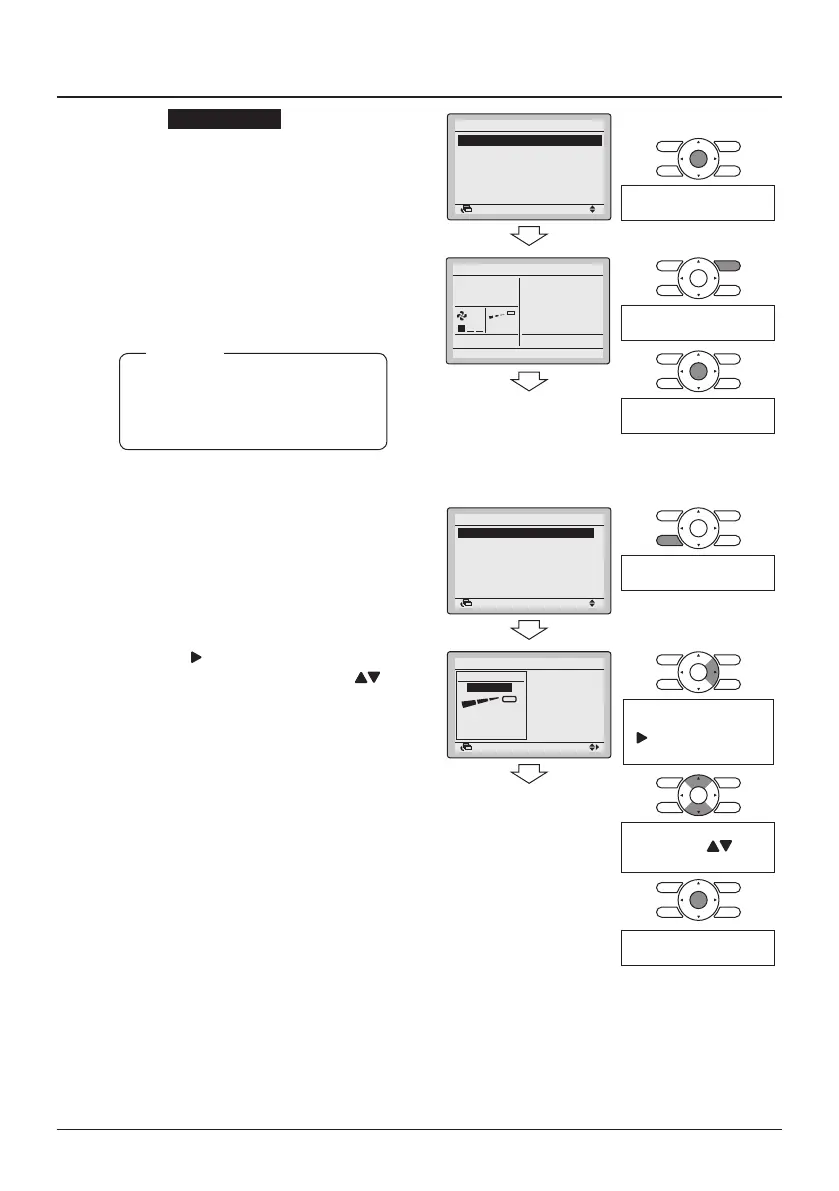
7-5 Select Test Operation and press the
Menu/Enter button. The Basic screen
returns and "Test operation" is
displayed.
7-5
Test Operation
Maintenance Contact
Field Settings
Demand
Min Setpoints Differential
External Input Interlock
Service Settings 1/3
SettingReturn
Press the Menu/Enter
button.
7-6 Press the On/Off button within about
10 seconds. Test operation starts.
Check the operation condition for
3 minutes.
Test operation can also be
started by rst performing 7-6
followed by 7-5.
NOTE
7-6
Cool
Return Setting
Press the On/Off button
(within 10 seconds).
Press the Menu/Enter
button.
<Main menu>
7-7 Press the Fan Speed/Airow
Direction button
7-7
SettingReturn
Airflow Direction
Individual Air Direction
Quick Start
Ventilation
Energy Saving Options
Schedule
1/2Main Menu
Press the Fan speed/
airow direction button
7-8 Press the button to select the
airow direction setting. Use the
buttons to change the airow
direction.
7-9 After conrming correct airow
operation, press the Menu/Enter
button to return to the Basic screen
7-8
7-9
Airflow Direction
Direction
Position 0
SettingReturn
To select the airow
direction setting, press the
(Right) button on the
setting screen
Change the airow direction
by using the (Up/
Down) buttons.
Press the Menu/Enter
button.



 To Next Page