BRC1E53 Installer reference guide
4P419250-1
–
2015.10
20
Test operation method (SkyAir only)
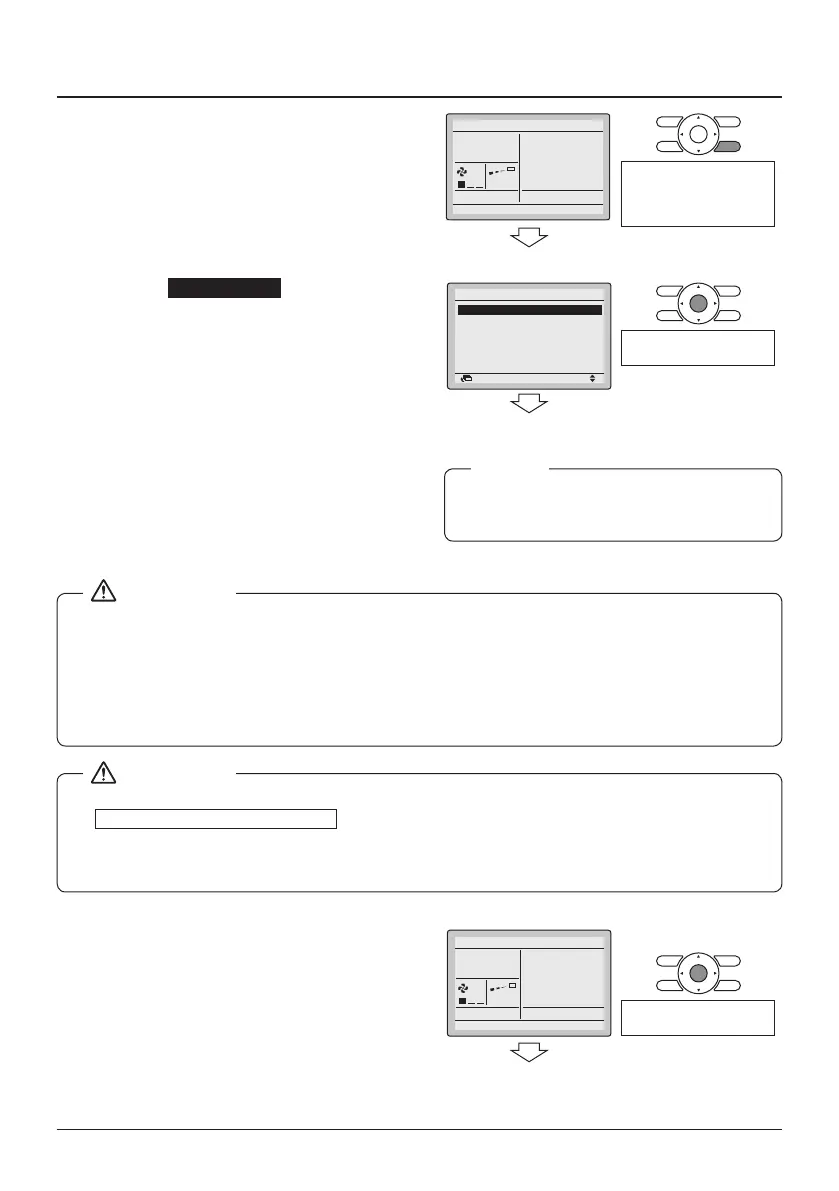
7-10 Press and hold the Cancel button for
4 seconds or longer in the Basic
screen. The Service Settings menu is
displayed.
7-10
Cool
Return Setting
<Service Settings menu>
Press and hold the Cancel
button for 4 seconds or
longer while the backlight
is lit.
7-11 Select Test Operation in the Service
Settings menu and press the Menu/
Enter button. The Basic screen
returns and normal operation is
possible.
7-11
Test Operation
Maintenance Contact
Field Settings
Demand
Min Setpoints Differential
External Input Interlock
Service Settings 1/3
SettingReturn
<Basic screen>
Press the Menu/Enter
button.
7-12 Check the functions according to the
operation manual.
7-13 When the decoration panel is not
installed, turn off the power after test
operation nishes.
Test operation will automatically nish
after 30 minutes.
NOTE
● If the interior work is not completed when the test operation is nished, explain to the customer
that he should not operate the unit until the interior work is completed in order to protect the
indoor unit.
● (If the indoor unit is operated, the indoor unit may be contaminated with the materials which
arise from paints or adhesives during the interior work and water splash or water leak may
occur.)
● If it is not possible to operate the unit due to any malfunction, refer to
Malfunction diagnosis method
.
● When the test operation nishes, check that the error code history is not displayed in the
Maintenance Information screen according to the following procedure.
<Basic screen>
7-14 Press the Menu/Enter button in the
Basic screen. The Main menu is
displayed.
7-14
Cool
Set to
28°C
<Main menu>
Press the Menu/Enter
button.



 To Next Page