AUTO · DRY · COOL · HEAT · FAN
Operation
The air conditioner operates with the operation mode of your choice.
From the next time on, the air conditioner will operate with the same operation
mode.
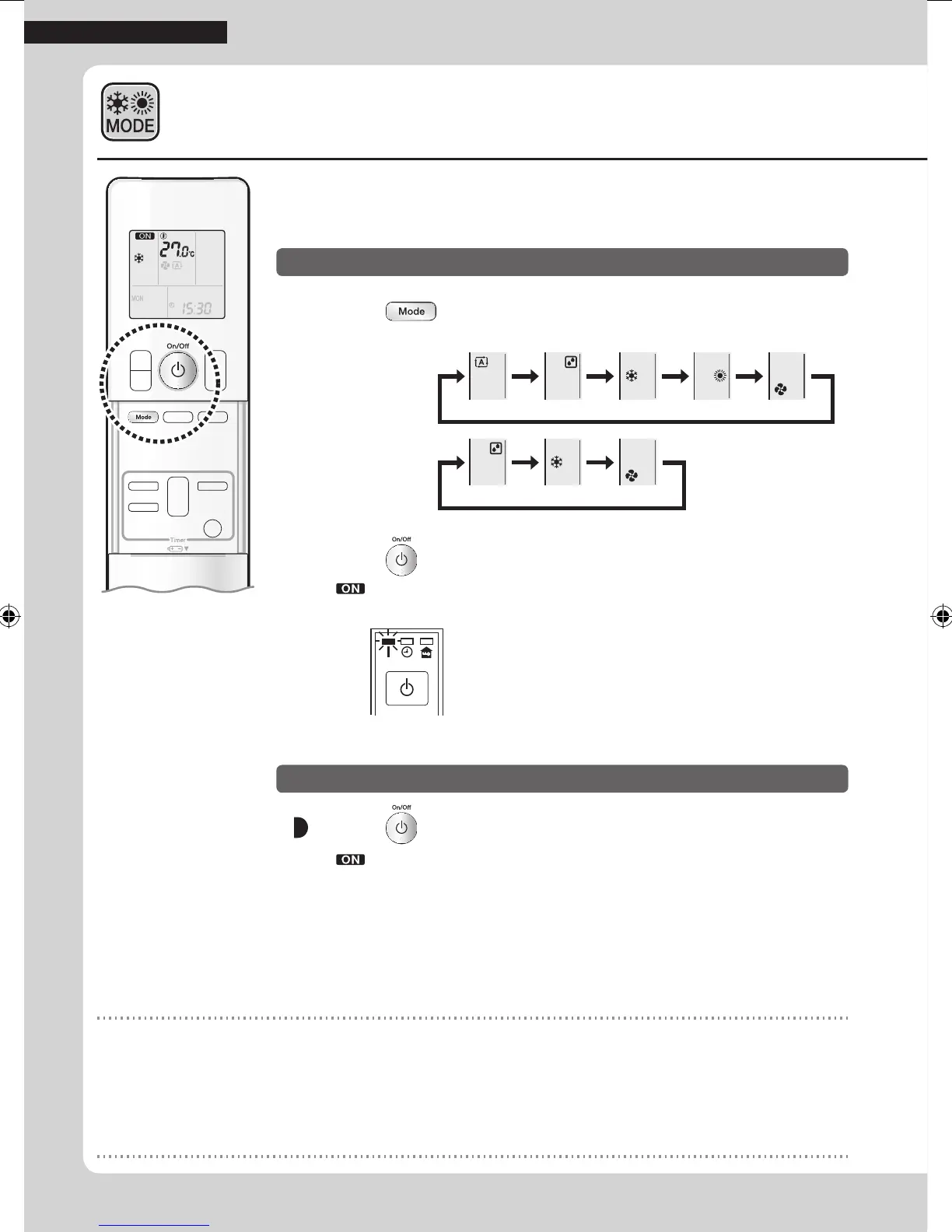
1. Press and select an operation mode.
• Each pressing of the button changes the mode setting in sequence.
HEAT PUMP
model
AUTO DRY COOL HEAT FAN
COOLING ONLY
model
DRY COOL FAN
2. Press .
• “ ” is displayed on the LCD.
• The OPERATION lamp lights green.
Display
Press again.
• “ ” disappears from the LCD.
• The OPERATION lamp goes off.
NOTE
Notes on AUTO operation
• In AUTO operation, the system selects an appropriate operation mode (COOL or HEAT) based on the indoor temperature and starts
the operation.
• The system automatically reselects setting at a regular interval to bring the indoor temperature to the user-setting level.
Note on DRY operation
• Eliminates humidity while maintaining the indoor temperature as much as possible. It automatically controls temperature and air ow
rate, so manual adjustment of these functions is unavailable.
7
Basic Operation
01_EN_3P477582-2.indd 7 6/14/2017 14:12:44



 To Next Page