DHOS-CS-IM-2107004D 19
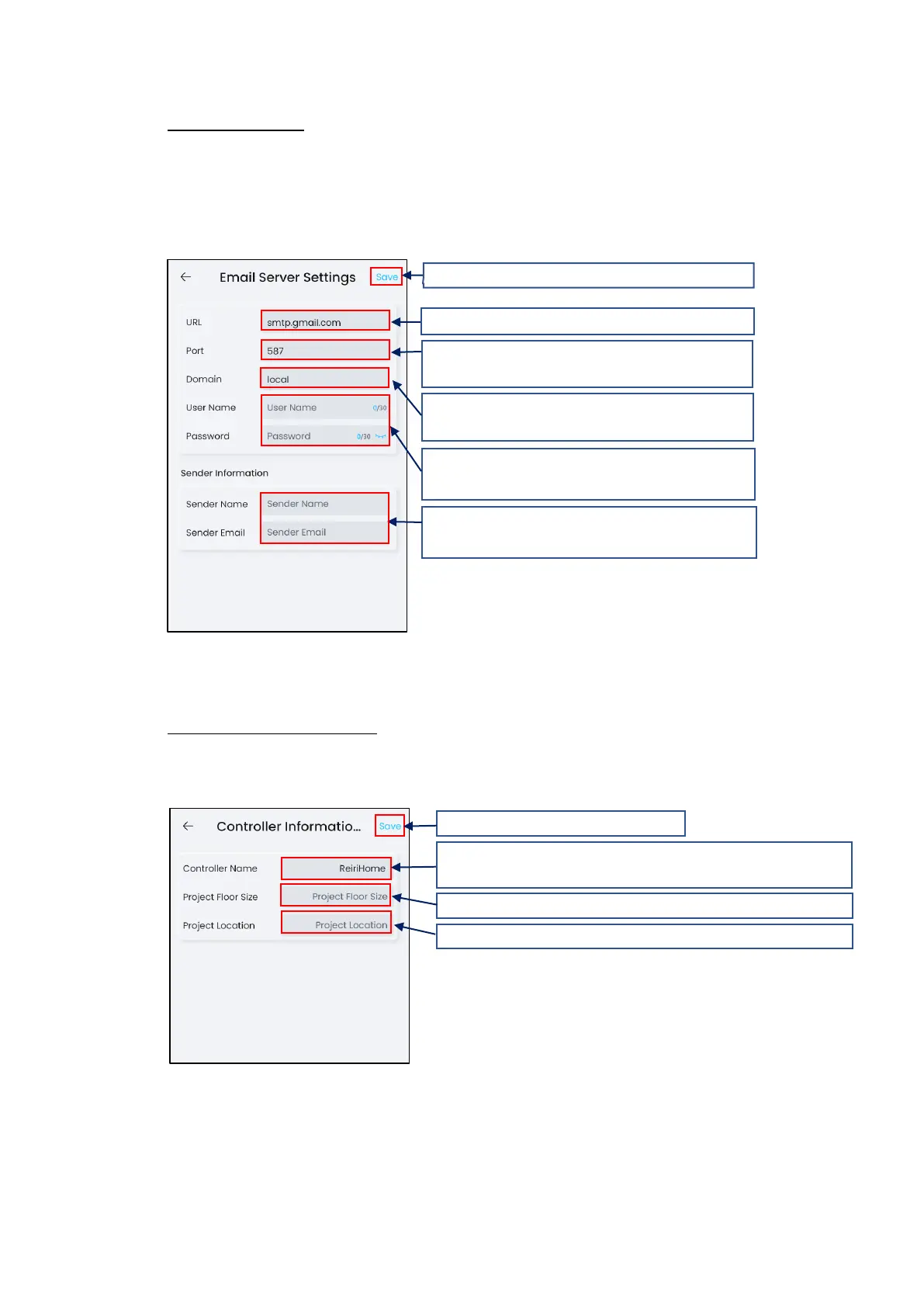
Email server setting
This is the setting of email server details to allow the Reiri controller to send the error
notifications out by Email.
Obtain the email server URL, port, domain, username and password of the person managing
the network.
This setting will only take effect after a reboot.
Controller Information Setting
This function adds information to identify the controller easily at login screen and in Multi-
Site Management (MSM).
This setting will only take effect after a reboot.
3. Domain name of this SMTP server.
For example, for Gmail is “gmail.com”
4. Enter username and password of this SMTP
server.
5. Enter sender name and email address.
This information is set to from field of email.
6. Tap “Save” to save changes.
1. Enter STMP server URL.
2. Port Number to send email.
For example, Gmail SMTP Port is 587.
4. Tap “Save” to save changes.
1. Enter name of this controller.
Name is limited to characters a-z, A-Z, numbers 0-9, “_”
2. Project Floor size information for MSM use.
3. Project Location for MSM use.



 To Next Page