22
Operation
Air Purifying Operation
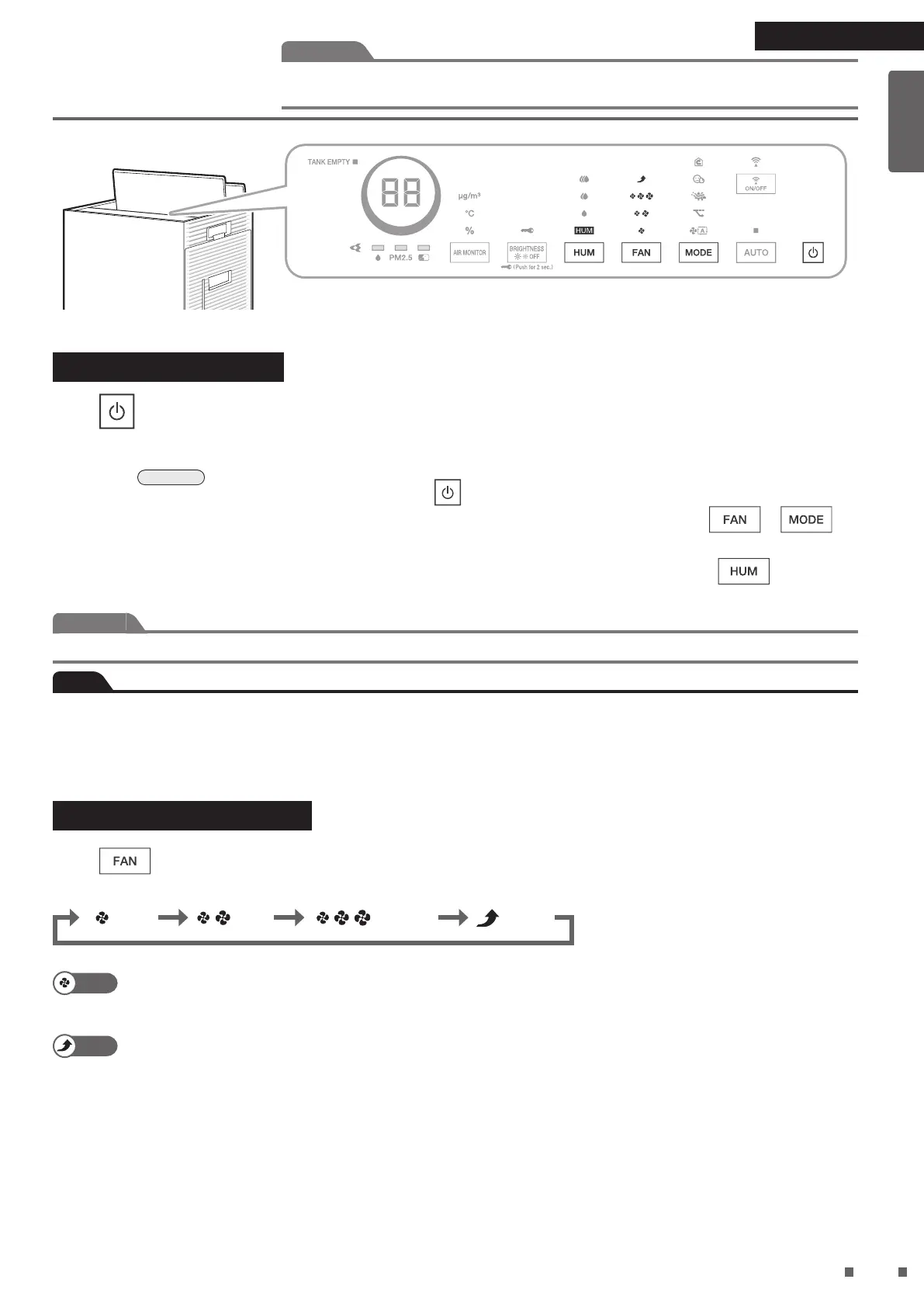
Press .
• Press again to turn OFF.
If Humidifying and Air Purifying Operation was running within the past 1hour, humidifying lter drying operation may be
performed.
►
Page 24
If you want to stop humidifying lter drying operation, press again.
• If AUTO operation was in progress last time, AUTO operation will be performed automatically, and press
or if
you want to perform only Air Purifying Operation.
• If Humidifying Operation was running previously, Humidifying Operation will start automatically, and press
until the
humidier lamp turns off if you want to perform only Air Purifying Operation.
Attention
When performing only Air Purifying Operation, discard the water in the water tank and humidifying tray.
Note
• At the time of purchase, the unit is set to carry out Air Purifying Operation in “AUTO FAN MODE”.
• If the power supply plug is unplugged, or the unit is stopped and started again, the operation that was in progress last time will
start again.
• Operation settings cannot be changed for about 2seconds immediately after the power supply plug is inserted.
Changing the Airow Rate
Press during operation to change the airow rate.
• Each press cycles between the FAN lamps (white).
: Standard : Turbo: Quiet : Low
Quiet
A gentle breeze is emitted. Recommended for use during sleep hours.
As the deodorising capacity is reduced, it is recommended that the FAN setting be set to “Standard” or
above if odour needs to be quickly eliminated from a room.
Turbo
The ambient air is quickly puried using a large airow rate. Recommended for use while you are cleaning
up a room.
Attention
Do not move the unit, or attach or remove parts to/from the unit while it is in operation.
Water leakage, breakage or malfunction may result.
01_EN_3P693798-1B.indd 22 2023/06/26 13:34:02


 To Next Page
 Loading...