31
Advanced Settings
Advanced Settings
Function 1 2 3 4
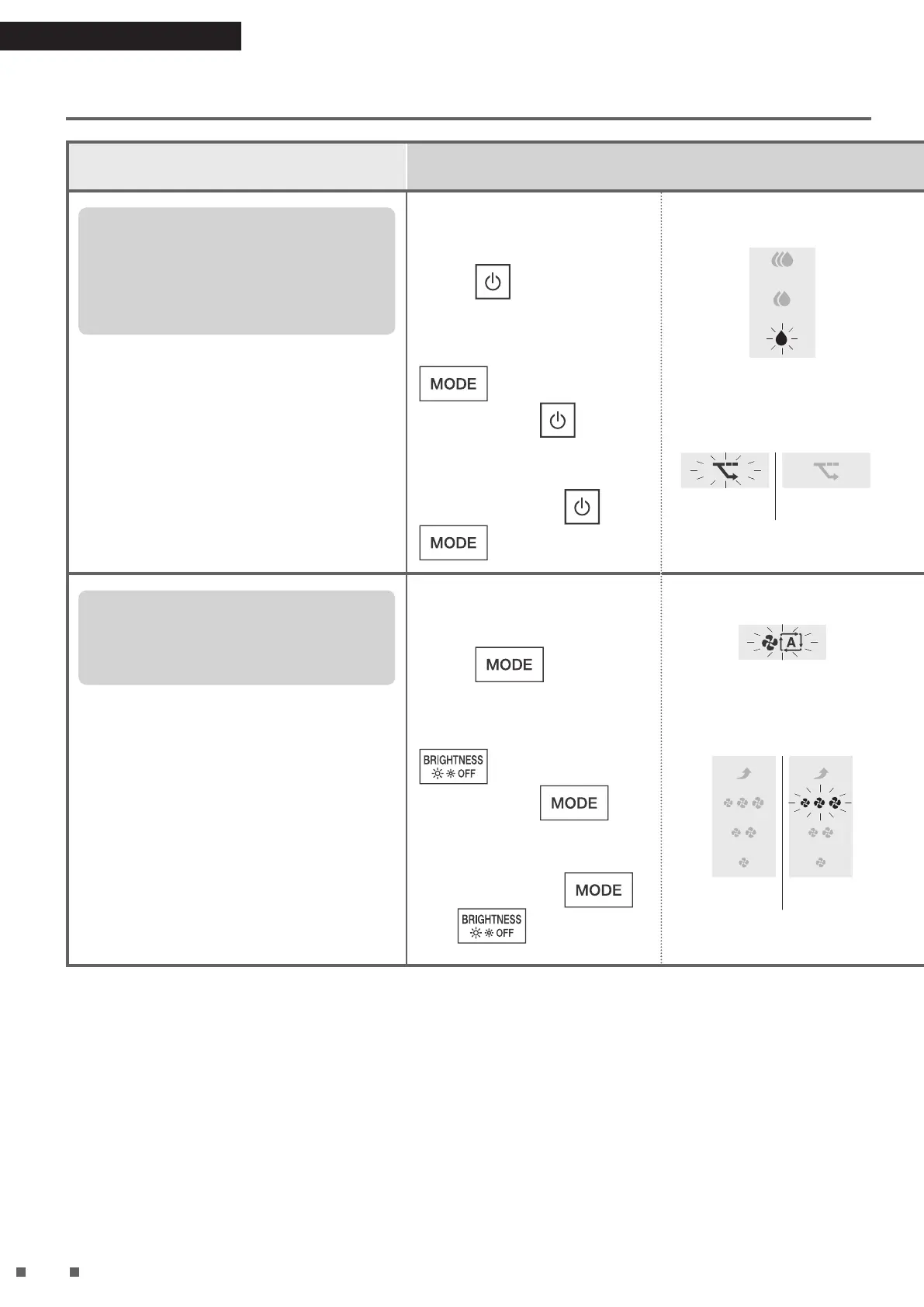
Monitoring mode within
AUTO Operation and ECONO
MODE (ON/OFF)
Setting at the time of purchase: ON
The sensitivity of the sensors decrease while
the fan is stopped during Monitoring mode.
If you do not want the sensitivity of the
sensors to be decreased, set to “OFF”.
• When set to “OFF”, Monitoring mode will not be
performed.
Setting can be performed either
during operation or while operation is
stopped.
Press for about
5seconds, and when a
short beep sounds, press
while continuing
to hold down
.
When a short beep
sounds, release
and
.
The humidity setting lamps
(Low) blinks, then lights up.
[Blinking → Lit up]
According to the current setting,
the ECONO MODE lamp will be
displayed as follows.
[Blinking → Lit up]
“ON”
[Unlit]
“OFF”
Press to change the setting*.
Each press cycles between “ON” and
“OFF”.
[Lit up]
“ON”
[Unlit]
“OFF”
Press
.
A short beep sounds, the Humidity
setting lamps (Low) blinks, and the
ECONO MODE lamp changes to the
following display according to the
setting.
[Blinking]
[Blinking]
“ON”
[Unlit]
“OFF”
While the lamp is blinking,
unplug the power supply
plug, wait at least
5seconds, and then insert
the power supply plug
again.
Setting is now complete.
Power supply plug
Power socket
• If this procedure is not performed,
the unit will not return to regular
operation mode.
• The settings will be remembered
even if the power supply plug is
removed.
Airow rate range for AUTO
FAN (4 levels/3 levels)
Setting at the time of purchase: 4 levels
If you are concerned about the operation noise
during AUTO FAN MODE/MOIST MODE/AUTO
Operation, switch from “4 levels” to “3 levels”.
Airow rate range
4 levels: “Quiet” “Low” “Standard” “High”
3 levels: “Quiet” “Low” “Standard”
Setting can be performed either
during operation or while operation is
stopped.
Press for about
5seconds, and when a
short beep sounds, press
while continuing
to hold down
.
When a short beep
sounds, release
and
.
The AUTO FAN MODE lamp
blinks, then lights up.
[Blinking → Lit up]
According to the current setting, the
FAN lamp will be displayed as
follows.
[Unlit]
“4 levels”
[Blinking → Lit up]
“3 levels”
Press to change the setting*.
The airow rate switches between
“4levels” and “3 levels” with each press.
[Unlit]
“4 levels”
[Lit up]
“3 levels”
Press
.
A short beep sounds, the AUTO FAN
MODE lamp blinks, and the FAN lamp
changes to the following display
according to the setting.
[Blinking]
[Unlit]
“4 levels”
[Blinking]
“3 levels”
01_EN_3P693798-1B.indd 31 2023/06/26 13:34:08


 To Next Page
 Loading...