27
Advanced Settings
Advanced Settings
Function 1 2 3 4
Streamer Output Setting
(Normal/Low)
Settings at time of purchase: Normal
If the hissing sound generated by the streamer
discharge or the smell of ozone bother you, set
it to “Low”.
• Setting to “Normal” is recommended, as
deodorising capacity, etc. is reduced when set
to “Low”.
Setting can be performed either
during operation or while operation is
stopped.
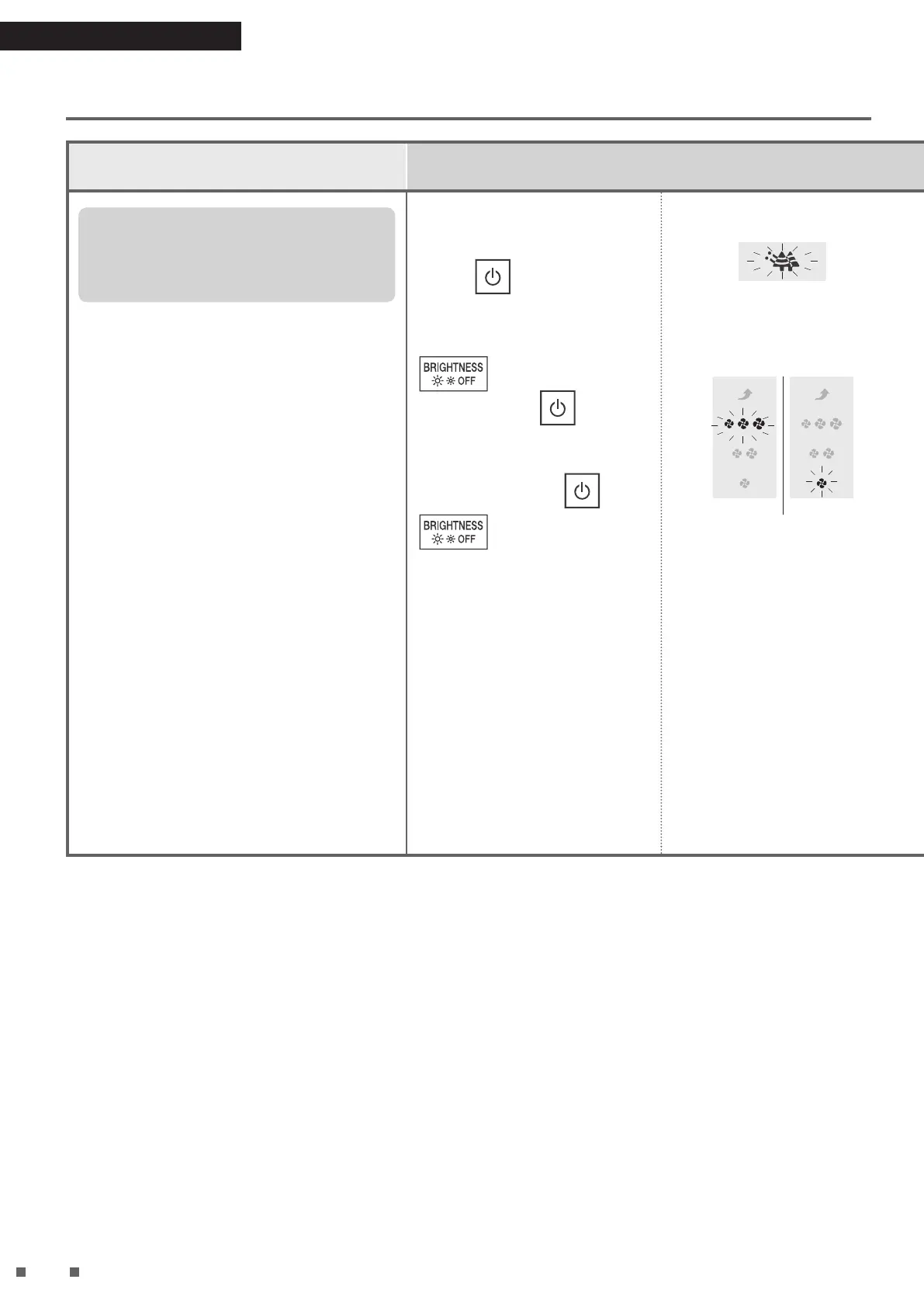
Press for about
5seconds, and when a
short beep sounds, press
while continuing
to hold down .
When a short beep
sounds, release
and
.
The ANTI-POLLEN lamp blinks,
then lights up.
[Blinking → Lit up]
According to the current setting,
the FAN lamp will turn from
blinking to lit up.
“Normal” “Low”
Press to change the setting*.
Each press cycles between “Normal”
and “Low”.
“Normal” “Low”
Operation status of streamer
Setting
Streamer output
setting
Normal
Low
FAN
Quiet, Low ON–OFF OFF
Standard ON–OFF
Turbo ON
MODE
AUTO FAN/
ANTI-POLLEN/MOIST/
CIRCULATOR
ON–OFF
ECONO ON–OFF OFF
AUTO operation ON–OFF
• The streamer operation status ON–
OFF means that the streamer turns
ON and OFF automatically
depending on the degree of air
impurity and airow rate.
About the streamer lamp
• When the setting condition of
streamer is “ON–OFF” or “ON”, it is
always lit up.(However, it is unlit
during monitor mode)
It is unlit when the setting condition of
streamer is “OFF”.
Press
.
A short beep sounds and the ANTI-
POLLEN lamp and set FAN lamp will
blink.
[Blinking]
“Normal” “Low”
While the lamp is blinking,
unplug the power supply
plug, wait at least
5seconds, and then insert
the power supply plug
again.
Setting is now complete.
Power supply plug
Power socket
• If this procedure is not performed,
the unit will not return to regular
operation mode.
• The settings will be remembered
even if the power supply plug is
removed.
01_EN_3P693798-1B.indd 27 2023/06/26 13:34:04


 To Next Page
 Loading...