www.DaikinApplied.com 37 IOM 1274-3 • CENTRIFUGAL WATER CHILLERS
Disabling
functionality in terms of disabling. The descriptions below apply
1. Unit Switch- When placed in the OFF position while
the chiller is running, the Unit Switch will shutdown the
chiller in a normal controlled sequence and will stop each
compressor that is running. This switch will leave the
entire chiller disabled until it is set in the ON position.
2. External Switch - This switch will disable the chiller in a
similar manner as the Unit Switch.
3. Remote Switch - This switch will disable the chiller in a
similar manner as the Unit Switch.
chiller. This method of disabling will cause the chiller to act in a
similar manner as when it is disabled using the Unit Switch in
right-hand edge of the display panel. Screen control buttons
are located to either side of it and elicit on-screen prompts
when pressed. The HMI is equipped with a screen saver (a
sure it is on before using the ON/OFF button.
Chiller Operation Without the HMI
The Human Machine Interface (HMI) communicates with the
unit control processor, displaying data and transmitting touch
screen inputs to the controllers. It does no actual controlling
and the chiller can operate without it. Should the touch
screen become inoperable, no commands are necessary
for continuing unit operation. All normal inputs and outputs
will remain functional. A PC monitor and USB mouse can
be connected to the unit control processor via its VGA and
USB ports and can be used to view operational data, to clear
alarms, and to change setpoints, if necessary. See “Controller
section starting on page 62 for more
information.
The Home View Screen, see Figure 37, is the main information
page for the chiller. This screen contains the AUTO and STOP
buttons in the upper right hand corner, which are used to start
of screens can be accessed from the Home View Screen by
pressing one of the icons on the bottom of the screen.
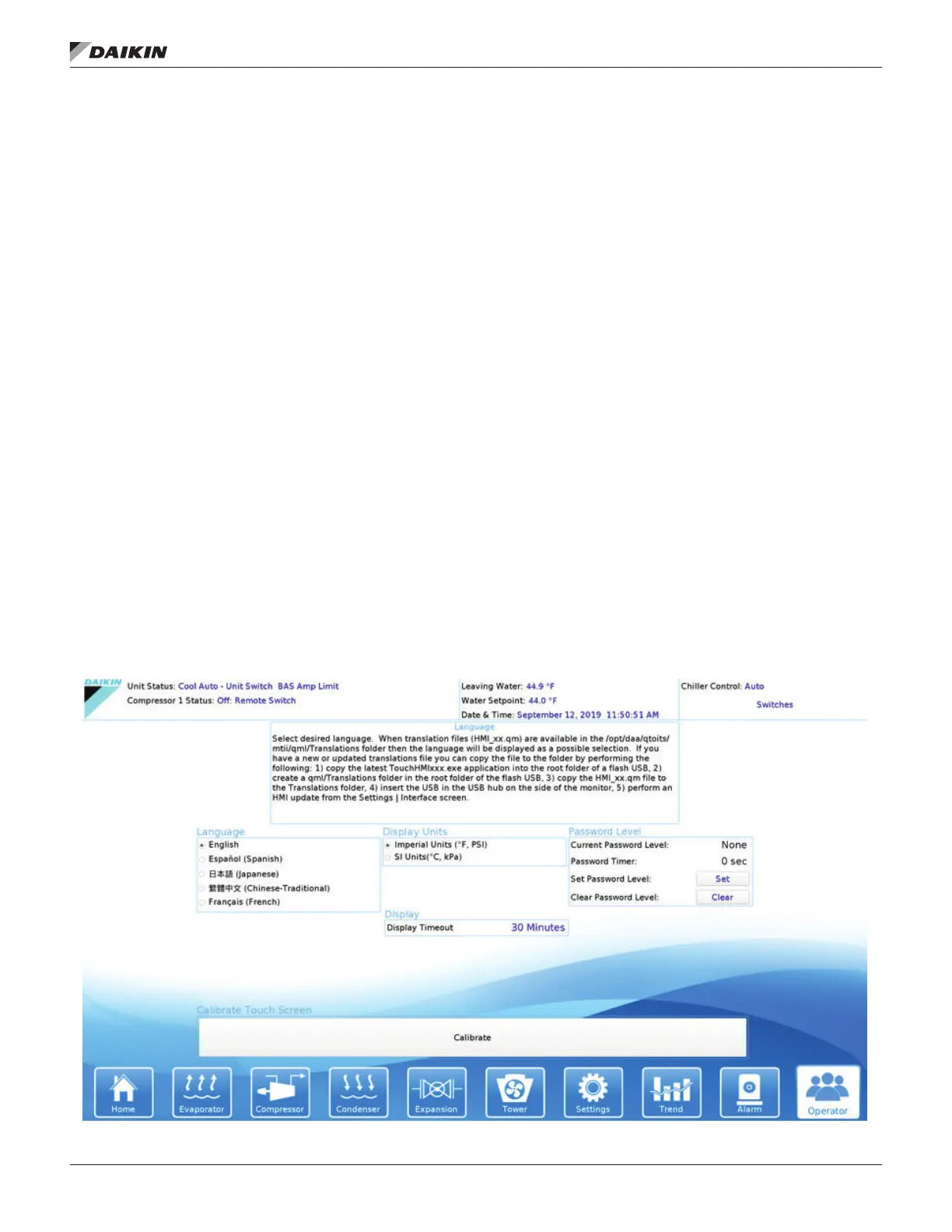
An initial startup step may be to select the Operator icon on the
bottom right of the HMI to access the Operator screen (Figure
36) to set display language and unit of measure preferences as
well as input the appropriate level of password for making unit
adjustments going forward. Should the touch screen cursor
not respond to where the screen is being pressed, use the
Calibrate button to recalibrate the screen. The bar was made
longer to make it easier for the non-calibrated cursor to select.
Figure 36: Operator View Screen


 To Next Page