www.DaikinApplied.com 39 IOM 1274-3 • CENTRIFUGAL WATER CHILLERS
NOTE: Timer countdown values will be shown in place of
is shown in the RUN state to indicate if the capacity is
controlled by speed from the VFD or by vane control.
The bottom icon bar will be visible on all screens with the
active screen highlighted in white.
(II) Unit Status Modes
If the unit is stopped, the Source would be listed after State.
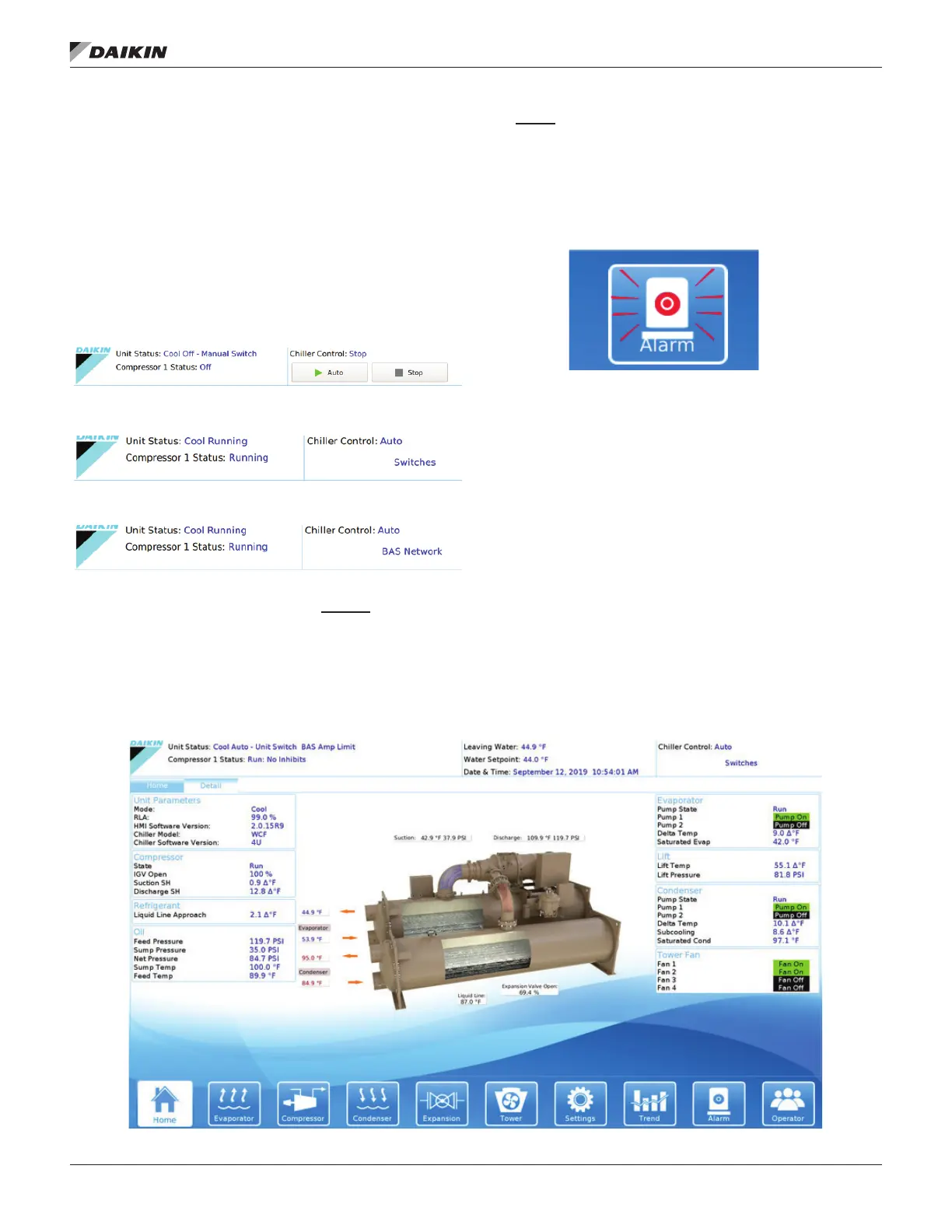
Various unit states and control sources are shown as examples
in Figure 38 to Figure 40.
Figure 38: Mechanical Switch Source
Figure 39: Remote Switches Source
Figure 40: BAS Network Source
Graphs
• Entering and leaving evaporator water temperatures
• Entering and leaving condenser water temperatures
• Percent compressor RLA
• Compressor kW (will read 0 without Full Metering Option)
(IV)
•
an alarm occur. This red ALARM button will appear on
all screens in the case of an alarm. See Figure 41 for an
example of an active alarm alert. For more information on
alarms, see page 58.
Figure 41: Active Alarm Icon
Additional HMI View Screens
Pressing the Detail Tab on the top of the Home View Screen
Figure
42
WSC, WDC, WCC, TSC, TDC, and HSC models (see
).
If a Technician level password is entered, two additional
tabs will follow the Detail Tab. The Tech Data Tab will show
compressor staging and pLAN communication. On the Tech
analog and digital, at both the Unit Controller and Compressor
Controller levels.
To make setpoint adjustments or change operating parameters,
tap on the Settings icon at the bottom of the screen; Figure 50
on page 46.
Figure 42: Unit Detail View Screen


 To Next Page