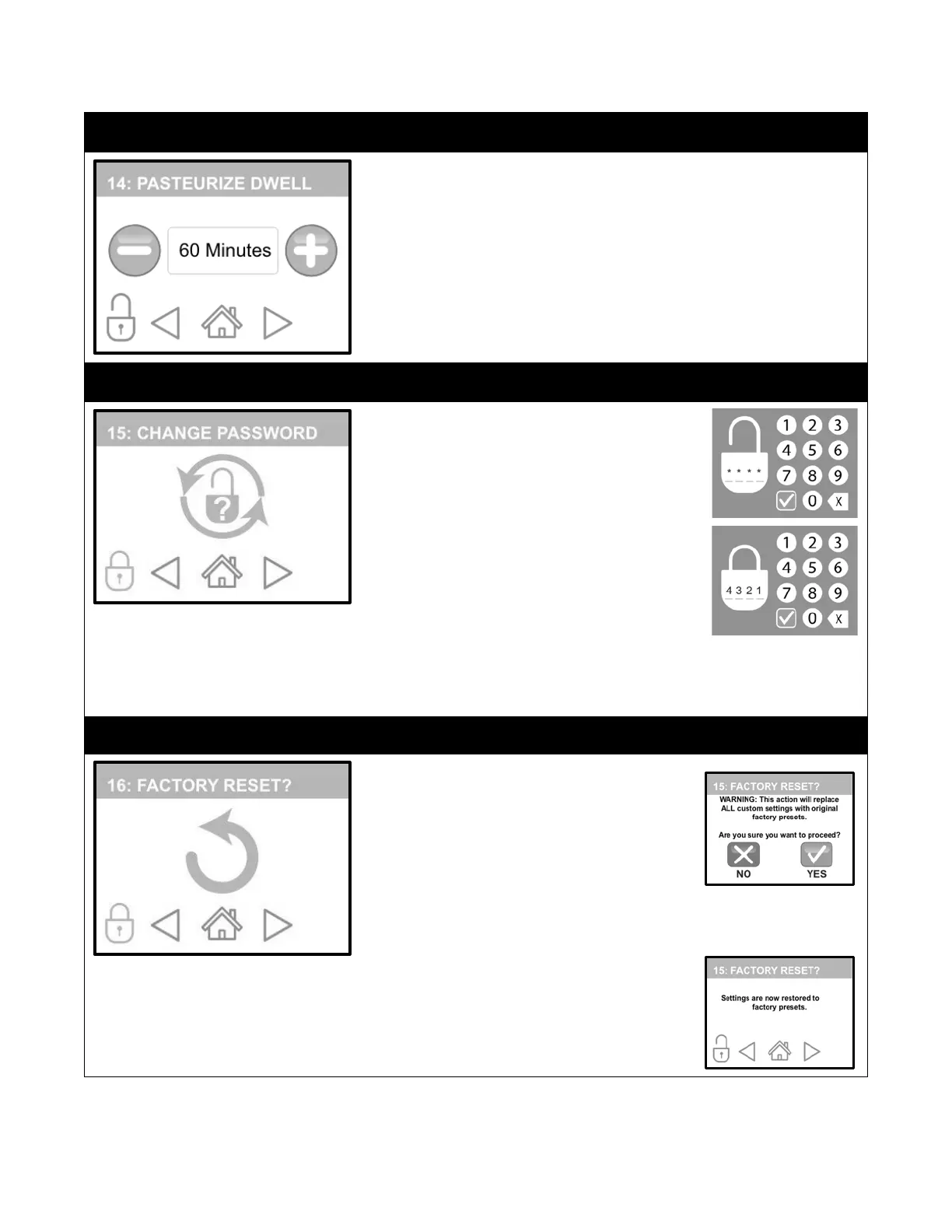
NOTE: This setting will dictate how long to stay at your Pasteurization
Temperature. Years of research has proven that the proper colostrum
pasteurization time is 60 minutes at 140°F (60°C).
1.
After unlocking this screen, use the (-) or (+) buttons to decrease or
increase this setting to your desired length of time.
2.
If you are satisfied with your selection, press “HOME” to save or
press “FORWARD/BACK” to make other modifications.
If you like, you can change the password to protect
your custom settings.
1.
Unlocking this screen will display an
orange keypad.
2.
Enter your new 4-digit password then
touch the Green button. (Password
displayed is used only for example.)
3.
This will “Lock” ALL settings screens again.
You will need to enter your New Password
to make additional changes to any
password protected screens.
If at any time the new password is lost or cannot be remembered, the system
has default password that can retrieved by contacting your Dairy Tech Dealer
or our Service Department.
This action will return all settings back to factory
defaults.
10.
After unlocking this screen, you will be
reminded that this action will replace ALL
custom settings and ask if you want to
proceed.
10.
Selecting “NO” will keep your current custom settings in place and
return you to the FACTORY RESET SCREEN.
10.
Selecting “YES” will return all settings back to factory defaults.
10.
This will “Lock” ALL settings screens
again. You will need to enter your New
Password to make additional changes to
any password protected screens.


 To Next Page