16
4
INFORMATION ON USE AND OPERATION
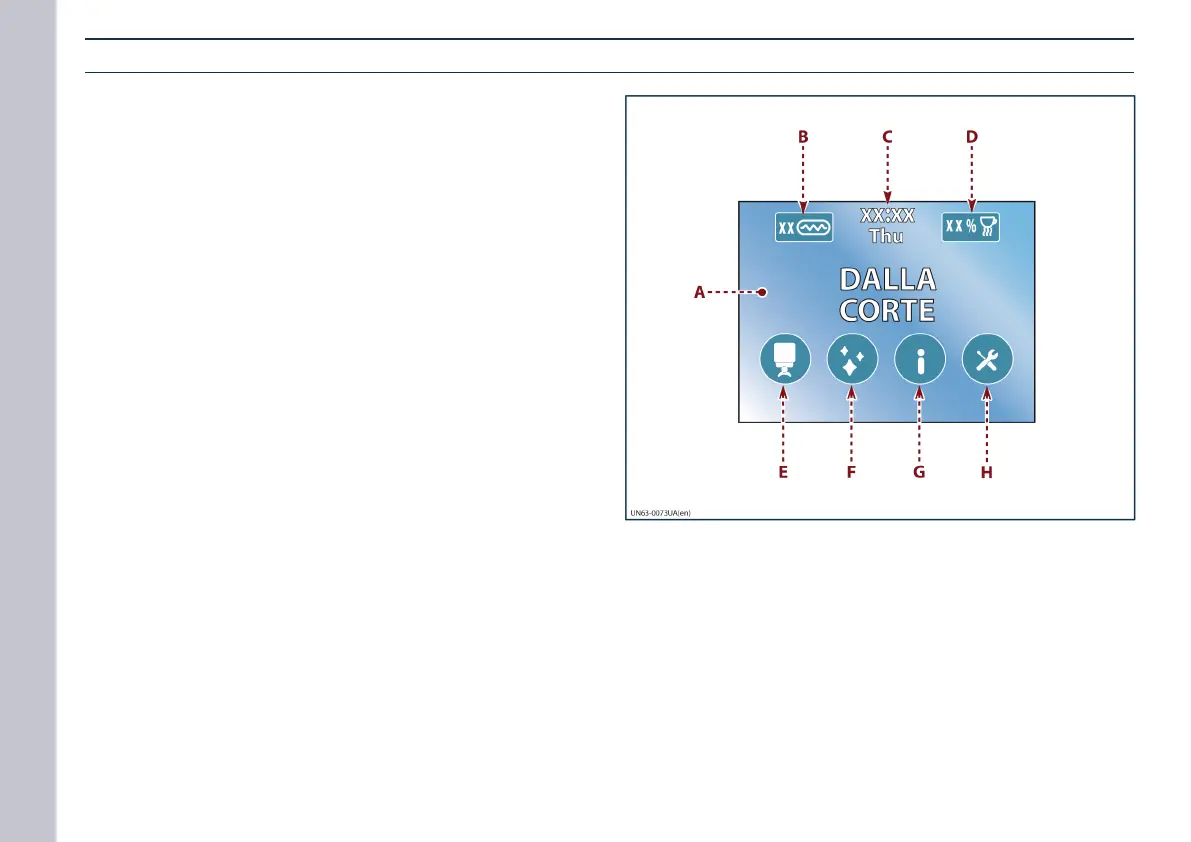
Home page of operating terminal
A) Touchscreen display unit.
B) Backlit key: this is used to enable boiler activation
(see “Boiler activation”).
- When this key is lit up, it means the boiler is on.
C) Field displaying the current date and time.
D) Backlit key: this is used to change the cup warming
surface temperature (see “Activation of the cup warm-
ing surface”).
- With the backlit key, you can adjust the temperature of
the cup warming surface.
E) Key: this is used to access the GROUPHEAD menu.
This menu can be used to switch the groupheads and
the boiler on and o.
F) Key: this is used to access the CLEANING menu.
This menu can be used to switch on the cleaning cy-
cles for the groupheads and the boiler.
G) Key: this is used to access the INFORMATION menu.
This menu is used to switch the lights on and o and to
display the operating parameters in view-only mode.
H) Touch this key to access the SETTINGS menus.
This menu can be used to edit the operating param-
eters.














 To Next Page