EasyManua.ls Logo

Danfoss 90 Series - Pump Control Cover Plate

Danfoss 90 Series
72 pages
Print Icon
To Next Page IconTo Next Page
To Previous Page IconTo Previous Page
Loading...
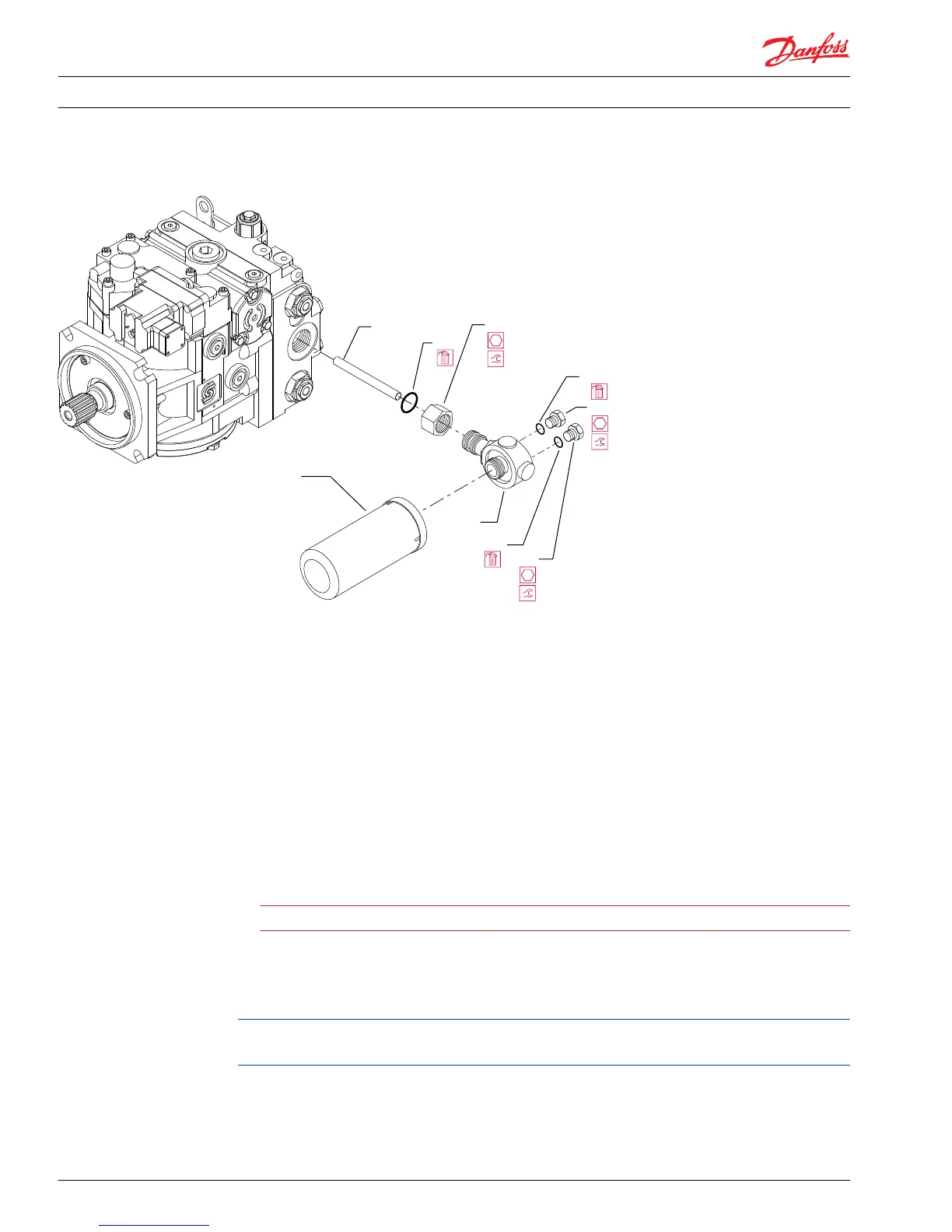
Integral charge pressure filter
N25
N15
N20
N10
N40
N35
N36A
N36
N35A
11/16 in
37 N•m [27 lbf•ft]
11/16 in
37 N•m [27 lbf•ft]
Filter manifold lock nut
Lock nut torque
P106 182E
Pump control cover plate
Removal
1. Thoroughly clean external surfaces prior to removal of cover plate.
2. Using a 5 mm internal hex wrench, remove the six cover plate mounting screws (M90). Remove the
cover plate (M1) and gasket (M11) from housing. Discard the gasket.
C
Caution
Protect exposed surfaces and cavities from damage and foreign material.
Reassembly
Install a new gasket on the housing. Install the cover plate and install the screws. Torque the screws to
16 N•m [12 lbf•ft].
Install a sealing washer under the head of any mounting screws that are installed into through holes in
the housing.
Service Manual
Series 90 Pumps
Minor repair
56 520L0818 • Rev 0101August 2015

Table of Contents

Other manuals for Danfoss 90 Series

Related product manuals