I N S T A L L A T I O N M A N U A L H 5 0 0 0 H Y B R I D I N V E R T E R
R e v . 2 © 2 0 1 7 D a r f o n E l e c t r o n i c s C o r p . 12 | P a g e
OPERATION AND DISPLAY PANEL
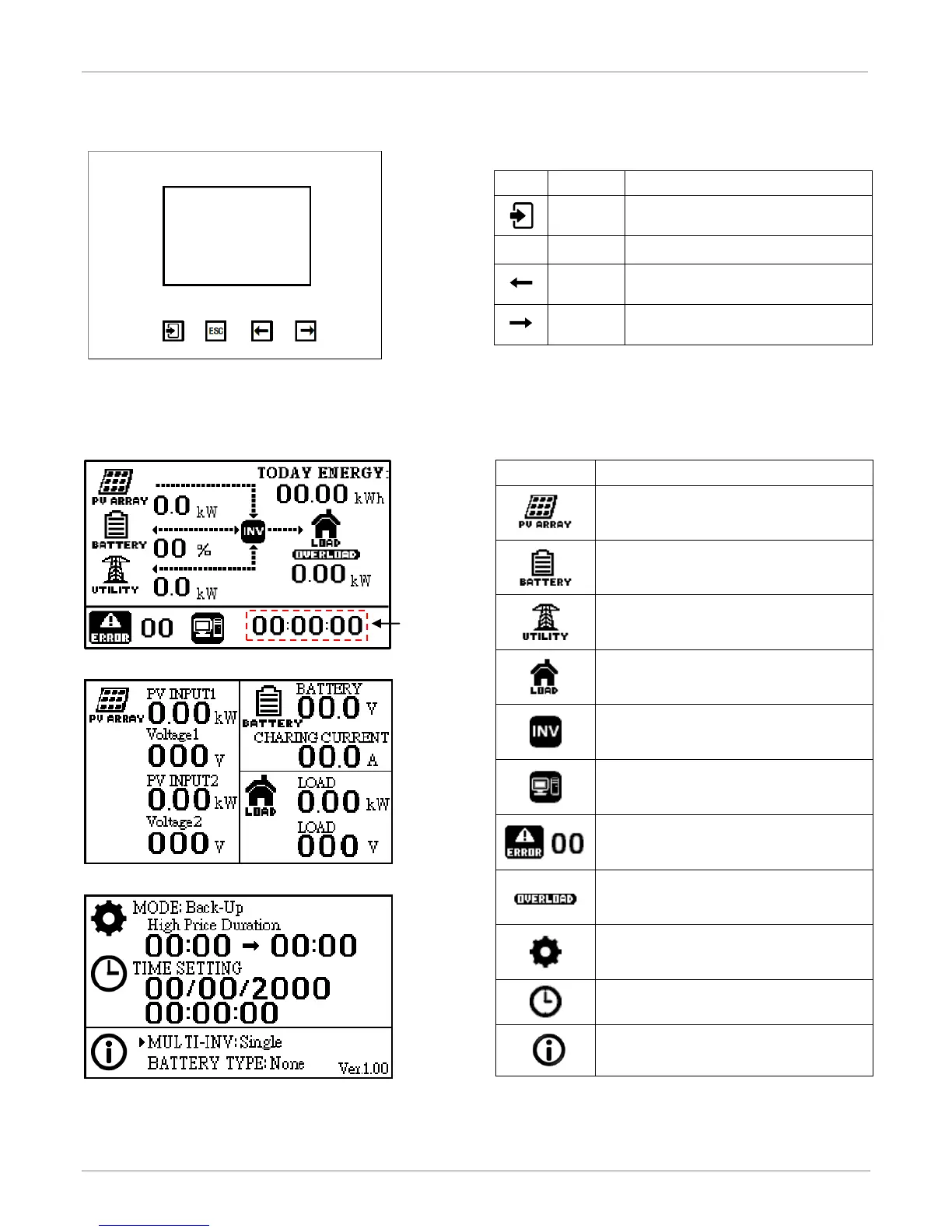
LCD Display Icons and Pages Introduction
The display panel includes two part, four function keys and a LCD display. The LCD display will show three different
pages which include “Power flows”, “Power information” and “System setting”.
POWER FLOWS PAGE
POWER INFORMATION PAGE
SYSTEM SETTING PAGE
Confirm the selection in setting mode or
enter setting mode.
Go to previous page, move or decreasing all
Number.
Go to next page; move; to increase all
Number.
Represents the Battery Pack
Represents the Hybrid Inverter
Indicates the Connection to a PC
Indicates the Error and error codes
Indicates an overload has occurred
Represents the System Mode Setting
Represents the System Time Setting
Represents the System Information



 To Next Page