I N S T A L L A T I O N M A N U A L H 5 0 0 0 H Y B R I D I N V E R T E R
R e v . 2 © 2 0 1 7 D a r f o n E l e c t r o n i c s C o r p . 13 | P a g e
System Settings
The System settings are divided into two parts, “System Mode Setting” and “System Time Setting.” To get to the
System Setting Page, switch pages using the
←
or
→
keys. Click to enter the System Setting Page. To exit the
System Setting Page, click ESC.
A. System Mode Setting
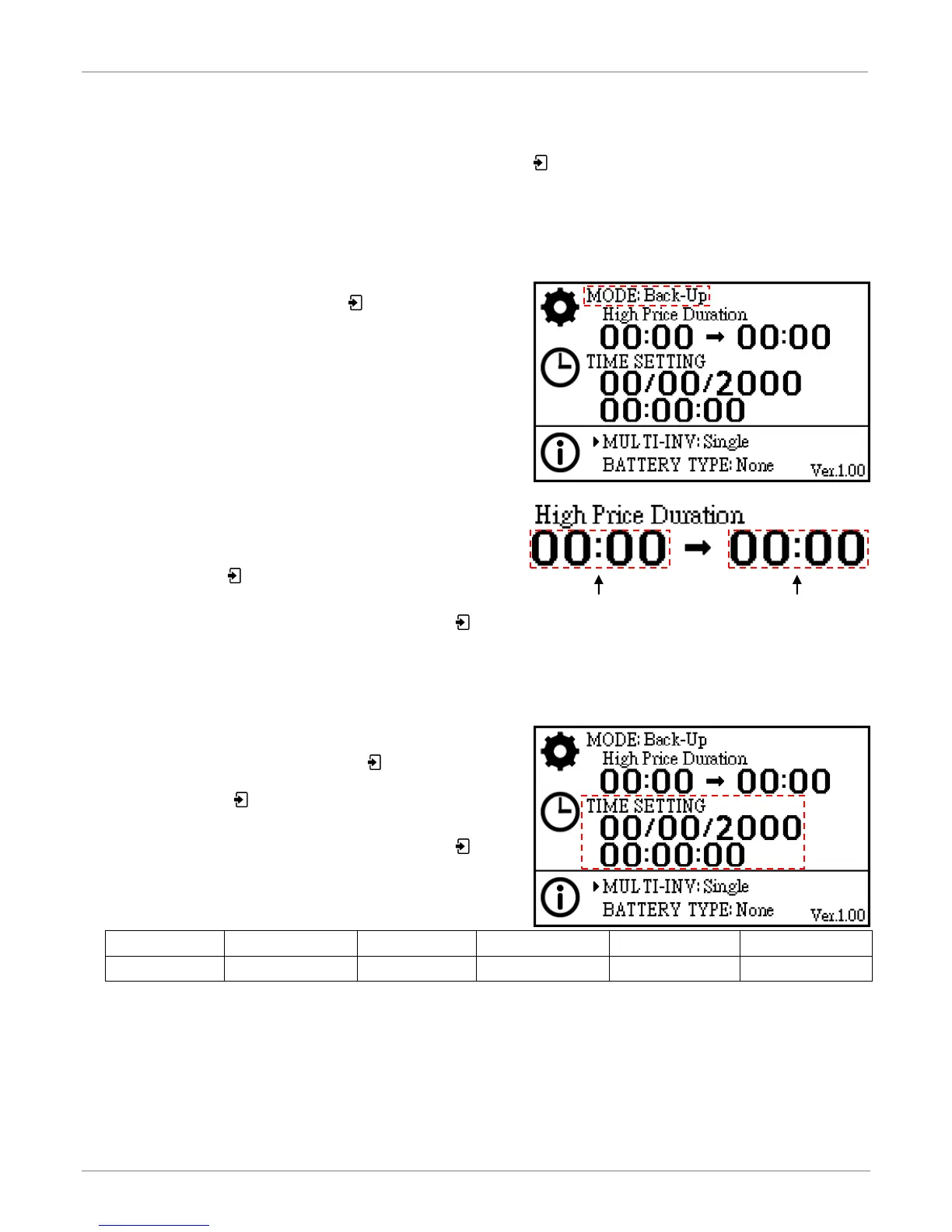
Once you are in the System Setting Page, make sure “System
Mode Setting” is selected and press to get into the edit
mode. You can select the mode by using the
←
or
→
keys.
Modes of operation (See page 17 for mode definitions):
a) Back-up
b) Residential
c) Back-up w/o Feed-in
d) Residential w/o Feed-in
e) TOU
f) TOU w/Batt. Feed-in
When either “Time of Use” or “Time of Use with Battery
Feed-in” modes are selected, you will be prompted to enter
the start and end times for “High Price Duration” in 24-hour
notation. Use the key to toggle between the time fields
and the
←
or
→
keys to select the values.
Once the value for the last time field is set, press the key. You will then be prompted to enter the password. Go
see password section on page 14 for details.
B. System Time Setting
Once you are in the System Setting Page, press
→
to select
“System Time Setting”, and then press to get into the edit
mode. The date fo rmat is DD/MM/YYYY, and the time format is
hh:mm:ss. Use the key to toggle between the date fields
and the
←
or
→
keys to select the values.
Once the value for the last date field is set, press the key.
You will then be prompted to enter the password. Go see
password section on page 14 for details.



 To Next Page