SR200 & SR300 Card Printers and LM200 & LM200 Laminators Installation Guide 73
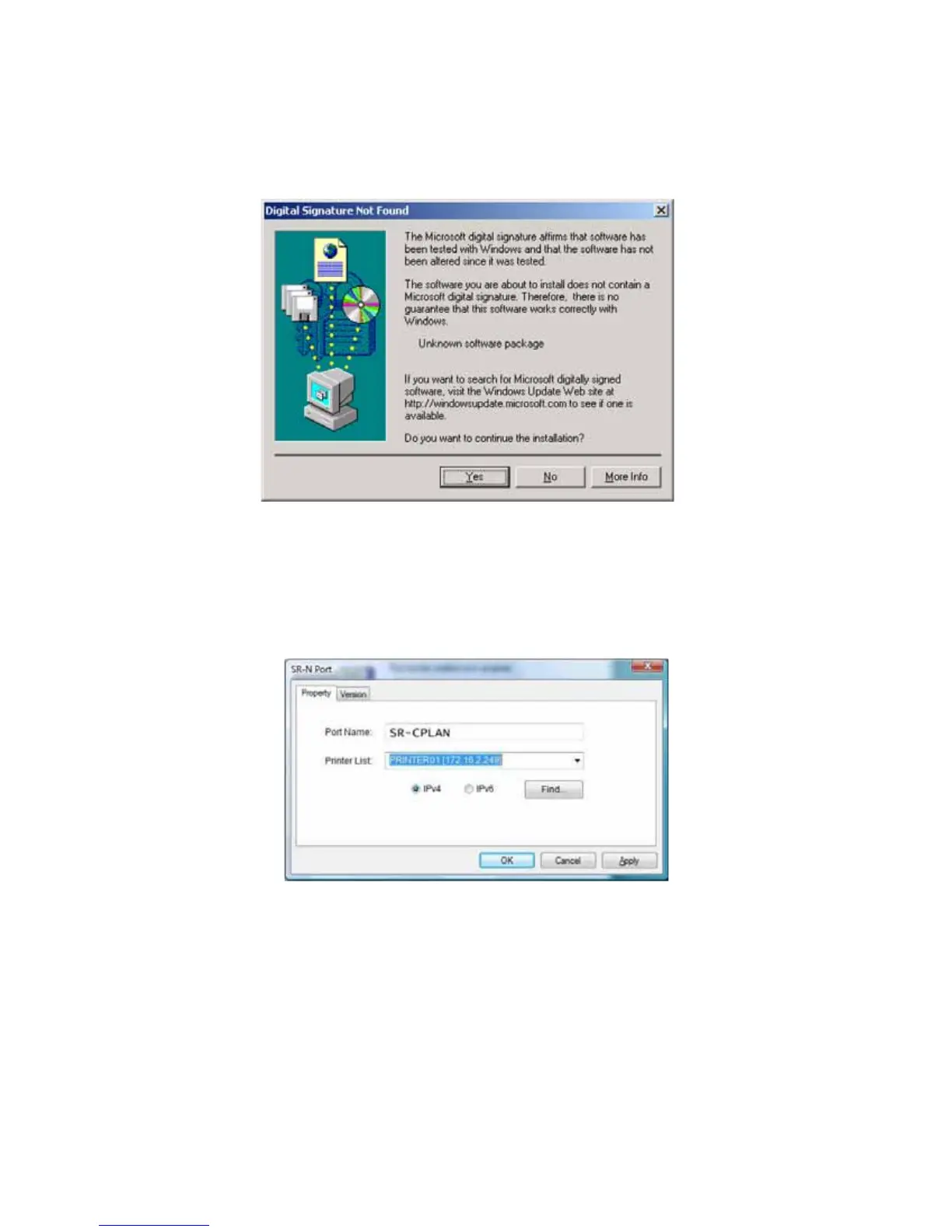
ForWindows2000,theDigitalSignatureNotFoundmessagedisplays.ClickYesto
continuewithinstallation.
PCsecuritymightbesettopreventinstallationwithoutadigitalsignature.Referto
Windowshelpfor"digitalsignature"or"Logosigning"tochangethesecuritysetting.
19. Thenetworkport(NPort)dialogboxdisplays.OnthePropertytab,enteraportname,such
asSR‐CPLAN.
20. FromthePrinterList,selecttheentrywiththeprinternameandIPaddress.ClickOK.
21. IftheprinternameandIPaddressdonotdisplay, searchfortheprinter:
a. RetrievetheIPaddress,asdescribedinthe“PrinterLCDPanel”sectionoftheUser’s
Guide.
b. SelectIPv4
fora32‐bitIPaddressorIPv6fora128‐bitIPaddress.
c. IPv4isthedefaultand192.168.0.148isthedefaultIPaddress.
d. TypetheIPaddressinthePrinterList.


 To Next Page