EasyManua.ls Logo

Datalogic Gryphon GBT4200 - User Manual

Datalogic Gryphon GBT4200
304 pages
Print Icon
To Next Page IconTo Next Page
Loading...
L
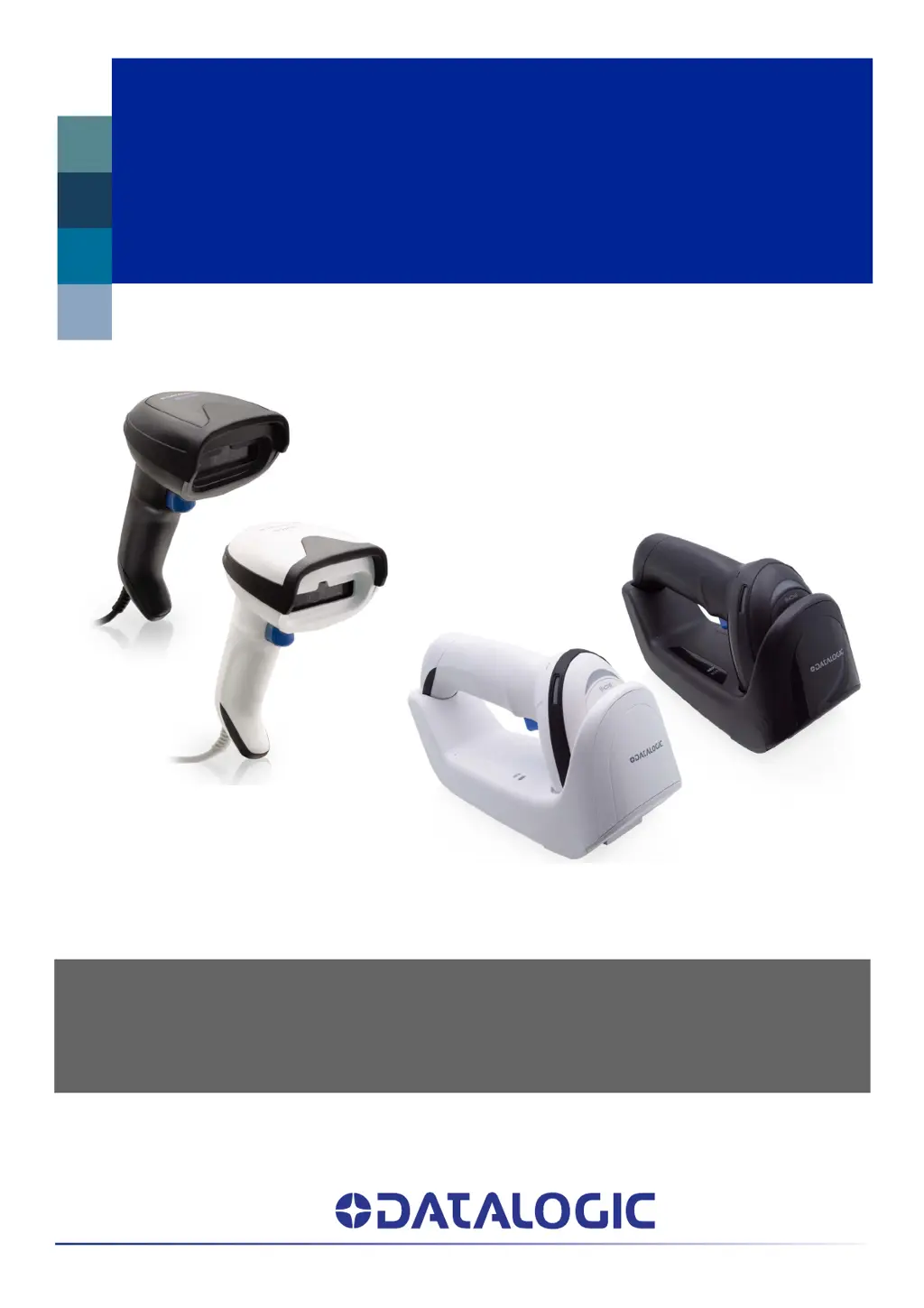
Gryphon™ I
GD/GBT/GM4200
PRODUCT REFERENCE GUIDE
General Purpose Linear Bar Code Reader: Corded or with Bluetooth®
Wireless Technology or Datalogic’s STAR Cordless System™

Table of Contents

Questions and Answers

  • L
    lisa54Aug 10, 2025
    What to do if Datalogic Barcode Reader LED is on but barcode does not decode?
    • S
      stacy93Aug 10, 2025
      If the LED is on, but the Datalogic Barcode Reader doesn't decode the barcode, ensure that the imager is programmed to read the barcode type you are scanning. Check the label to make sure it is readable. Try scanning another barcode type. Also, adjust the distance between the imager and the barcode by moving the imager closer or further away.
  • C
    Christina NelsonAug 20, 2025
    Why nothing happens when scan button is pulled on Datalogic Gryphon GBT4200 Barcode Reader?
    • A
      April WelchAug 20, 2025
      If nothing happens when you pull the scan button on your Datalogic Barcode Reader, check the system power and ensure the power supply is connected. Also, make sure all cable connections are secure.
  • E
    Edward MurphyAug 29, 2025
    What to do if barcode is decoded but not transmitted to the host on Datalogic Barcode Reader?
    • S
      sabrinawilkinsonAug 29, 2025
      If the barcode is decoded but not transmitted to the host from your Datalogic Barcode Reader, ensure the imager is programmed for the correct host type. Scan the appropriate host type barcode.

Summary

CHAPTER 1 INTRODUCTION

USING THE GRYPHON I GD;GBT;GM4200 READER

Instructions on how to use the scanner for reading bar codes.

BATTERY SAFETY

Safety precautions for handling and using the scanner's battery.

CHAPTER 2 SETUP

CONNECT HOST INTERFACE

Details on connecting the scanner to various host interfaces.

CHAPTER 3 CONFIGURATION WITH BAR CODES

CONFIGURATION PARAMETERS

Overview of configurable parameters and their logical grouping.

RS-232 INTERFACE SETTINGS

Settings specific to the RS-232 interface.

RS-232;USB-COM SETTINGS

Settings applicable to both RS-232 and USB interfaces.

KEYBOARD INTERFACE SETTINGS

Settings for keyboard interfaces.

READING PARAMETERS

Settings related to scanner operation and indicators.

SYMBOLOGIES

Settings for various barcode symbologies.

Datalogic Gryphon GBT4200 Specifications

General IconGeneral
Wireless range100 m
Bluetooth version4.0
Operating frequency2400 MHz
Standard interfacesBluetooth
Connectivity technologyWireless
Sustainability certificatesRoHS
Product colorBlack
LED indicatorsYes
Protection featuresElectrostatic Discharge (ESD) protection
International Protection (IP) codeIP52
Storage temperature (T-T)-20 - 70 °C
Operating temperature (T-T)-10 - 50 °C
Operating relative humidity (H-H)0 - 95 %
TypeHandheld bar code reader
Sensor typeCCD
Scanner type1D
Read rate (max)400 reads/s
Scanner resolution0.077 mm
Tilt reading angle-45 - 45 °
Pitch reading angle-65 - 65 °
Light levels (direct sunlight)0 - 130000 lx
Linear (1D) barcodes supportedGS1 DataBar
2D (matrix & stacked) barcodes supported-
Cables includedUSB
Battery typeBuilt-in battery
Charging time4 h
Input voltage4.5 - 14 V
Battery voltage3.6 V
Battery capacity2550 mAh
Power source typeBattery
Number of reads per charge80000
Number of batteries supported1
Harmonized System (HS) code84716070
Weight and Dimensions IconWeight and Dimensions
Depth68 mm
Width166 mm
Height109 mm
Weight235 g

Related product manuals