16
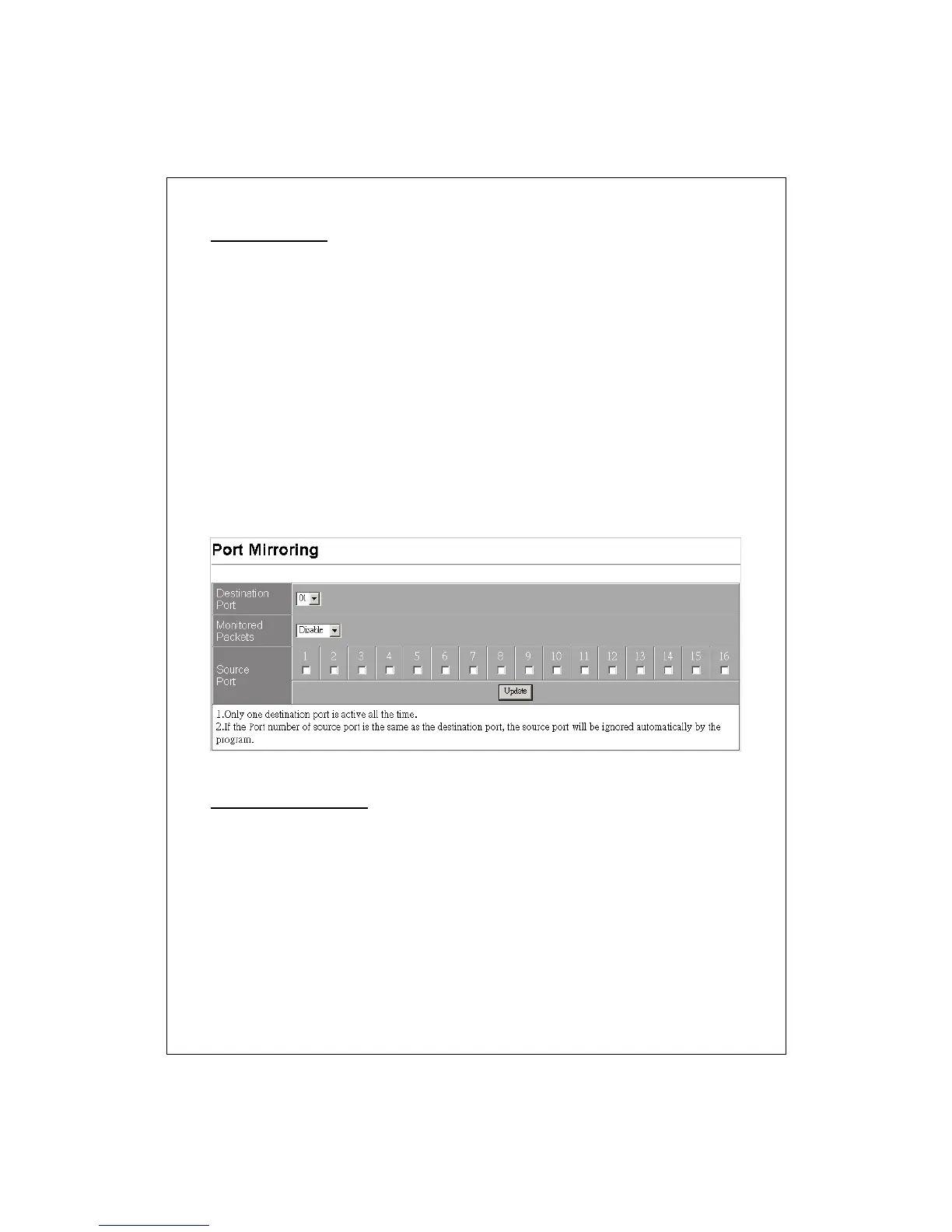
Port Mirroring
The Mirror function copies all the packets that are transmitted by the
source port to the destination port. It allows administrators to analyze and
monitor the traffic of the monitored ports.
Mirror Configuration:
1. Select those ports that are going to be monitored by marking the
checkboxes in “Source Port” column.
2. Click the drop list in “Monitored Packets” column. Select the packet
types that are going to be monitored (transferred or received packets or
both).
3. Select a port as the administration port for monitoring those source
ports in the “Destination Port’ drop list.
4. Click “Update” to activate.
Bandwidth Control
This “Bandwidth Control” page allows users to configure the bandwidth
for each port.
To perform speed configuration for each port:
1. Select the port that you are going to configure on the “Port No.” drop list.
2. Select the allowed transmitting and receiving speed for this port.
3. Click the Update button to perform your changes.
4. You may also click the “LoadDefault” button to restore the factory
default bandwidth setting.


 To Next Page