DBL Technology EP-636 User Manual
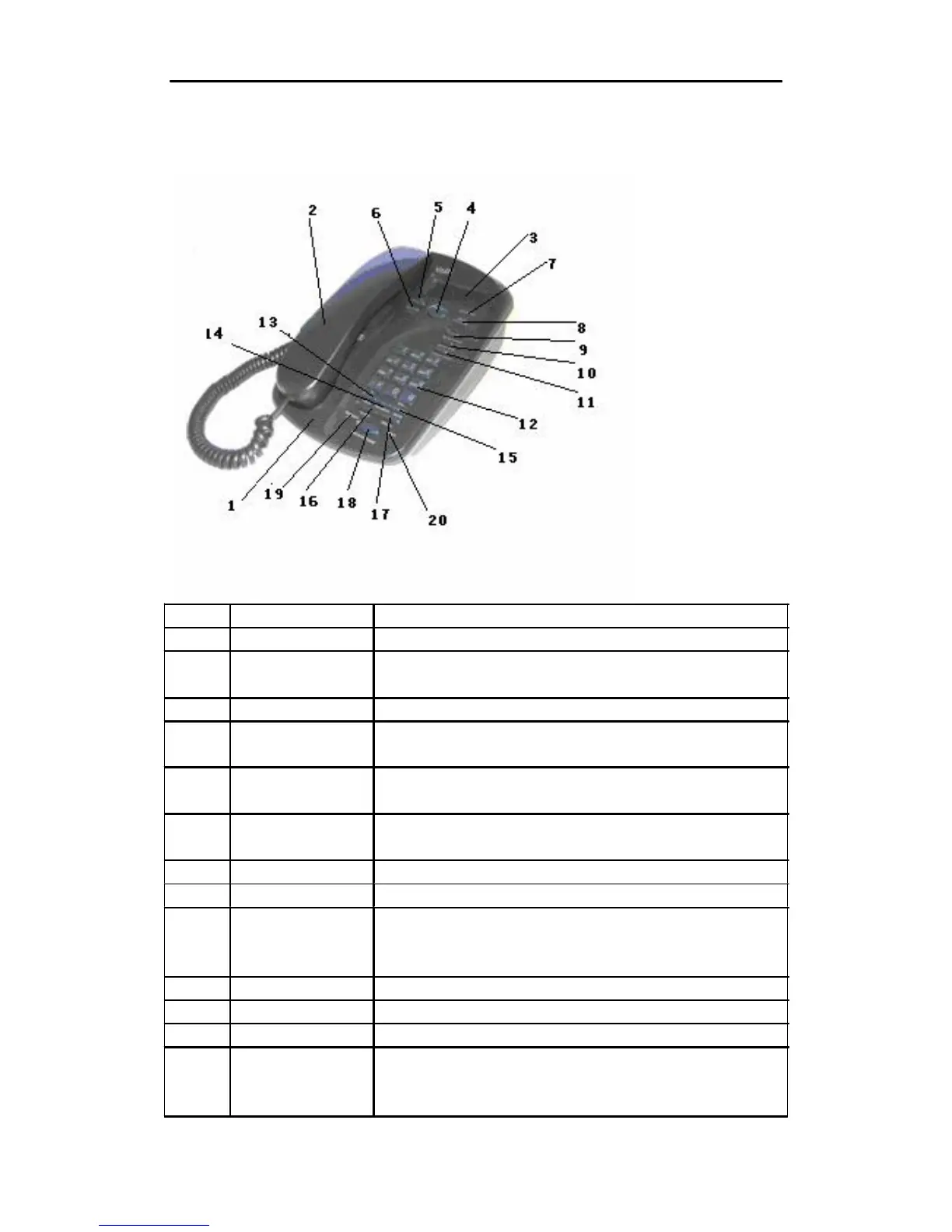
1.6 Front View
Number
1
2
3
4
5
6
Name
Main Unit
Handset
LCD
Up/Down
OK
ESC
Description
This is the main unit of the EP-636.
This part is the hardest receiver and microphone, used for phone
conversation.
This is the LCD of the IP phone.
The scroll keys are used to browse the menu list. Press Up key
to view outgoing calls.
This key is used to confirm information input or phone
operation.
Press this key to exit the current menu selection or entry and
return to the previous condition.
7 MESSAGE(LED) It illuminates when there is an unanswered call or voicemail.
8 MENU Press this key to enter Menu mode.
9
10
11
12
F1(BACKSPACE) Press this key to move the cursor on the LCD one position
backward. This key is used for deleting a phone number entry or
other phone setup entry.
F2(CONFERENCE) Press this key to initiate a three-way conference.
PHONEBOOK Press this key to view and edit the phonebook.
Number/Letter key Refer to Section 3.1.1.
13 HOLD When endpoint type uses SIP Phone, press this key to hold the
current call. When endpoint type uses H323 Phone, press this
key to answer a waiting call or hold the current call and enter
• 7



 To Next Page