104
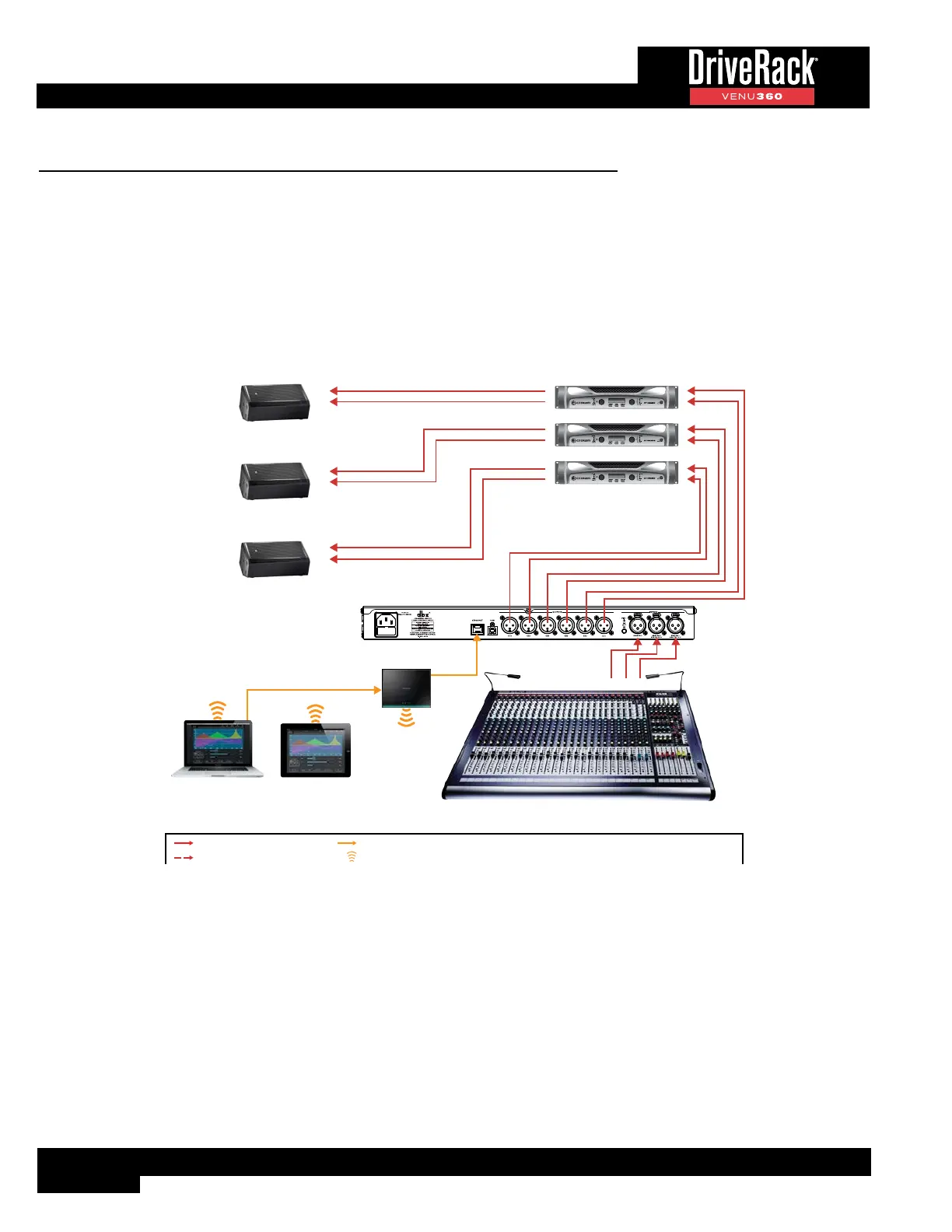
Application 6: Bi-Amplified Stage Monitors
This application is suited for use with up to 3 bi-ampable 2-way stage monitors.
Application Notes:
• Make sure your mixer and amplifiers (or powered speakers) are turned off before making connections.
• Make connections as described in ‘Making Connections’ on page 4 then apply power to the system according
to the instructions described in ‘Applying Power’ on page 4.
• Press the WIZARD button then run the Setup Wizard and follow the on-screen instructions. Or, if you know your
speakers and amps aren’t listed in the Setup Wizard, you can simply load preset 100 and start from there.
1
2
1
2
Monitor 1 Amp
1
2
1
2
Monitor 2 Amp
1
2
1
2
Monitor 3 Amp
or
Wireless Router
Windows
®
or Mac
®
Computer
iOS
®
or Android™
Tablet
or
or
Monitor 3
Monitor 2
Monitor 1
High
Low
High
Low
High
Low
LEGEND
Left ChannelL
R Right Channel
Center ChannelC
Aux ChannelA
Channel 11
2 Channel 2
Ethernet Connection
Wi-Fi Signal
Analog Audio Connection
Optional
Mixer
A2
A3 A1



 To Next Page