SF600/SF600
Plus
Serial Flash Programming solution
www.dediprog.com 16
4.2 Standalone mode (SF600Plus)
The SF600Plus has been designed to work in standalone mode that is optimized for
production as each programmer does not require to be connected to the computer.
Before to work in standalone mode, user needs to download the existed project from
PC to SF600Plus embedded memory.
4.2.1 Project Preparation
In order to perform standalone programming, the contents and the programming
operation procedures have to be pre-downloaded to the SF600Plus embedded
memory through the USB with the software provided by DediProg.
Prepare a standalone programming project
A. Open DediProg Production Software.
B. Select IC brand and part number.
C. Load the programing file.
D. Click “Config” Icon to set programming flow.
E. Save dprj file to PC.
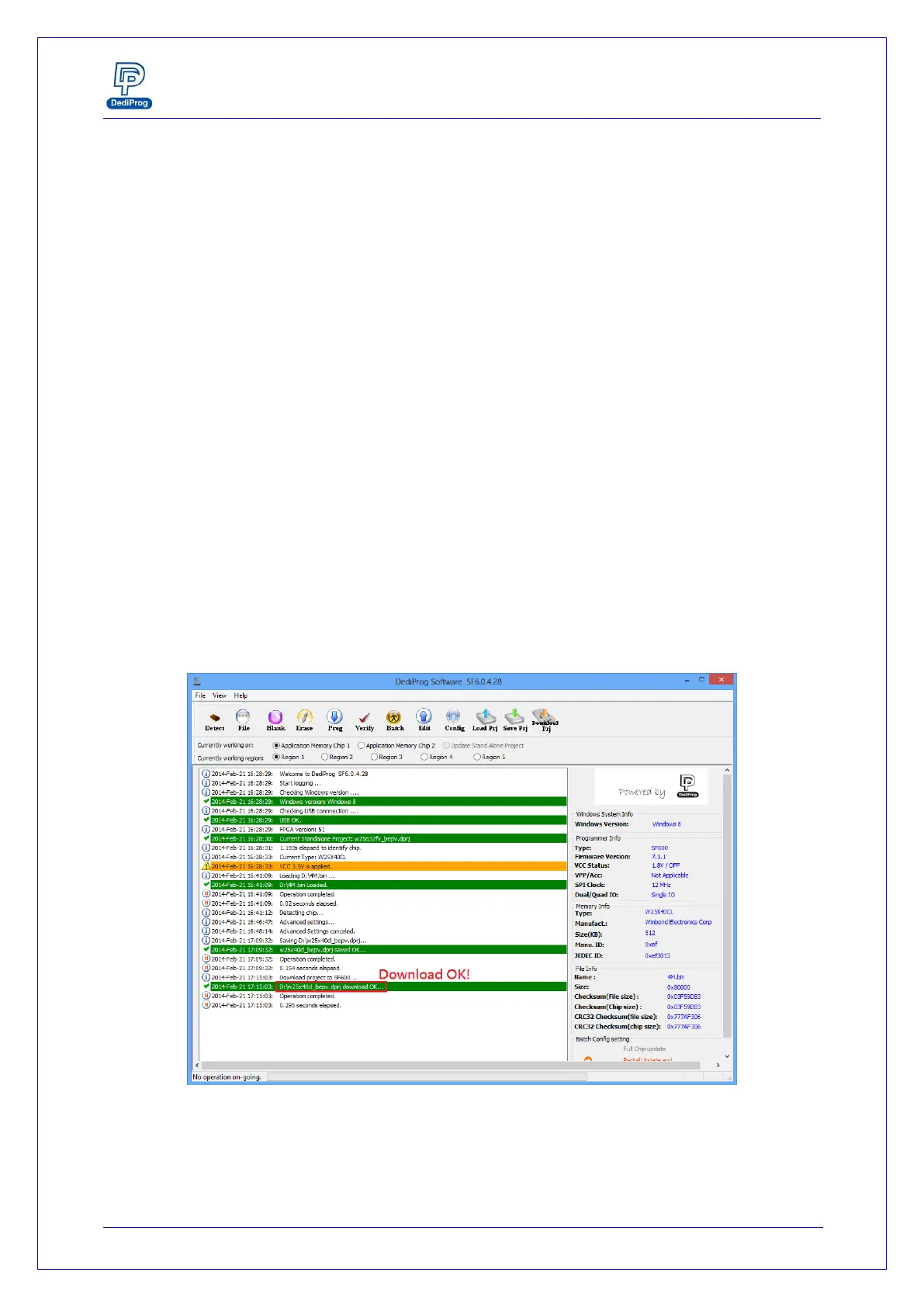
F. Click “Download Prj” to download project to SF600Plus embedded memory
G. Download project successful
Fig 10: SF600Plus download project successful interface
4.2.2 Standalone programming
When the project is available in the SF600Plus embedded memory, the user can run the
project from push the start button.


 To Next Page