6
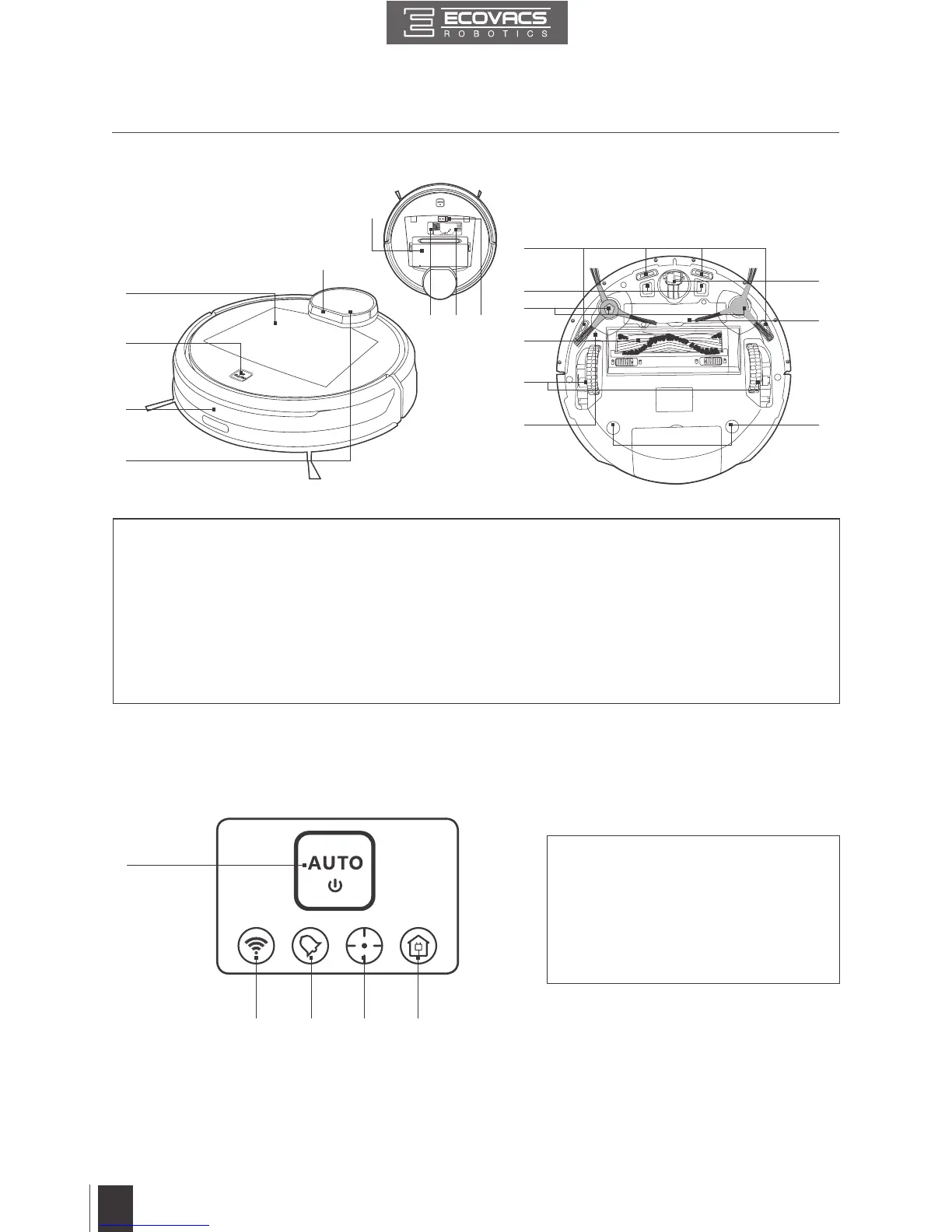
2.3 Product Diagram
1
4
6
7
8
9
10
15
11
12
17
2
3
Robot
1
2 3 4 5
1. Top Cover
2. AUTO Mode Button
3. Anti-Collision Sensors
and Bumper
4. LDS (Laser Distance Sensor)
5. LDS Bumper
6. Anti-Drop Sensors
7. Charging Contacts
8. Side Brushes
9. Main Brush
10. Driving Wheels
11. Universal Wheel
12. Battery Pack with Screws
13. Upgrade Port
14. Multi-Function Cleaning
Tool
15. RESET Button
16. Power Switch
17. Advanced Wet/Dry
Reservoir Slots
18. Dust Bin
1. AUTO Mode Button
2. Wi-Fi Indicator
3. Scheduled Cleaning Indicator
4. Mapping Indicator
5. Return to Charger Mode Indicator
Control Panel
13
5
14 16
18
2. Package Contents and Technical Specifications



 To Next Page