13
3. Operating and Programming
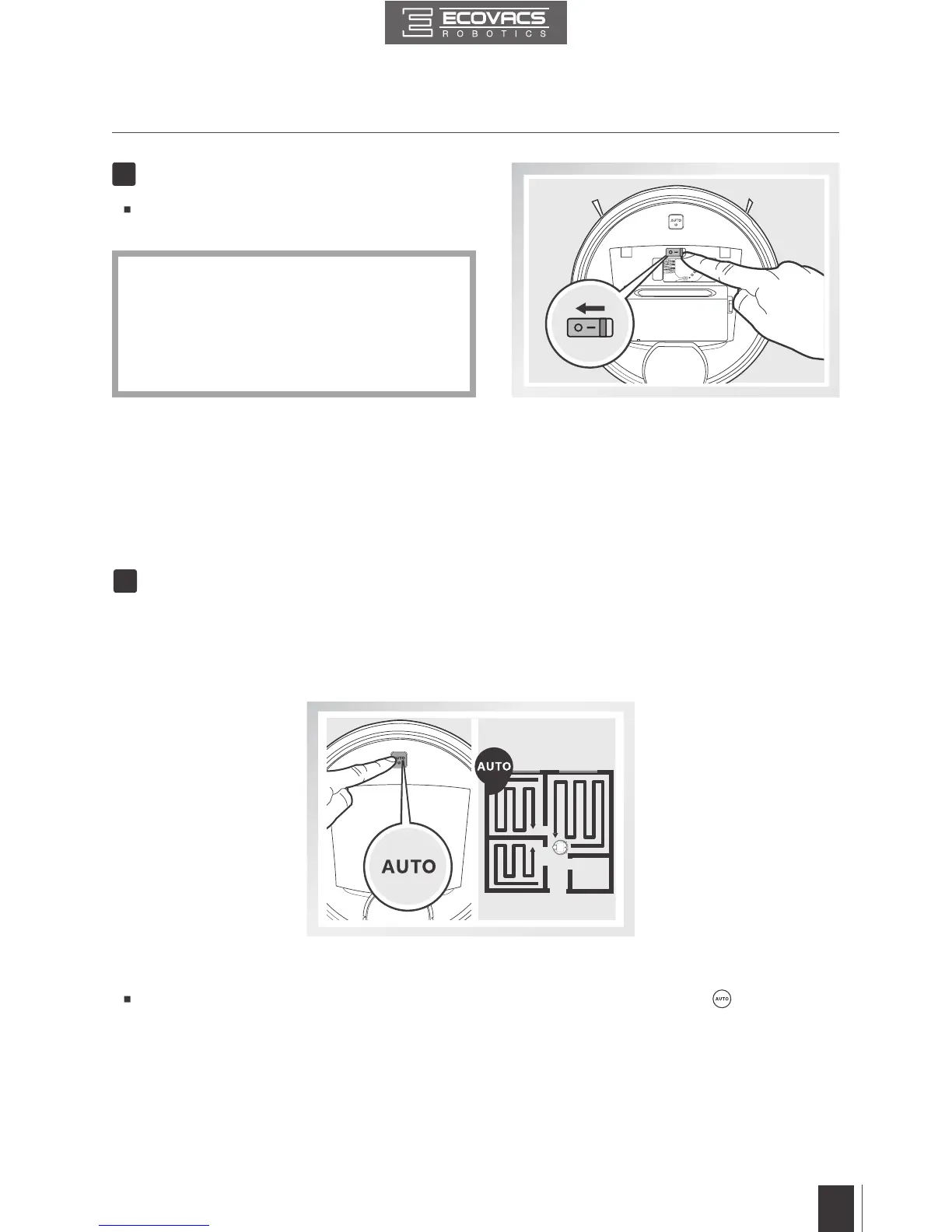
Open the robot’s Top Cover. Move the Power
Switch to the “O” position to power OFF.
8
Power OFF
*
*
When DEEBOT is not working, it is suggested
to keep it powered ON and charging.
DEEBOT loses its map once it is powered
OFF. It is suggested to keep DEEBOT
powered ON if it remains in the same
home environment.
AUTO Cleaning Mode
This is the most commonly used mode. In AUTO Cleaning Mode, DEEBOT cleans in a back and
forth straight-line pattern.
When DEEBOT nishes mapping, it immediately starts AUTO Cleaning Mode.
1
3.3 Cleaning Mode Selection
DEEBOT has several Cleaning Modes to choose from to effectively clean different oors. Cleaning
Modes are selected using the ECOVACS App or using the AUTO Mode Button on the robot’s Control
Panel. For more information on the ECOVACS App, see the separate ECOVACS App leaet.
To start AUTO Cleaning Mode, press the AUTO Mode Button on the robot or on the App.



 To Next Page