EasyManua.ls Logo

Defiant THD-1000 - User Manual

Defiant THD-1000
22 pages
Print Icon
To Next Page IconTo Next Page
Loading...
THANK YOU
We appreciate the trust and condence you have placed in Deant through the purchase of this wireless home protection system. We strive
to continually create quality products designed to enhance your home. Visit us online to see our full line of products available for your home
improvement needs. Thank you for choosing Deant!
USE AND CARE GUIDE
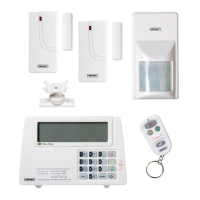
WIRELESS HOME PROTECTION SYSTEM
Questions, problems, missing parts? Before returning to the store,
call Customer Service
8 a.m. - 4:30 p.m., CST, Monday - Friday
844-212-0200
HOMEDEPOT.COM
Item #1001-090-469
Model #THD-1000
Question and Answer IconNeed help?

Do you have a question about the Defiant THD-1000 and is the answer not in the manual?

Summary

Safety Information

LIMITATIONS OF ALARM PRODUCTS

Discusses limitations and responsibilities regarding alarm product performance and insurance.

Installation

Wall mounting the smart panel and tamperproof switch

Step-by-step guide for physically mounting the smart panel and its tamperproof magnet.

Programming your PIN Number

Using the Panic Alarm

Operating in ARM Mode

Details how to arm the system, including status indicators and default settings.

ADJUSTING EXIT DELAY

ADJUSTING ENTRY DELAY

ARMING THE SYSTEM

DISARMING THE SYSTEM

Operating in Alert Alert Mode

EXITING ALERT MODE

Operating in Home Mode

Installing the Sensors

INSTALLING THE MOTION SENSOR

Using the Key Fob Remote Control

ADDING THE REMOTE CONTROL TO THE SMART PANEL SYSTEM

Procedure for enrolling or pairing a key fob remote control with the smart panel.

OPERATING THE KEY FOB REMOTE CONTROL

DELETING A REMOTE CONTROL FROM THE SMART PANEL

Home Security Code Settings

Troubleshooting

Defiant THD-1000 Specifications

General IconGeneral
BrandDefiant
ModelTHD-1000
CategorySecurity System
LanguageEnglish

Related product manuals