16
Installing the Sensors (continued)
INSTALLING THE MOTION SENSOR
The Motion Sensor is designed to sense movement in a given area.
NOTE: It is best if pets are not allowed onto higher surfaces so that the sensors are not triggered unnecessarily (no more than 1 m/3.3 ft.
high).
Step 1: Powering up the Motion Sensor
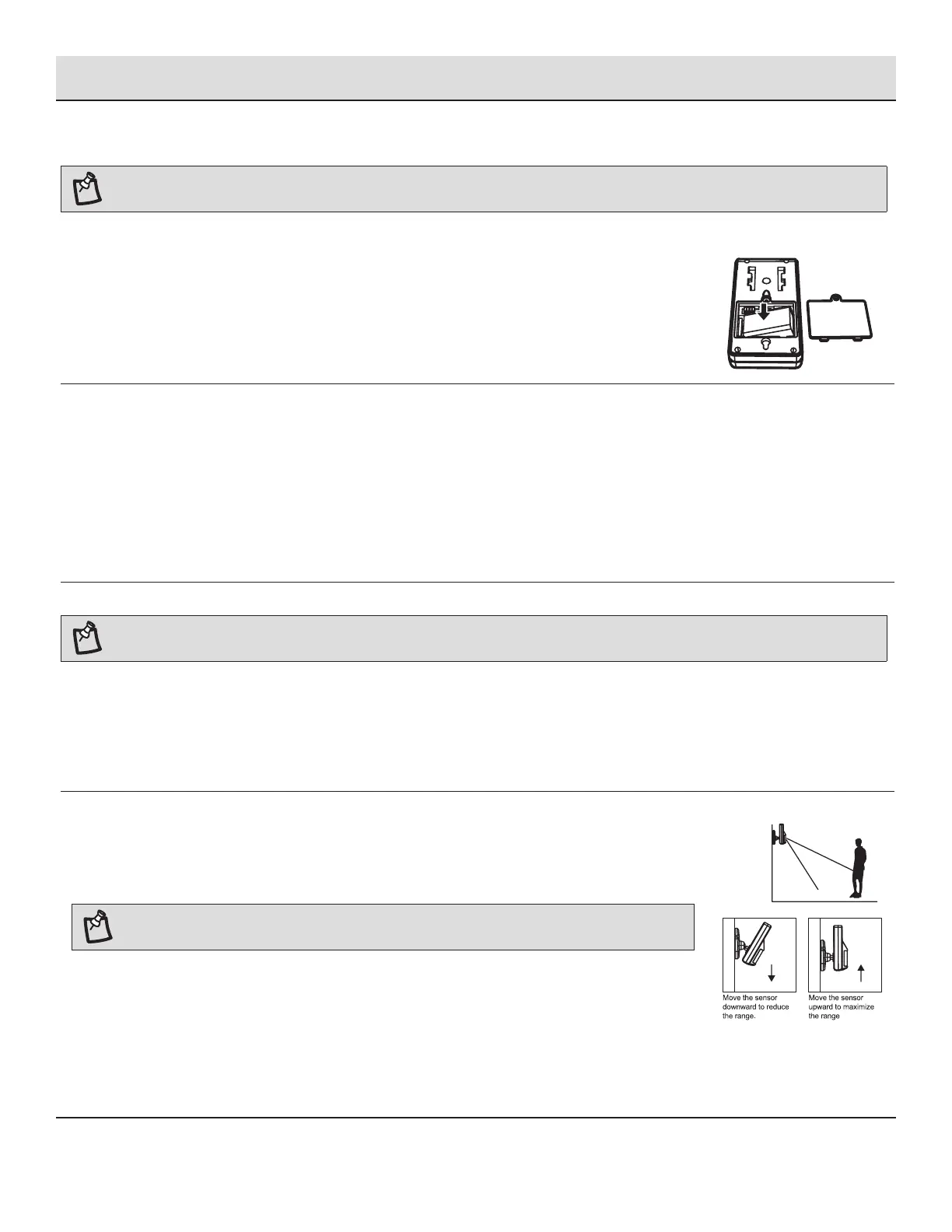
□ Remove the battery cover, insert and connect a 9V battery as shown in diagram below and replace
the cover. (Requires 1 x 9V battery).
Low battery indication: If the batteries need to be replaced, the RED LED will ash (not including entry /
exit delay ashing).
Step 2: Installing the Motion Sensor
Determine the location of the Motion Sensor. The Sensor should be placed:
□ In the most vulnerable rooms or near key entry points
□ On a solid surface between 1.8 m to 2.4 m (6 ft. to 8 ft.) from the oor
□ Away from extreme temperature sources (radiators, ovens, stoves etc.)
□ Away from direct sunlight
□ Indoors only and not behind partitions
□ Where better RF performance can be achieved (if necessary)
Step 3: Adjusting Sensor Sensitivity
NOTE: The Motion Sensor is designed with a built-in sleep timer to save battery power. The Motion Sensor will sleep for 3 minutes after
every trigger. Any movement detected in sleep mode will not be reported, please bear this in mind during system set up.
The sensitivity of the Motion Sensor is adjustable and can be changed by setting the connector, found in the battery compartment, on
either the “High”, “Middle” or “Low” position. When the sensitivity is set to “Low”, more movement is required to trigger the sensor. It is
recommended to set the sensitivity to “Low” and perform a “Walk Test” (see step 4). If the walk test result is satisfactory, the sensitivity
does not require further adjustment. If the walk test result shows the sensitivity is too low, then the sensitivity can be set to “Middle” or
“High” as required. It is recommended that a walk test be conducted after each change in sensitivity setting. Test the Motion Sensor by
pressing the test button inside the battery compartment.
Step 4: Performing a Walk Test
After mounting the sensor at the desired location, it is important to perform a walk test in order to
determine if the sensor is detecting the correct area. The distance at which the sensor can detect motion
can be adjusted by altering the angle of the sensor. To reduce the detection range, move the sensor
downward and move the sensor upward to maximize the range.
NOTE: Enter into ALERT mode before you perform the walk test, so that the alarm is not triggered.
Walk in the area that you would like the sensor to monitor. If movement is detected, the red light inside
the unit will appear. If the red light does not appear, adjust the mounting angle accordingly. Perform the
walk test again after 3 minutes. Repeat this procedure until motion is detected. While carrying out the
test, there should be no movement in the detection area during the 3 minute interval.
Tips: The sensor should not face towards direct sunlight, be placed near heat or cold producing devices
(i.e. air conditioning, radiators, fans, ovens, heaters etc.) that may cause false triggers. Also perform the
walk test in areas which the sensor is not intended to cover, to ensure movement cannot be detected.


 To Next Page