9 HOMEDEPOT.COM
Please contact 844-212-0200 for further assistance.
Operating in ARM Mode (continued)
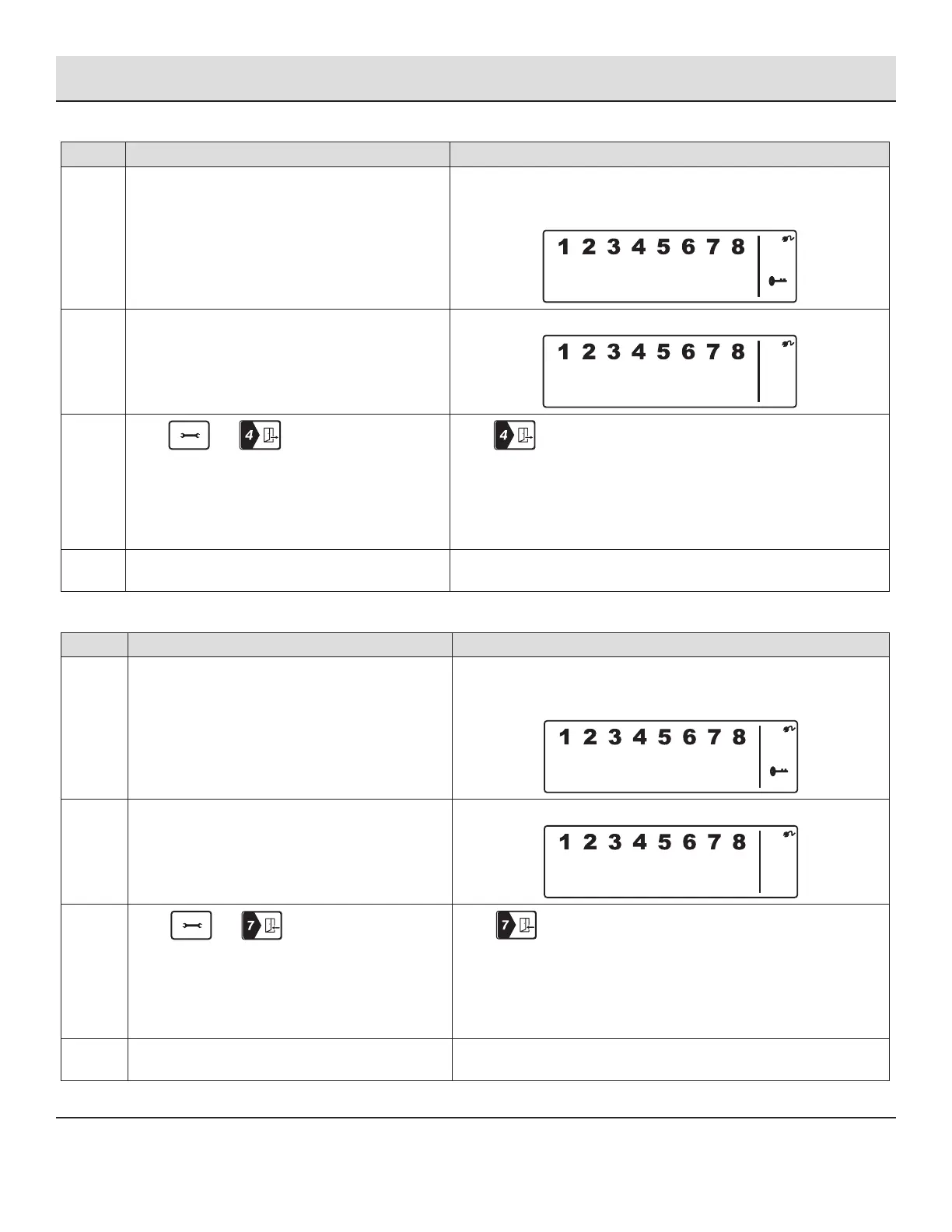
ADJUSTING EXIT DELAY
Step Procedure Example
1 Ensure you are in STANDBY mode by entering the
default PIN of 1 2 3 4 OR your new 4-digit PIN and
pressing the Enter button.
The Smart Panel displays this image when in STANDY mode. One beep
indicates that you entered a valid PIN. Three beeps indicate that an
invalid operation was performed.
2 Enter the default PIN of 1 2 3 4 OR your new 4-digit
PIN of your choosing. Press the Enter button.
The Smart Panel displays this image:
3
Press and (as many times as
required) to set the new Exit Delay.
When is pressed the rst time the Smart Panel ashes with the
number of seconds currently set for the Exit Delay. The factory default
setting is 20 seconds. Each time this button is pressed, the Exit Delay
is increased by an additional 10 seconds between the adjustable range
of 10 to 60 seconds. The Exit Delay time on the LCD display will ash
until the setting is completed.
4 Press the Enter button to conrm the setting and
return the Smart Panel to STANDBY.
ADJUSTING ENTRY DELAY
Step Procedure Example
1 Ensure you are in STANDBY mode by entering the
default PIN of 1 2 3 4 OR your new 4-digit PIN and
pressing the Enter button.
The Smart Panel displays this image when in STANDY mode. One beep
indicates that you entered a valid PIN. Three beeps indicate that an
invalid operation was performed.
2 Enter the default PIN of 1 2 3 4 OR your new 4-digit
PIN of your choosing. Press the Enter button.
The Smart Panel displays this image:
3
Press and (as many times as
required) to set the new Entry Delay.
When is pressed the rst time, the Smart Panel ashes with
the number of seconds currently set for the Entry Delay. The factory
default setting is 30 seconds. Each time this button is pressed, the Exit
Delay is increased by an additional 10 seconds between the adjustable
range of 10 to 60 seconds. The Exit Delay time on the LCD display will
ash until the setting is completed.
4 Press the Enter button to conrm the setting and
return the Smart Panel to STANDBY.


 To Next Page