3
DAC-510E-EN-BF
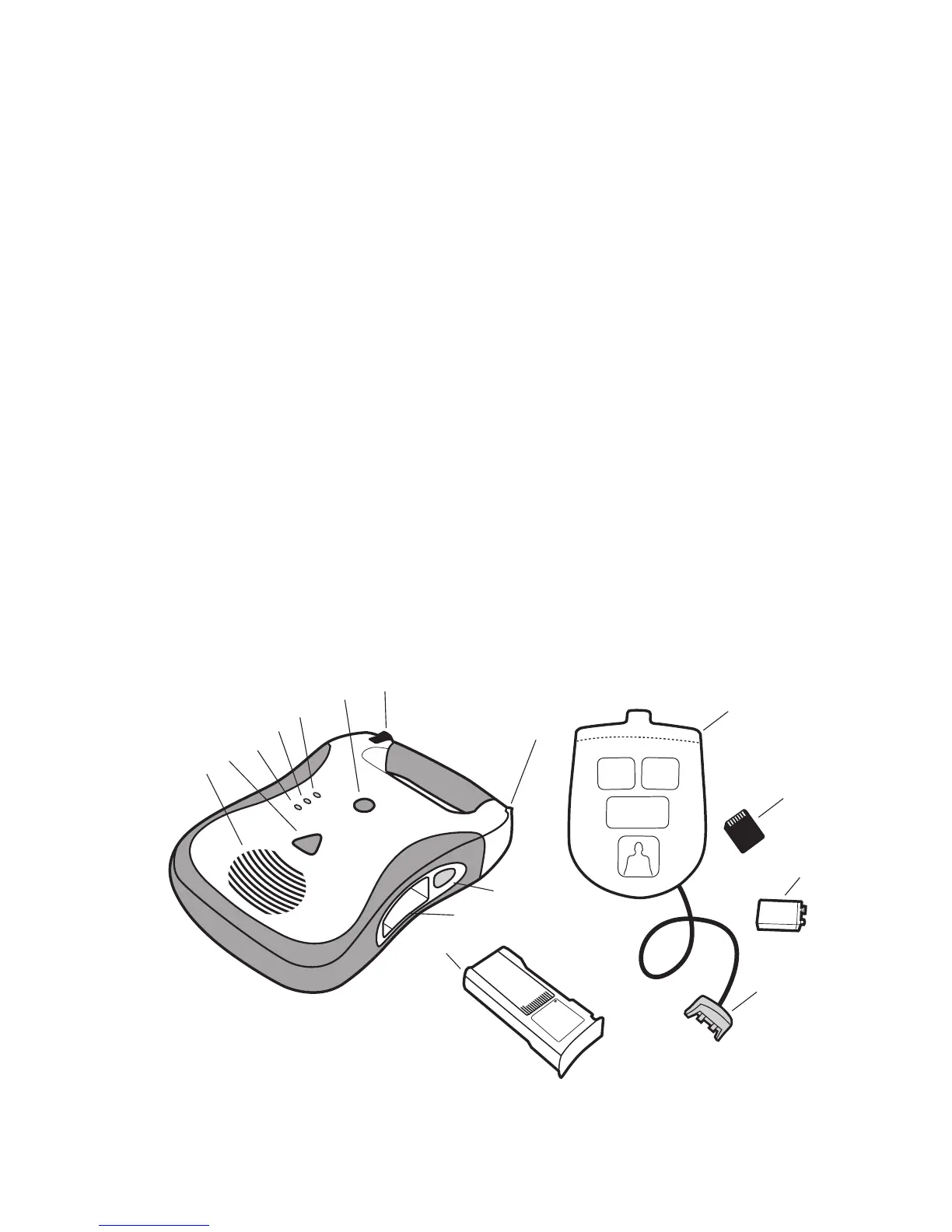
G. Pads connector port.InsertPatientPadsConnector(itemO)intothisporttoconnectpads
to DDU-100 AED.
H. Battery pack. The battery pack provides a replaceable main power source for the DDU-100 AED.
I. Battery pack opening. Insert the battery pack firmly into this opening until the latch clicks
into place.
J. Battery pack eject button. This button releases the battery pack from the DDU-100 AED. To
remove the battery pack, push the button until the battery pack is partially ejected from the unit.
K. Active Status Indicator (ASI). When the unit is off, this indicator blinks green to indicate the
unit is fully operational and blinks red to indicate unit needs attention from the user or servicing.
L. Patient pads. The defibrillation/monitoring pads that are placed on the patient. The pads
may be stored in the pad storage area on the back of the unit.
M. Defibtech Data Card (DDC). This optional plug-in card provides enhanced storage
capabilities to the DDU-100 AED.
N. Active Status Indicator (ASI) battery. This is a 9V lithium battery that provides power to
the Active Status Indicator. It is inserted into a compartment in the battery pack.
O. Patient pads connector.InsertintoPadsConnectorPort(itemG)toconnectpadstothe
DDU-100 AED.
G
F
E
D
C
B
A
K
L
M
J
N
H
I
O


 To Next Page