Return your monitor color settings to those that were set at the time of manufacture.
Push to exit the OSD main menu.
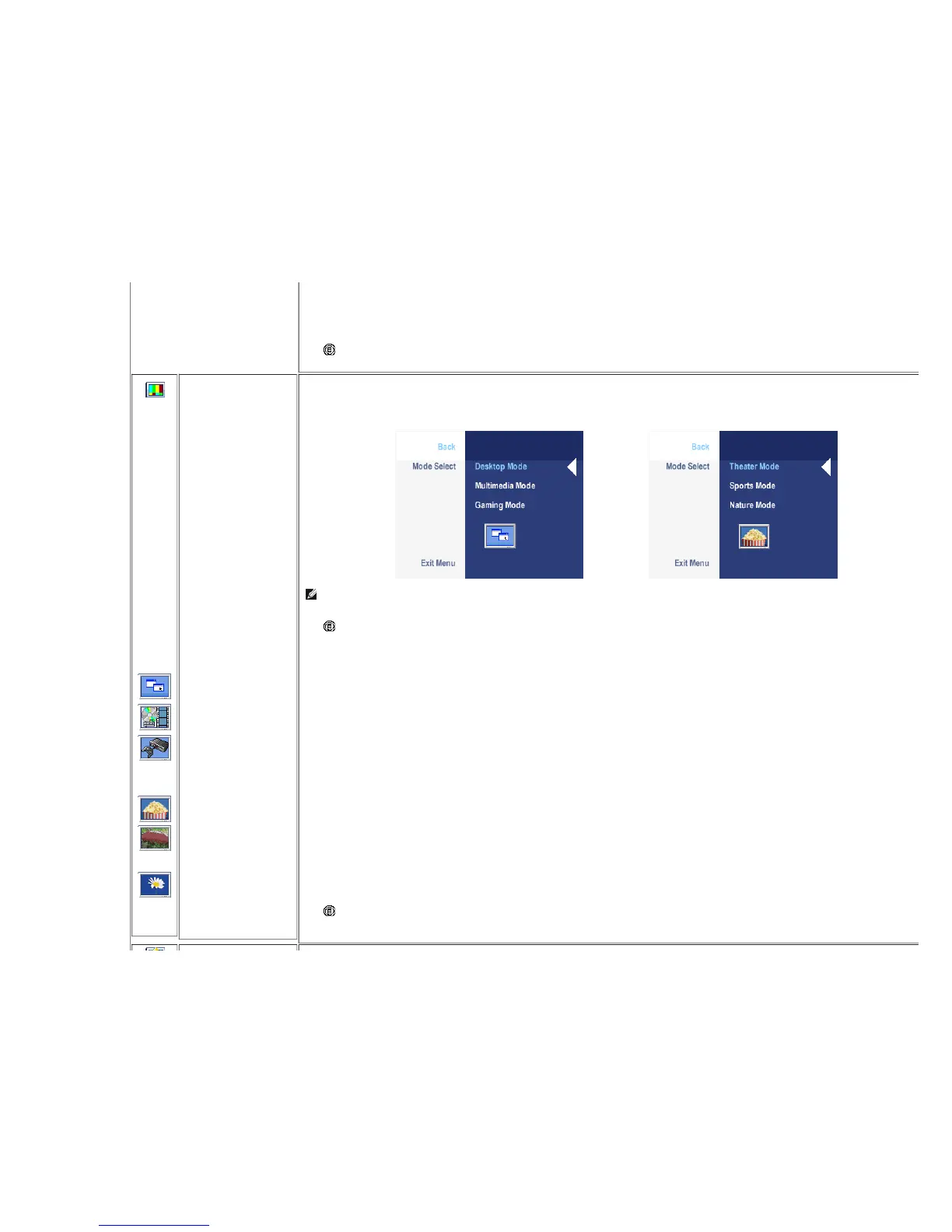
IMAGE
MODES
Back
VGA/DVI-D input
Desktop Mode
Multimedia Mode
Gaming Mode
Video input
Theater Mode
Sports Mode
Nature Mode
Exit Menu
There are 3 image modes for different usage.
Image mode submenu for VGA/DVI-D input Image mode submenu for Video input
or
NOTE: Image modes are different between the VGA/DVI-D and Video inputs
Push to select Back to go back to the main menu.
Mode suitable for desktop applications.
Mode for multimedia applications, eg video playback.
Mode suitable for gaming applications.
Mode suitable for movie playback.
Mode suitable for sports scenes.
Mode suitable for nature scenes.
Push to exit the OSD main menu.
DISPLAY










 To Next Page