Back
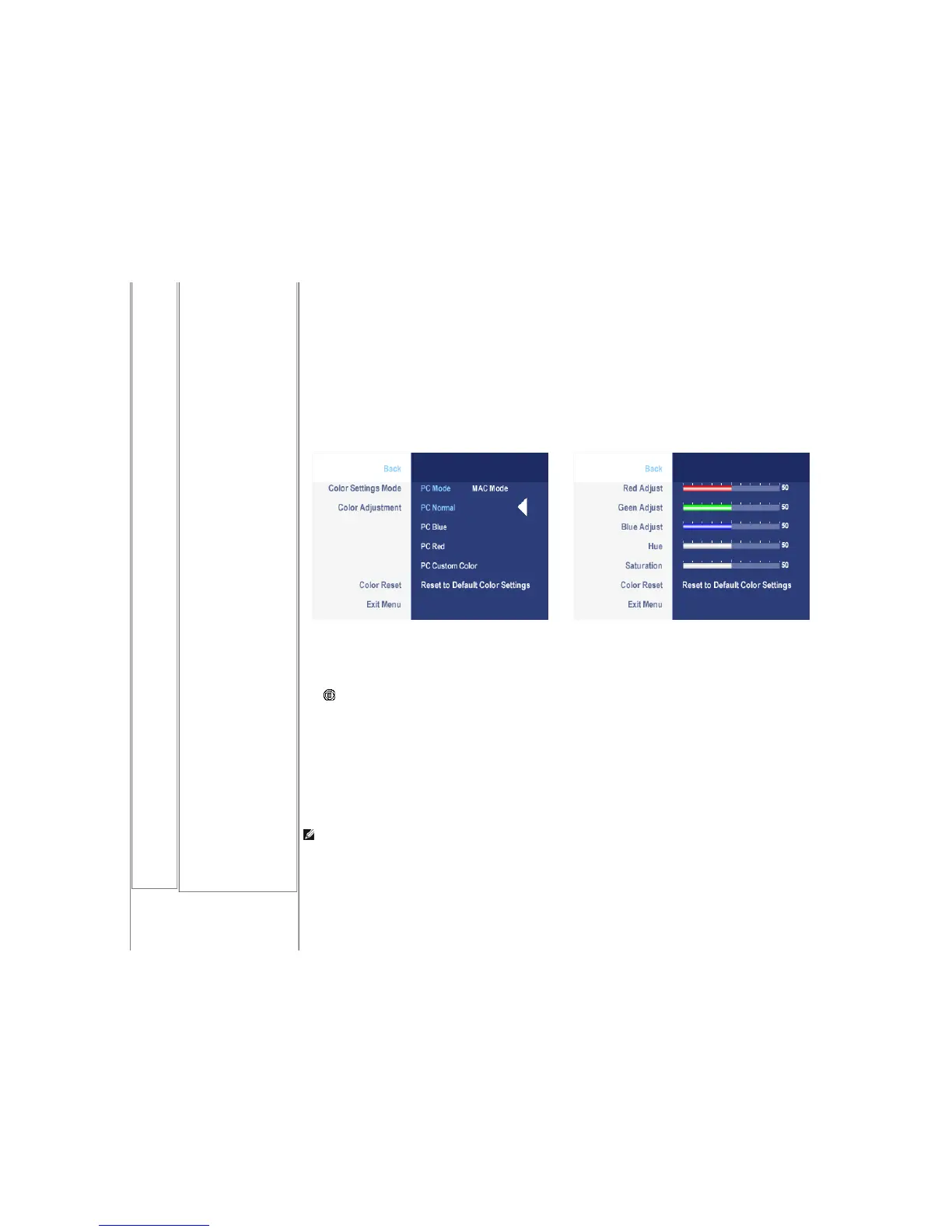
Color Settings Mode
(VGA/DVI-D)
Color Adjustment
Color Reset
Exit Menu
or
Push to select Back to go back to the main menu.
To achieve the different color mode for PC and Mac.
PC Blue: PC Blue is selected to obtain a bluish tint. This color setting is typically used for text based applications (Spreadsheets, Programming, Text Editors etc.).
PC Red: Red Preset is selected to obtain a redder tint. This color setting is typically used for color intensive applications (Photograph Image Editing, Multimedia,
Movies etc.).
PC Custom: Use the plus and minus buttons to increase or decrease each of the three colors (R, G, B) independently, in single digit increments, from '0' to '100'.
NOTE: Color temperature is a measure of the 'warmth' of the image colors (red/green/blue). The two available presets ('Blue' and 'Red') favor blue and red
accordingly. Select each one to see how each range suits your eye....or utilize the 'Custom Color' option to customize the color settings to your exact choice.










 To Next Page