Using Your Projector 23
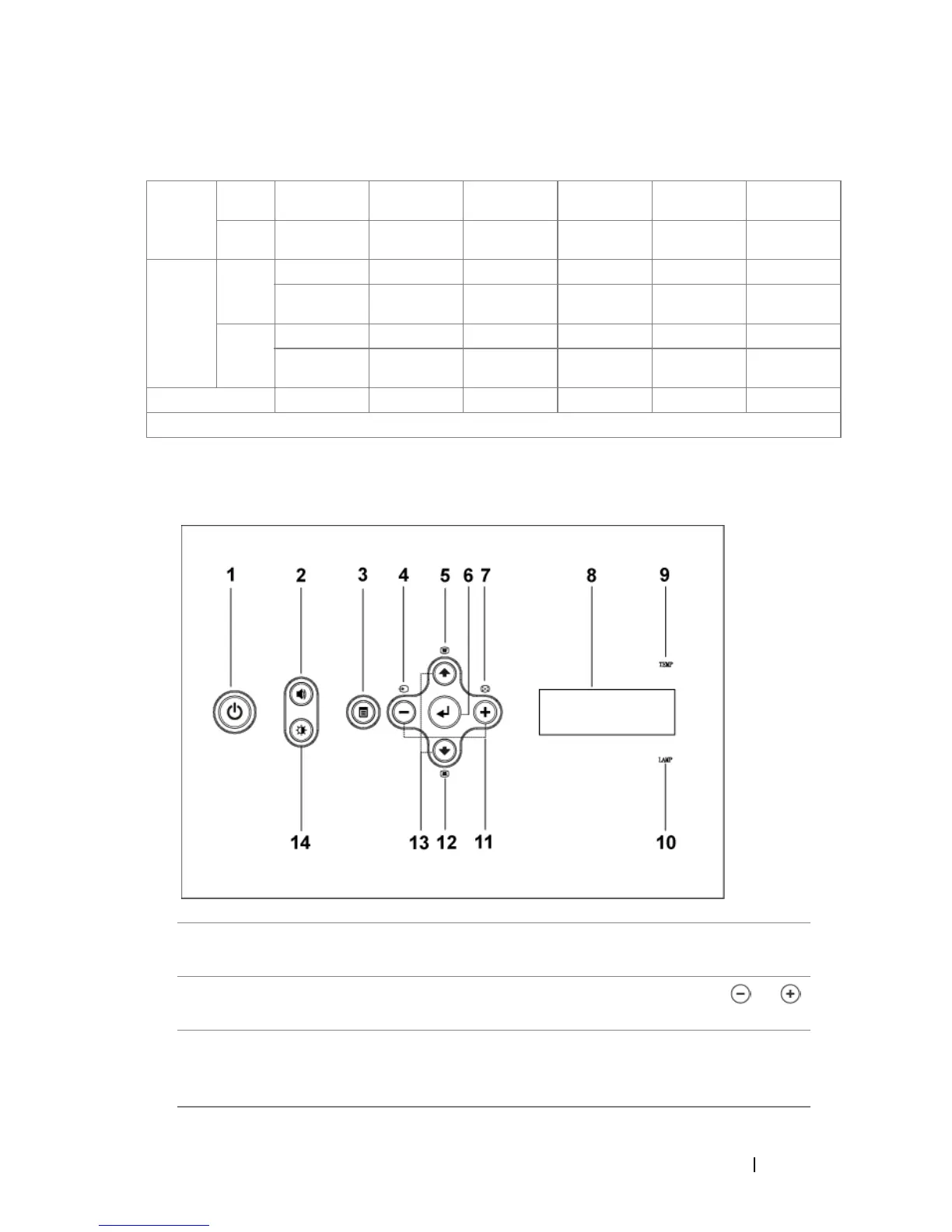
Using the Control Panel
Screen
(Diagonal)
Max. 36.9"
(93.8cm)
83.7"
(212.5cm)
135.3"
(343.8cm)
189.5"
(481.3cm)
241.1"
(612.5cm)
295.3"
(750.0cm)
Min. 30.8"
(78.1cm)
69.7"
(177.1cm)
112.8"
(286.5cm)
157.9"
(401.0cm)
201.0"
(510.4cm)
246.1"
(625.0cm)
Screen
Size
Max.
(WxH)
29.5" X 22.1" 66.9" X 50.2" 108.3" X 81.2" 151.6" X 113.7" 192.9" X 144.7" 236.2" X 177.2"
(75.0cm X
56.3cm)
(170.0cm X
127.5cm)
(275.0cm X
206.3cm)
(385.0cm X
288.8cm)
(490.0cm X
367.5cm)
(600.0cm X
450.0cm)
Min.
(WxH)
24.6" X 18.5" 55.8" X 41.8" 90.2" X 67.7" 126.3" X 94.7" 160.8" X 120.6" 196.9" X 147.6"
(62.5cm X
46.9cm)
(141.7cm X
106.3cm)
(229.2cm X
171.9cm)
(320.8cm X
240.6cm)
(408.3cm X
306.3cm)
(500.0cm X
375.0cm)
Distance 4.9' (1.5m) 11.2' (3.4m) 18.0' (5.5m) 25.3' (7.7m) 32.2' (9.8m) 39.4' (12.0m)
* This graph is for user reference only.
1 Power Turn the projector on and off. For more
information, see page 19.
2 Volume Control Press to control the volume, then press or
buttons to decrease or increase the volume.
3 Menu Press to activate the OSD. Use the directional
keys and Menu button to navigate through the
OSD.


 To Next Page