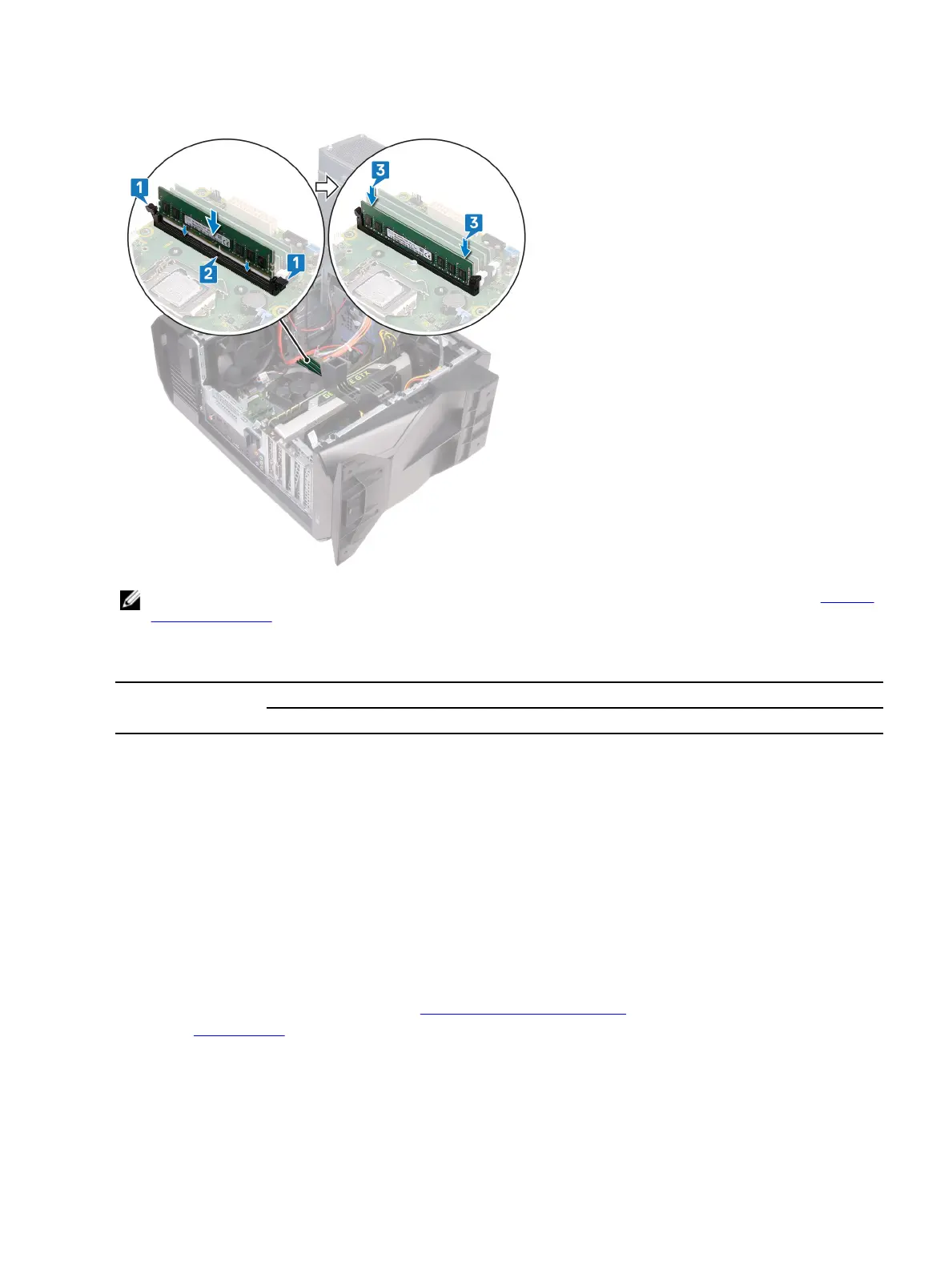
3 Insert the memory module into the memory-module slot and press the memory module down until it snaps into position
and the securing clips lock in place.
NOTE: Use slots XMM1 and XMM2 if you need to use two memory modules. For more information, see System-
board components.
The following table lists the available memory conguration matrix:
Table 1. Memory conguration matrix
Conguration
Slot
DIMM1 DIMM2 DIMM3 DIMM4
8 GB DDR4 8 GB
16 GB DDR4 8 GB 8 GB
32 GB DDR4 16 GB 16 GB
64 GB DDR4 16 GB 16 GB 16 GB 16 GB
16 GB XMP 8 GB 8 GB
32 GB XMP 16 GB 16 GB
64 GB XMP 16 GB 16 GB 16 GB 16 GB
Post-requisites
1 Follow the procedure from step 10 to step 11 in "Replacing the power-supply unit".
2 Replace the left-side cover.
61












 To Next Page