14 | About your display
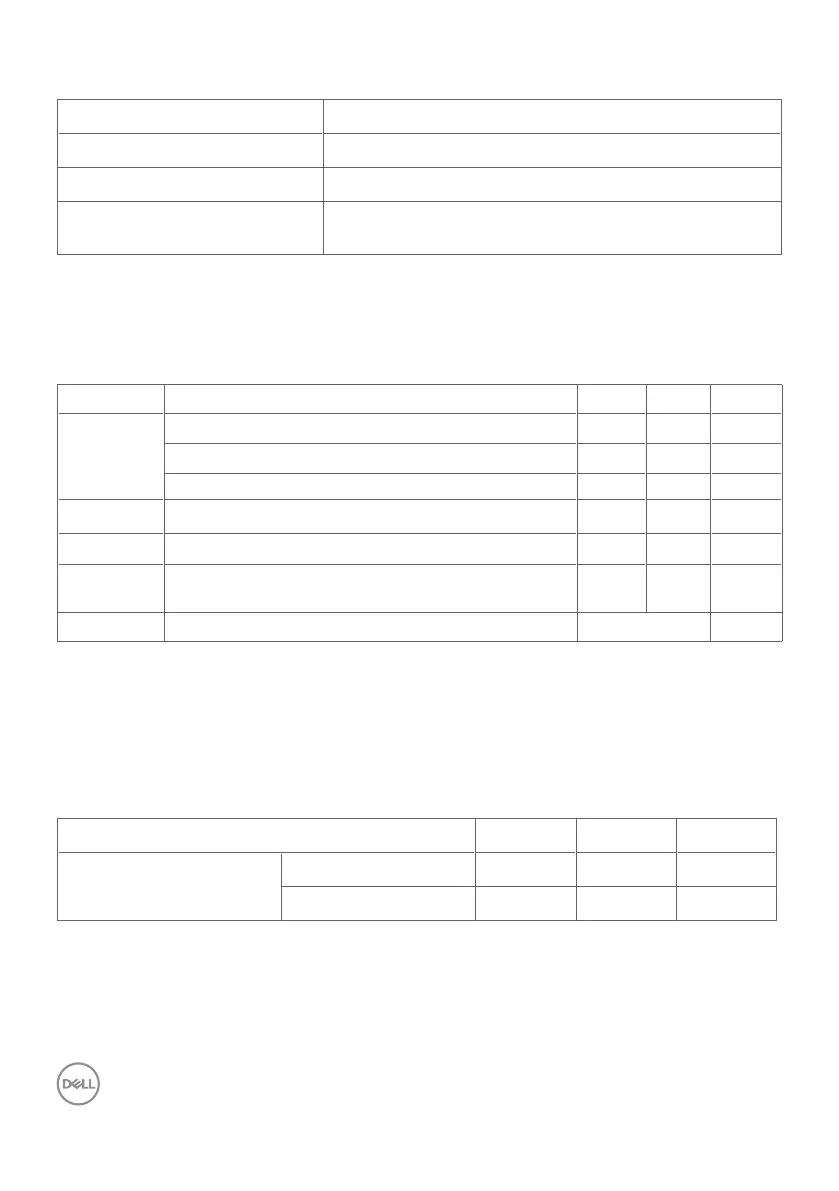
Touch
Type InGlass
TM
Touch Technology
Input Method Finger and stylus
Interface USB HID Compliant
Touch point
Up to 20 points touch
Up to 4 pens
NOTE: Touch Pen and Eraser differentiation ready (functionality subject to
application).
Support OS
OS Version Touch Pen Eraser
Windows 7 Pro and Ultimate 20 4 1
8, 8.1 20 4 1
10 20 4 1
Chrome OS Linux kernel version 3.15 (3.10) or later
1
20 4 (0) 1 (0)
Android 4.4 (KitKat) with Linux kernel 3.15 (3.10) or later
1
20 4 (0) 1 (0)
Other Linux
based OS
Linux kernel 3.15 or later 20 4 1
macOS 10.10, 10.11 1 (mouse
2
) No
1
Functionality of Linux kernel has been verified on Ubuntu 14.04 and Debian 8.
Functionality of Chrome OS and Android with Linux kernel 3.15 or later recommende.
2
Mouse emulation in landscape mode. Full multi-touch requires additional drivers on
the host system.
Touch sensor input accuracy
Ty p
1
Maximum
2
Unit
Touch sensor input
accuracy
Center area
3
1.0 1.5 mm
Edge area
4
1.2 2.0 mm
1
Average accuracy at the specified input area.
2
95-percentile accuracy of specified input area.
3
>20 mm from active touch area edge
4
>20 mm from active touch area edge



 To Next Page