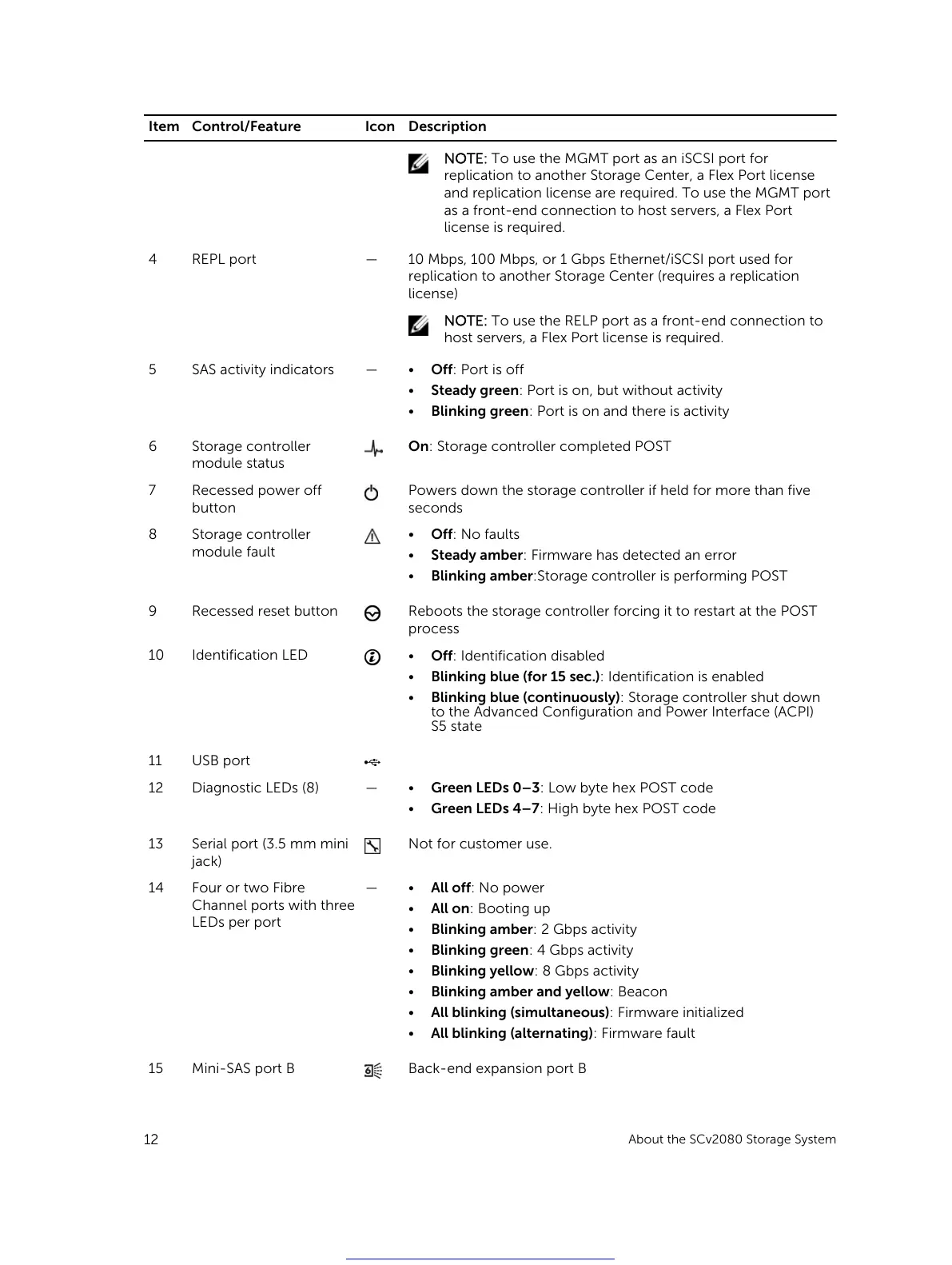
Item Control/Feature Icon Description
NOTE: To use the MGMT port as an iSCSI port for
replication to another Storage Center, a Flex Port license
and replication license are required. To use the MGMT port
as a front-end connection to host servers, a Flex Port
license is required.
4 REPL port — 10 Mbps, 100 Mbps, or 1 Gbps Ethernet/iSCSI port used for
replication to another Storage Center (requires a replication
license)
NOTE: To use the RELP port as a front-end connection to
host servers, a Flex Port license is required.
5 SAS activity indicators —
• Off: Port is off
• Steady green: Port is on, but without activity
• Blinking green: Port is on and there is activity
6 Storage controller
module status
On: Storage controller completed POST
7 Recessed power off
button
Powers down the storage controller if held for more than five
seconds
8 Storage controller
module fault
• Off: No faults
• Steady amber: Firmware has detected an error
• Blinking amber:Storage controller is performing POST
9 Recessed reset button Reboots the storage controller forcing it to restart at the POST
process
10 Identification LED
• Off: Identification disabled
• Blinking blue (for 15 sec.): Identification is enabled
• Blinking blue (continuously): Storage controller shut down
to the Advanced Configuration and Power Interface (ACPI)
S5 state
11 USB port
12 Diagnostic LEDs (8) —
• Green LEDs 0–3: Low byte hex POST code
• Green LEDs 4–7: High byte hex POST code
13 Serial port (3.5 mm mini
jack)
Not for customer use.
14 Four or two Fibre
Channel ports with three
LEDs per port
—
• All off: No power
• All on: Booting up
• Blinking amber: 2 Gbps activity
• Blinking green: 4 Gbps activity
• Blinking yellow: 8 Gbps activity
• Blinking amber and yellow: Beacon
• All blinking (simultaneous): Firmware initialized
• All blinking (alternating): Firmware fault
15 Mini-SAS port B Back-end expansion port B
12
About the SCv2080 Storage System
Get other manuals https://www.bkmanuals.com





 To Next Page