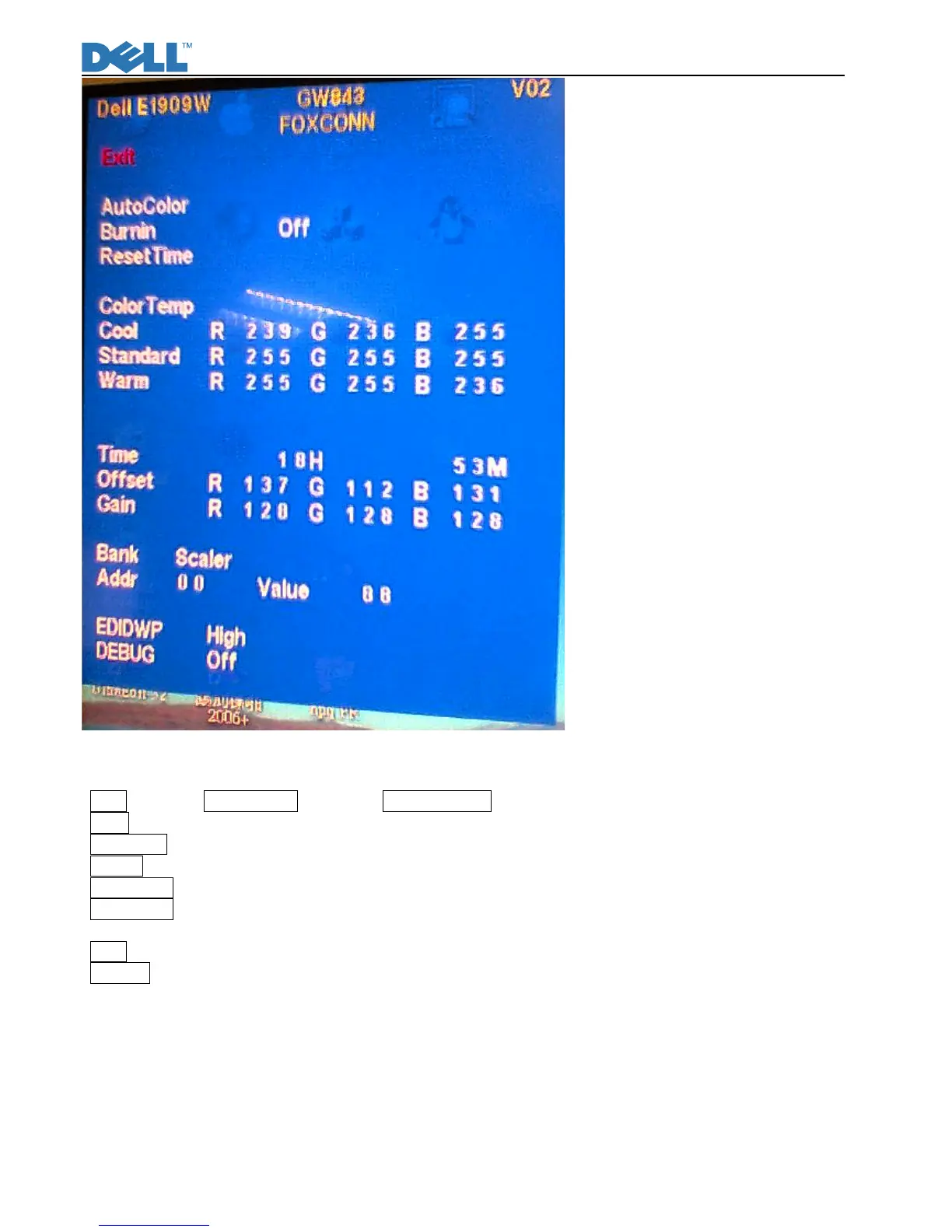
Fig10
Back: Exit from Factory mode and back to NO OSD Status.
Panel: The current-setting panel is highlighted.
Auto Color: Automatically calibrate chip ADC parameters by using internal DAC.
Burn In: Enable or disable the Burn-in mode by choosing ON or OFF.
Reset Timer: Reset the “Turn-on time” of the panel to 0H0M.
Color Temp: The R, G, B of Blue Preset (9300K), Red Preset (5700K) and Normal Preset (6500K) are generated
from scaling chip’s back-end white-balance program.
Time: Turn-on time of the panel.
DEBUG: Debug tool of scale IC U104.
Dell panel P/N
Burn-in pattern
Burn-in pattern will self-generate automatically without VGA and DVI cable plugged in when the monitor set at
Burn-in on mode and burn-in pattern will not be stopped until plugging in the VGA cable. Exit Burn-in mode



 To Next Page