34 | Setting Up the Monitor
Attaching the Stand
NOTE: The stand is detached when the monitor is shipped from the factory.
NOTE: This is applicable for a moni
tor with a stand. When any other stand is
bought, please refer to the respective stand setup guide for the set up instructions.
WARNING: Do not plug-in or turn-on the power to the monitor until you are
instructed to
do so.
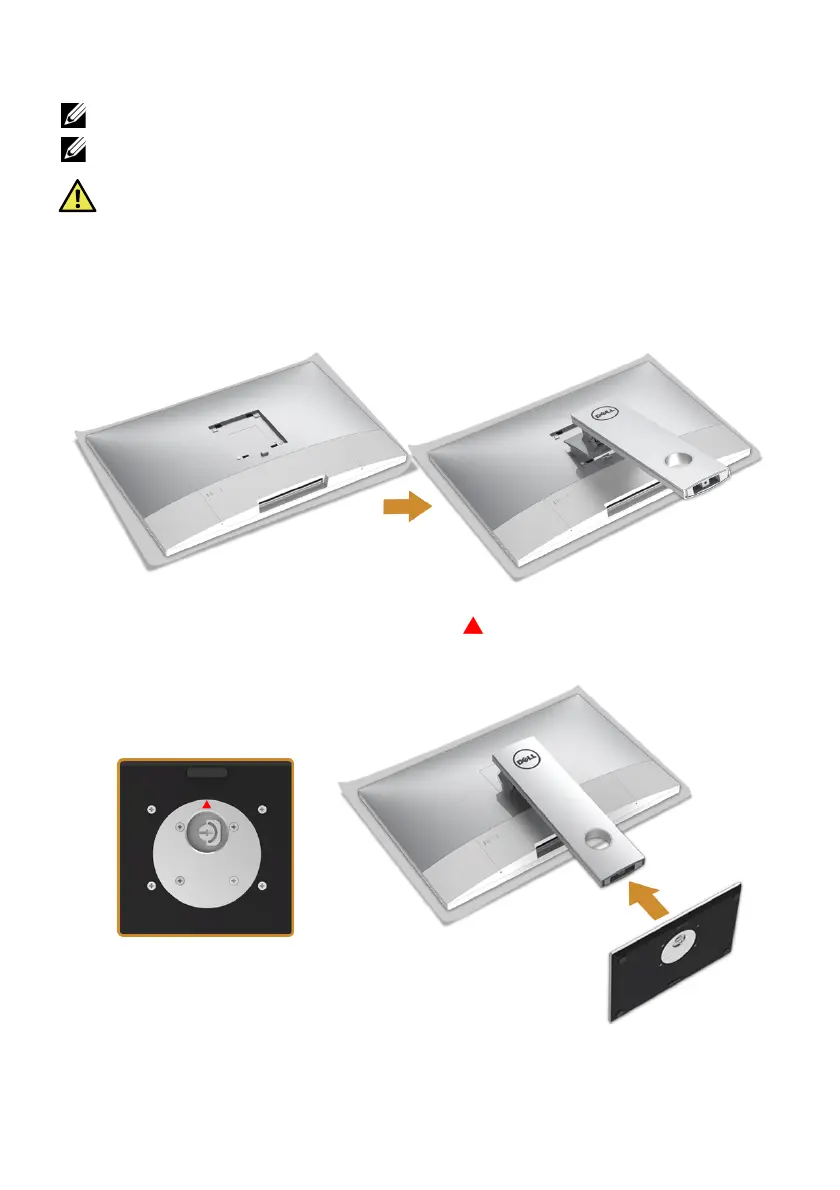
To attach the monitor stand:
1 Insert the two
tabs on the upper part of the stand to the groove on the back of the
monitor.
2 Pr
ess the stand till it snaps into place.
3 Hold the stand base with the triangle mark, , facing upward. Then, align the
stand base protruded blocks to the matching slot on the stand.








 To Next Page