36 | Setting Up the Monitor
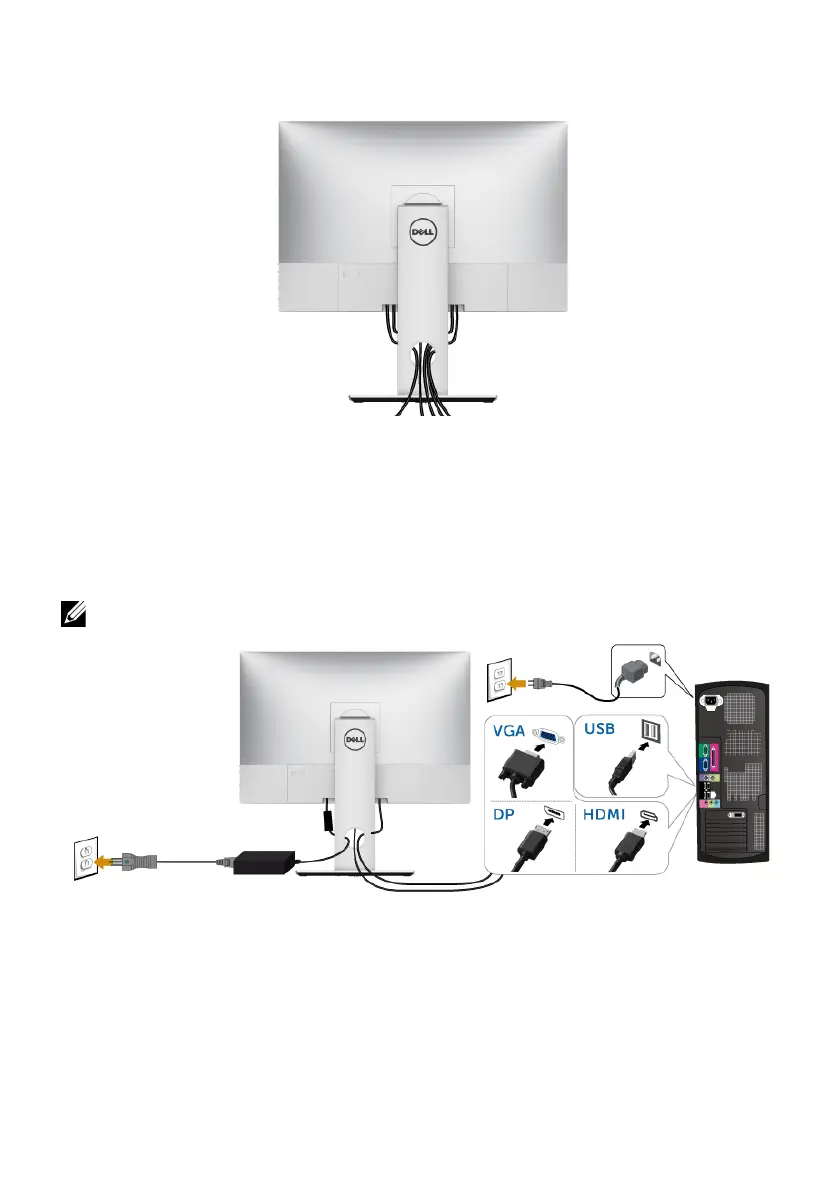
Organizing Your Cables
After attaching all necessary cables (see
Organizing Your Cables
), the cable cover (see
Attaching the Cable Cover
), and the monitor stand (see
Attaching the Stand
), organize all
cables as shown above.
Connecting the Computer
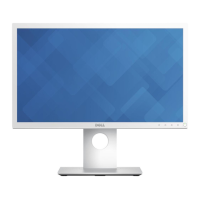
To connect the monitor to your computer:
NOTE: See
also
Connecting Your Monitor
.
1 Plug the othe
r end of the connected VGA or DP or HDMI cable to your computer.
2 Plug the USB upstream cable to an appropriate USB 2.0 port on your computer.
3 Connect
the USB 2.0 peripherals to the downstream USB 2.0 ports on the monitor.
4 Plu
g the power cables for your computer and monitor into a nearby outlet.
5 Turn On the monitor and the computer.
CAUTION: The graphics are used for the purpos
e of illustration only. Appearance of
the computer may vary.








 To Next Page