EasyManua.ls Logo

Dell OptiPlex 320 - System Board Details; System Board Component Locations

Dell OptiPlex 320
140 pages
Print Icon
To Next Page IconTo Next Page
To Previous Page IconTo Previous Page
Loading...
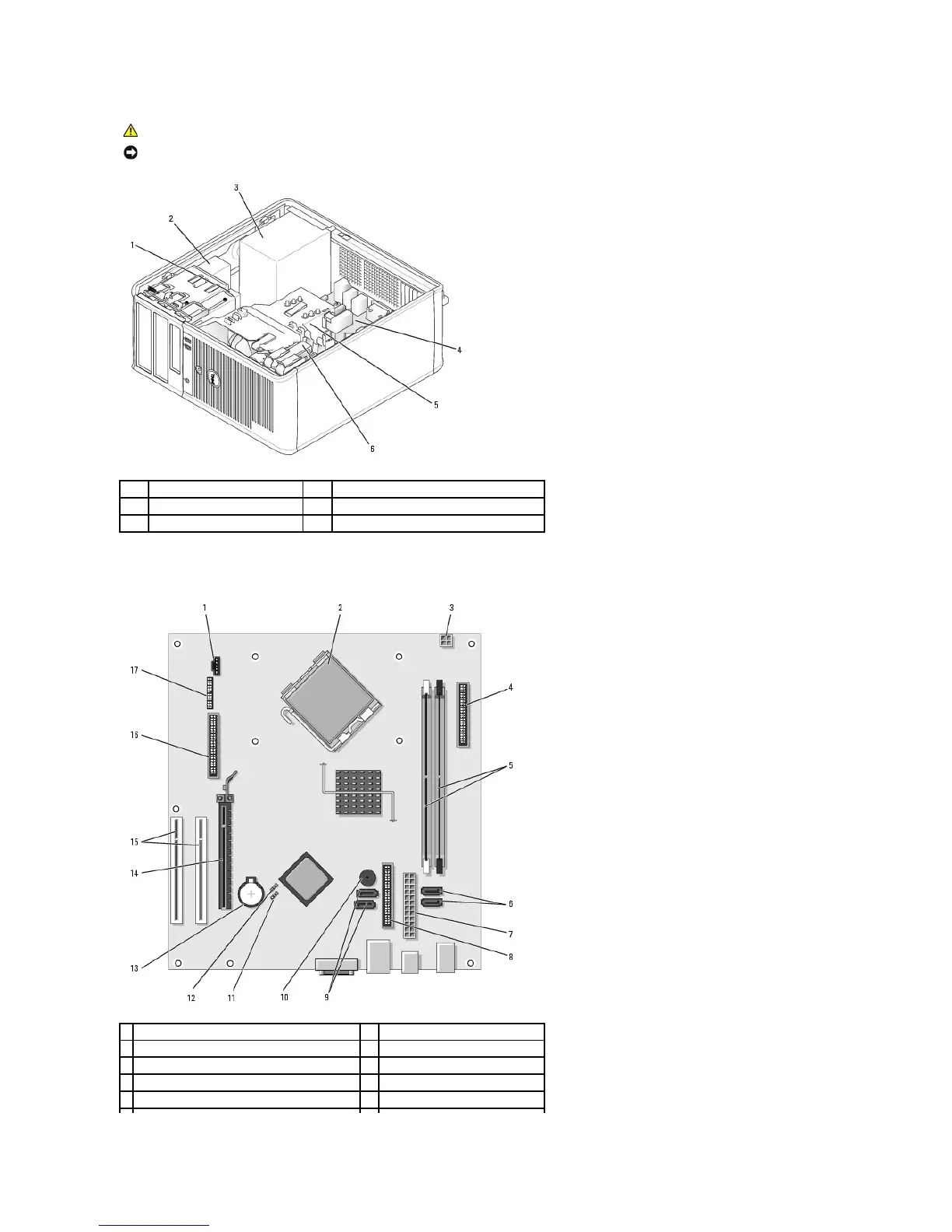
System Board Components
CAUTION: To avoid electrical shock, always unplug your computer from the electrical outlet before removing the computer cover.
NOTICE: Be careful when opening the computer cover to ensure that you do not accidentally disconnect cables from the system board.
1
floppy drive
4
system board
2
CD/DVD drive
5
heat sink assembly
3
power supply
6
hard drive
1
fan connector (FAN)
10
internal buzzer (SPKR1)
2
processor connector (CPU)
11
password jumper (PSWD)
3
processor power connector (12VPOWER)
12
RTC reset jumper (RTCRST)
4
front-panel connector (FNT_PANEL)
13
battery socket (BATT)
5
memory module connectors (DIMM_1, DIMM_2)
14
PCI Express x16 card connector

Table of Contents

Other manuals for Dell OptiPlex 320

Related product manuals